
Squirrel.Windows
 Squirrel.Windows copied to clipboard
 Squirrel
Uninstallation of my WPF desktop app from Add/Remove programs doesn't work with Squirrel.Windows.
Uninstallation of my WPF desktop app from Add/Remove programs doesn't work with Squirrel.Windows.
AssemblyInfo.cs
[assembly: AssemblyMetadata("SquirrelAwareVersion", "1")]
App.xaml.cs
private void Application_Startup(object sender, StartupEventArgs e)
        {
            var rootDirectory =
                $"{Environment.GetFolderPath(Environment.SpecialFolder.LocalApplicationData)}\\";
            var updateManager = new UpdateManager(Constants.PackagePath, Constants.PackageName, rootDirectory);
            SquirrelAwareApp.HandleEvents(
                onInitialInstall: v =>
                {
                    updateManager.CreateShortcutForThisExe();
                    updateManager.CreateUninstallerRegistryEntry();
                },
                onAppUpdate: v =>
                {
                    //updateManager.RemoveShortcutForThisExe();
                    updateManager.CreateShortcutForThisExe();
                    //updateManager.RemoveUninstallerRegistryEntry();
                    updateManager.CreateUninstallerRegistryEntry();
                    //UpdateManager.RestartApp();
                },
                onAppUninstall: v =>
                {
                    MessageBox.Show("Uninstall started");
                    updateManager.RemoveShortcutForThisExe();
                    updateManager.RemoveUninstallerRegistryEntry();
                });
How do I debug the problem? onAppUninstall doesn't get called I guess. One observation is on Removing from Add/Remove programs, it closes the application if open, but doesn't shortcuts. What am I missing?

Having the same issue.
Seems like running the Update.exe somehow fails. I tried to run Update.exe from the command line (both as a user and administrator). This starts the Update.exe, but apparently it exits immediately.
Running with uninstall parameters (taken from the registry uninstall entry) does not seem to do anything (nothing is logged from my WPF application).
Running without parameters flashes the usage screen briefly.
I'm using Windows 10, The Update.exe version is 1.9.0.0
-- Thor A. Johansen Rosberg AS


I think I lost the log in heat of the battle.
However I figured out the problem. I read early on somewhere to bring Update.exe into the project and "Copy Always" to output (for debugging purposes). When I removed the update.exe from the project things started working as expected.
So I'm all good. Not sure about the OP though?
@SubasishMohapatra Are you still getting this issue? Have you checked the solution suggested in the comment above?

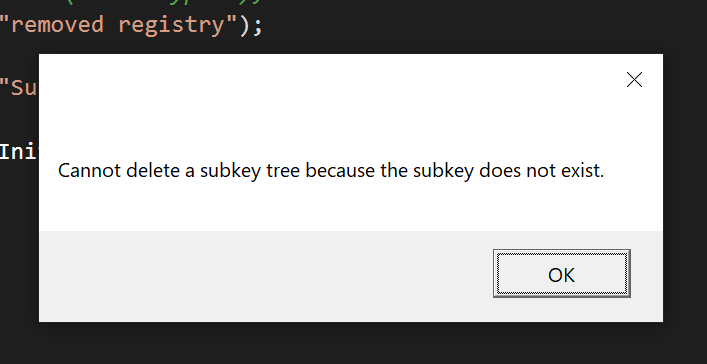
I'm having this problem as well in WPF. Here is some more information: When uninstalling via Add/Remove a program windows forces the uninstaller to be elivated and the following code (mgr.RemoveUninstallerRegistryEntry()) in specific causes the error:
SquirrelAwareApp.HandleEvents(
onInitialInstall: v => {
	mgr.CreateShortcutForThisExe();
	mgr.CreateUninstallerRegistryEntry();
},
onAppUpdate: v => {
	mgr.CreateShortcutForThisExe();
},
onAppUninstall: v => {
	try {
                //THIS LINE CAUSES THE ERROR:
		mgr.RemoveUninstallerRegistryEntry();
	} catch(Exception e) {
                //"Cannot delete a subkey tree because the subkey does not exist"
                //RemoveUninstallerRegistryEntry() ONLY fails when uninstalling from
                //Add/Remove a program
                MessageBox.Show(e.Message);
	}
},
onFirstRun: () => IsInitialStartup = true);
results in this error:
Running the uninstall by hand using .\Update.exe --uninstall works correctly as well and does not cause the error
Edit: This is error is also caused when using an administrator elevated prompt to run the manual uninstall command. I'm pretty sure its got something to do with trying to remove the registry key from the current user which is the administrator user when elevating Update.exe rather than the original user who installed the program in this line: https://github.com/Squirrel/Squirrel.Windows/blob/bdfcd72033565431a04055dcbd525dd2de22f481/src/Squirrel/UpdateManager.InstallHelpers.cs#L143
Why is windows even forcing Update.exe to be elevated I've got no idea. The old system uninstall system using control panel does not cause it to elevate thus it works.

Could it be that this is only an issue on systems where local user is not admin? LATER: In my case I had simply forgotten to make the app squirrel aware. Looks like it works now. WPF on Windows 10 with non admin user.
