
AutoGPT
 AutoGPT copied to clipboard
 Significant-Gravitas
Update setup.md so files are accessible within Docker
Change the workspace folder from /app/auto_gpt_workspace folder to /app/autogpt/auto_gpt_workspace folder so it can access the files correctly. See https://github.com/Significant-Gravitas/Auto-GPT/issues/3768#issuecomment-1537460086
Background
See https://github.com/Significant-Gravitas/Auto-GPT/issues/3768
Changes
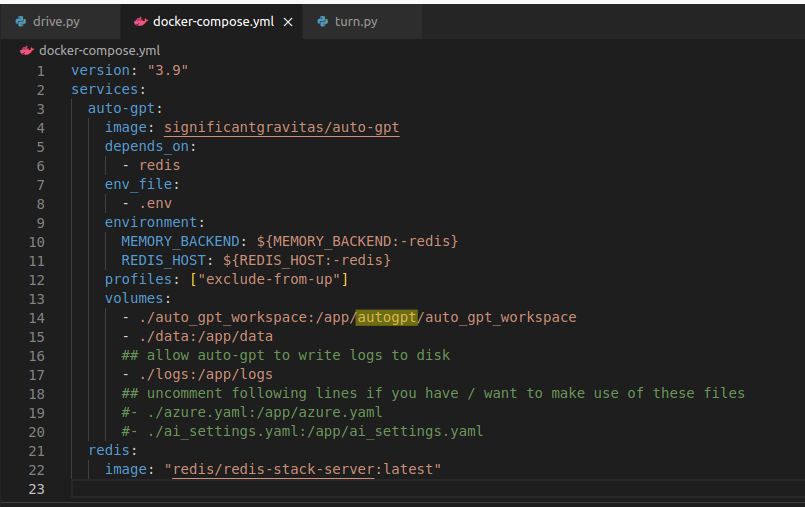
Edited docker-compose.yml.
- ./auto_gpt_workspace:/app/auto_gpt_workspace
to
- ./auto_gpt_workspace:/app/autogpt/auto_gpt_workspace
Documentation
By running the docker-compose run --rm auto-gpt command, the files located in the local auto_gpt_workspace folder will be in the /app/auto_gpt_workspace folder. As you can see in the snippet with the VS code extension below:
 But AutoGPT searches in the /app/autogpt/auto_gpt_workspace folder...
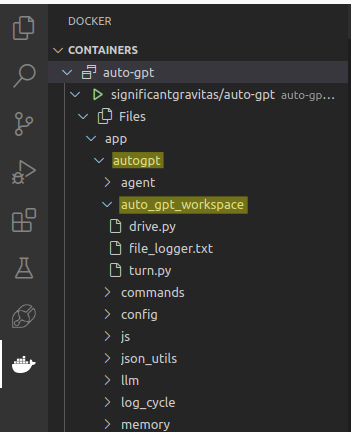 So what I did is I changed the
 docker-compose.yml so that it uses /app/autogpt/auto_gpt_workspace folder and not just /app/auto_gpt_workspace as in the screenshot below:
Test Plan
Tested it and i saw the files in the correct folder in VS Code.
PR Quality Checklist
- [ x ] My pull request is atomic and focuses on a single change.
- [ x ] I have thoroughly tested my changes with multiple different prompts.
- [ x ] I have considered potential risks and mitigations for my changes.
- [ x ] I have documented my changes clearly and comprehensively.
- [ x ] I have not snuck in any "extra" small tweaks changes

The latest updates on your projects. Learn more about Vercel for Git ↗︎
| Name | Status | Preview | Comments | Updated (UTC) |
|---|---|---|---|---|
| docs | ✅ Ready (Inspect) | Visit Preview | 💬 Add feedback | May 7, 2023 3:08pm |
![vercel[bot] avatar](https://avatars.githubusercontent.com/in/8329?v=4 "Published by a pub.dev verified publisher")
