
AutoGPT
 AutoGPT copied to clipboard
 Significant-Gravitas
Error searching google with api-key
⚠️ Search for existing issues first ⚠️
- [X] I have searched the existing issues, and there is no existing issue for my problem
Which Operating System are you using?
Windows
GPT-3 or GPT-4?
GPT-3.5
Steps to reproduce 🕹
set google api key for custom search google api. run python -m autogpt --speak --debug
Current behavior 😯
System: Command google returned: Error: <HttpError 400 when requesting https://customsearch.googleapis.com/customsearch/v1?q=best+tools+and+technologies+for+web+development&cx=234635659477-a3ujtof5vsk7n2o6hni4fe6jvpv9dald.apps.googleusercontent.com&num=8&key=AIzaSyBcws-Yfa4I6gVzDTKSJ47eoHBd1q2b_Ao&alt=json returned "Request contains an invalid argument.". Details: "[{'message': 'Request contains an invalid argument.', 'domain': 'global', 'reason': 'badRequest'}]">
Expected behavior 🤔
Search in web using google
Your prompt 📝
# Paste your prompt here
The JSON object is valid. THOUGHTS: I need to start by researching the best practices for developing a multiside digital platform. I will use Google to find relevant information. REASONING: Researching best practices will help me develop a solid foundation for the platform and ensure that it is user-friendly and efficient. PLAN:
- Use Google to research best practices for developing a multiside digital platform
- Analyze the information gathered to determine the most effective strategies
- Begin developing the web portal and mobile app based on the best practices identified CRITICISM: I need to ensure that I am not spending too much time on research and that I am taking action to develop the platform. NEXT ACTION: COMMAND = google ARGUMENTS = {'input': 'best practices for developing a multiside digital platform'} Enter 'y' to authorise command, 'y -N' to run N continuous commands, 'n' to exit program, or enter feedback for ...
Your Logs 📒
<insert your logs here>
System: Command google returned: Error: <HttpError 400 when requesting https://customsearch.googleapis.com/customsearch/v1?q=best+tools+and+technologies+for+web+development&cx=234635659477-a3ujtof5vsk7n2o6hni4fe6jvpv9dald.apps.googleusercontent.com&num=8&key=AIzaSyBcws-Yfa4I6gVzDTKSJ47eoHBd1q2b_Ao&alt=json returned "Request contains an invalid argument.". Details: "[{'message': 'Request contains an invalid argument.', 'domain': 'global', 'reason': 'badRequest'}]">

Your custom search engine id does not look correct. It should look something like: e836ece254e036dc7 (this is fake for demonstration purposes) If this solves your issue, please don't forget to return and close it, ty.

When editing ".env" make sure the following lines are correct:
GOOGLE GOOGLE_API_KEY - Google API key (Example: my-google-api-key) CUSTOM_SEARCH_ENGINE_ID - Custom search engine ID (Example: my-custom-search-engine-id) GOOGLE_API_KEY=(INSERT ID FROM API KEY) CUSTOM_SEARCH_ENGINE_ID=(INSERT FROM CUSTOM SEARCH)
To make an API key head to: https://console.cloud.google.com
Then under API's and services, click on "Credentials" and then "Create Credentials", select API and let it make an API key, use the Now made key and insert it into your .env file:
Example API:

To get a custom search ID, first head to: https://console.cloud.google.com
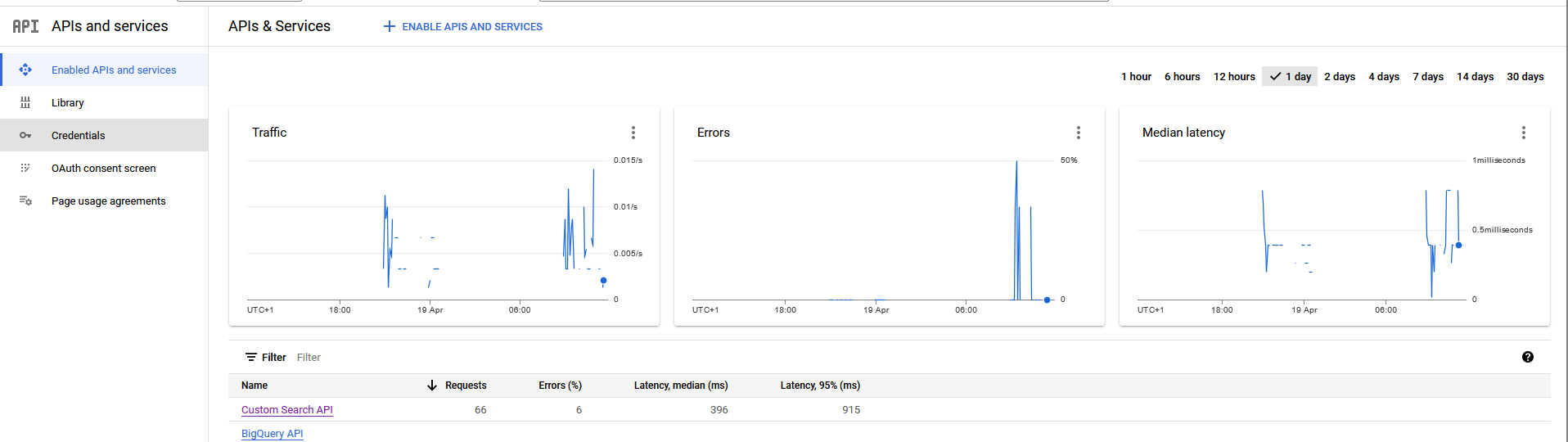
Then under Then under API's and services, click on "Enabled API's and Services"
Now click "Enable APIS and SERVICES"
Once a new page opens called API Library, search for "custom search api" and click the one made by Google and then once a new page opens click "enable".
It will have an ID at this point, copy that ID to the .env file
Example of it working once both ID and API key is enabled and searching the web:

https://programmablesearchengine.google.com/controlpanel/create?hl=zh-cn
创建一个新的search engine, 获取id
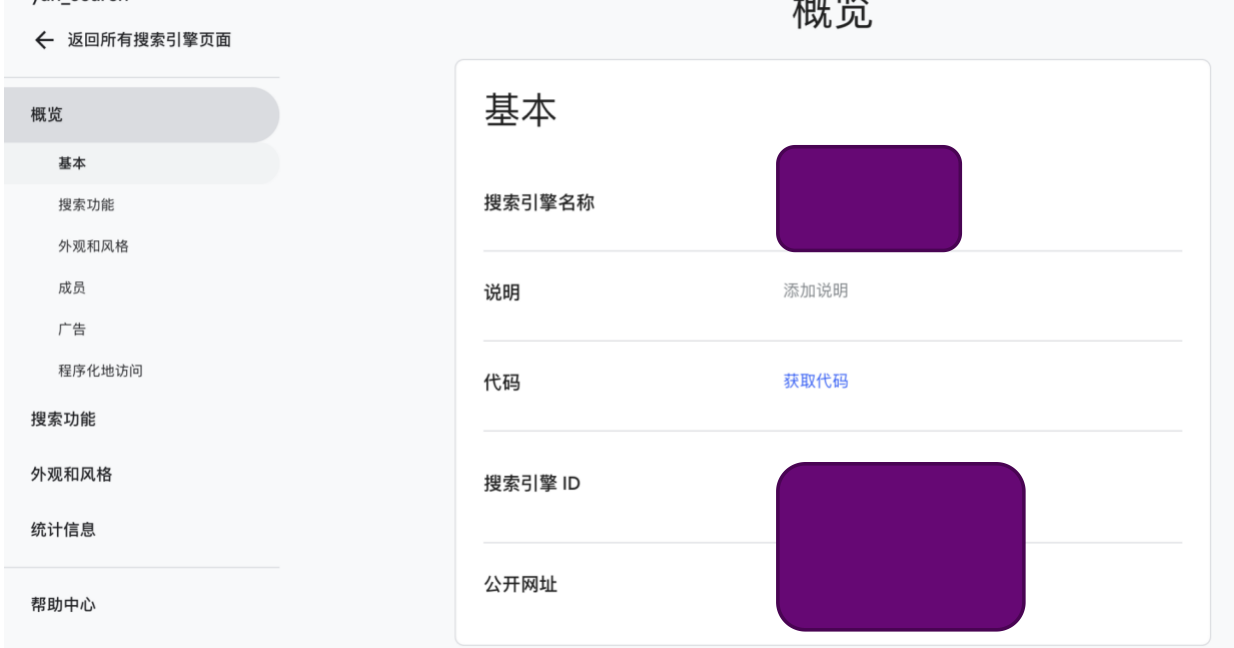

It will have an ID at this point, copy that ID to the .env file
@SparksSkywere
Your screenshot correctly shows the location of GOOGLE_API_KEY, but not CUSTOM_SEARCH_ENGINE_ID.
Need to create search engine here: https://programmablesearchengine.google.com/controlpanel/all

This issue has automatically been marked as stale because it has not had any activity in the last 50 days. You can unstale it by commenting or removing the label. Otherwise, this issue will be closed in 10 days.
![github-actions[bot] avatar](https://avatars.githubusercontent.com/in/15368?v=4 "Published by a pub.dev verified publisher")
This issue was closed automatically because it has been stale for 10 days with no activity.