
AutoGPT
 AutoGPT copied to clipboard
 Significant-Gravitas
Command browse_website returned: Error: Proxy URL had no scheme, should start with http:// or https://
⚠️ Search for existing issues first ⚠️
- [X] I have searched the existing issues, and there is no existing issue for my problem
GPT-3 or GPT-4
- [X] I am using Auto-GPT with GPT-3 (GPT-3.5)
Steps to reproduce 🕹
Versions
Autogpt: 0.2.1 Windows 11 pro python 3.10
My problem
NEXT ACTION: COMMAND = browse_website ARGUMENTS = {'url': 'https://hbr.org/2015/06/inventory-management-in-the-age-of-big-data', 'question': "What is the article 'Inventory Management in the Age of Big Data' about?"}
Then it prompted "Command browse_website returned: Error: Proxy URL had no scheme, should start with http:// or https://."
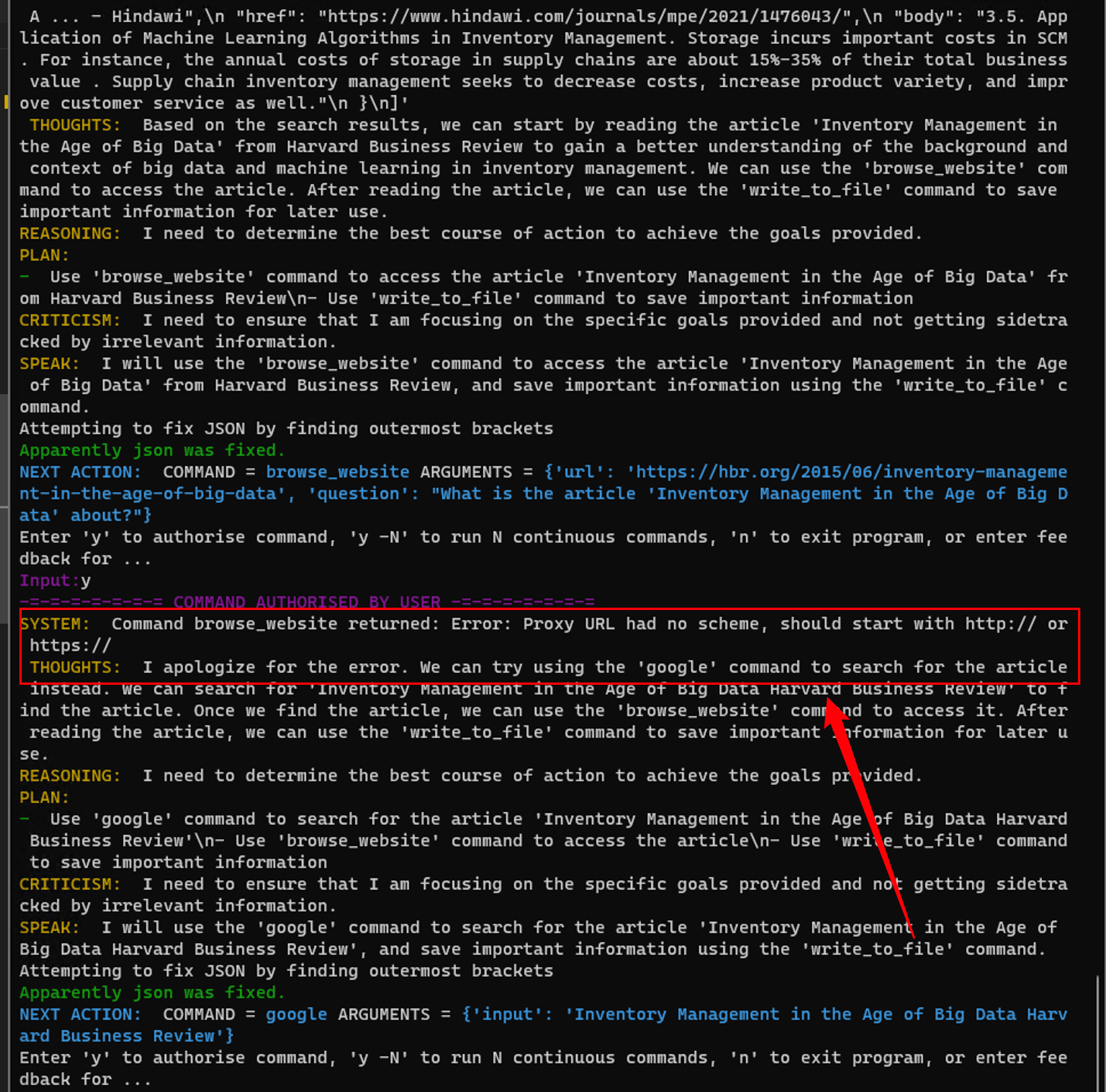
I have tried:
I have confirmed that the website is not the issue. At first, I suspected it was a problem with the request version, so I tried pip install -upgrade request but it prompted me that I was already using the latest version. Then I suspected it was a proxy issue:
I tried modifying Auto-GPT/autogpt/commands/web_requests.py from changing:
response = session.get(sanitized_url, timeout=timeout)
to:
response = session.get(sanitized_url, timeout=timeout,
                               proxies={ "http": "http://127.0.0.1:7890", "https": "http://127.0.0.1:7890"})
I am very sure that my proxy is not the problem because I can access Google and any other website normally.
Current behavior 😯
NEXT ACTION: COMMAND = browse_website ARGUMENTS = {'url': 'https://hbr.org/2015/06/inventory-management-in-the-age-of-big-data', 'question': "What is the article 'Inventory Management in the Age of Big Data' about?"}
Then it prompted "Command browse_website returned: Error: Proxy URL had no scheme, should start with http:// or https://."
Expected behavior 🤔
I would not expect to see "Command browse_website returned: Error: Proxy URL had no scheme, should start with http:// or https://."
Your prompt 📝
Goal 1: The title of this paper is "Inventory Management under Deep Learning". Please help me write an introduction to the paper. The structure of the introduction should include three parts: background, context, and unsolved problems.
Goal 2: The background should be about the development and application of big data and machine learning. The context should focus specifically on inventory management of new products under big data and machine learning.
Goal 3: Both the background and context should highlight the importance of inventory management under the big data background, where product cycles are short, quantities are large, and managing inventory for new products without historical data is particularly important.
Goal 4: The unsolved problems should be approached from the industry and academic perspectives. The main points to focus on include the challenges of utilizing large amounts of data in the industry, and the lack of inventory management models that incorporate real-time data in academic research. For example, the article "Feature-Based Nonparametric Inventory Control with Censored Demand" may not be applicable to real-world scenarios.
Goal 5: Please refer to journals such as Management Science or Operations Research as much as possible.


See if #1275 helps
It did not work cause it's not the same error. #1275 is about the openai proxy, however, I can access openai and my clash worked well. I try to add these code into main.py
import os

if __name__ == "__main__":

    os.environ['HTTP_PROXY'] = "http://localhost:7890"
    os.environ['HTTPS_PROXY'] = "http://localhost:7890"
    main()
still has the same problem: SYSTEM: Command browse_website returned: Error: Proxy URL had no scheme, should start with http:// or https://
NEXT ACTION:  COMMAND = browse_website ARGUMENTS = {'url': 'https://hbr.org/search?term=inventory+management+big+data+machine+learning', 'question': 'articles on inventory management under big data and machine learning'}
Enter 'y' to authorise command, 'y -N' to run N continuous commands, 'n' to exit program, or enter feedback for ...
Input:y
-=-=-=-=-=-=-= COMMAND AUTHORISED BY USER -=-=-=-=-=-=-=
[WDM] - Downloading: 100%|████████████████████████████████████████████████████████| 6.80M/6.80M [00:05<00:00, 1.33MB/s]
SYSTEM:  Command browse_website returned: Error: Proxy URL had no scheme, should start with http:// or https://
 THOUGHTS:  I apologize for the error. Let's try browsing the Harvard Business Review website again, but this time with a valid URL. We can also browse the Management Science and Operations Research journals for academic articles on inventory management under big data and machine learning.
REASONING:  Browsing these websites will allow us to gather more detailed information on inventory management under big data and machine learning. This will help us to better understand the context of the paper and identify any unsolved problems.
PLAN:
-  Browse the Harvard Business Review website for articles on inventory management under big data and machine learning.\\n- Browse the Management Science and Operations Research journals for academic articles on inventory management.\\n- Save relevant information to files for later use in the paper.
CRITICISM:  I need to ensure that the information I gather is relevant and reliable. I should also be mindful of the time I spend on this task to ensure that I am efficient.
SPEAK:  Let's try browsing the Harvard Business Review website again, but this time with a valid URL. We can also browse the Management Science and Operations Research journals for relevant articles. I suggest we save the information to files for later use in the paper.
Attempting to fix JSON by finding outermost brackets
Apparently json was fixed.
NEXT ACTION:  COMMAND = browse_website ARGUMENTS = {'url': 'https://hbr.org/search?term=inventory+management+big+data+machine+learning', 'question': 'articles on inventory management under big data and machine learning'}
Enter 'y' to authorise command, 'y -N' to run N continuous commands, 'n' to exit program, or enter feedback for ...
try
import os

if __name__ == "__main__":

    os.environ['HTTP_PROXY'] = "http://localhost:7890"
    os.environ['HTTPS_PROXY'] = "https://localhost:7891"
    main()
You're forwarding all https traffic to an HTTP proxy which wont work
os.environ['HTTP_PROXY'] = "http://localhost:7890"
    os.environ['HTTPS_PROXY'] = "https://localhost:7891"
Still not solved
try
import os

if __name__ == "__main__":

    os.environ['HTTP_PROXY'] = "http://localhost:7890"
    os.environ['HTTPS_PROXY'] = "https://localhost:7891"
    main()
You're forwarding all https traffic to an HTTP proxy which wont work
The new version of clash has merged the ports for https and http, so both are now 7890 instead of https being 7891. However, it still cannot function properly.
This issue has automatically been marked as stale because it has not had any activity in the last 50 days. You can unstale it by commenting or removing the label. Otherwise, this issue will be closed in 10 days.
![github-actions[bot] avatar](https://avatars.githubusercontent.com/in/15368?v=4 "Published by a pub.dev verified publisher")
This issue was closed automatically because it has been stale for 10 days with no activity.