
sp-dev-docs
 sp-dev-docs copied to clipboard
 SharePoint
SPFX Extension ListViewCommandSet - command title not translating based on locale
Target SharePoint environment
SharePoint Online
What SharePoint development model, framework, SDK or API is this about?
💥 SharePoint Framework
Developer environment
Windows
What browser(s) / client(s) have you tested
- [ ] 💥 Internet Explorer
- [X] 💥 Microsoft Edge
- [X] 💥 Google Chrome
- [ ] 💥 FireFox
- [ ] 💥 Safari
- [ ] mobile (iOS/iPadOS)
- [ ] mobile (Android)
- [ ] not applicable
- [ ] other (enter in the "Additional environment details" area below)
Additional environment details
- MS Edge browser - version 105.0.1343.53
- SPFx version - "@microsoft/sp-core-library": "1.15.2"
- Node.js version - v16.16.0
Describe the bug / error
I have created a custom ListViewCommandSet to add a new button to SharePoint Online Document Libraries.
I am successfully using the localisation options to translate text within the Dialog prompt that gets displayed once the button is clicked.
However the actual text of the button does not switch when changing the locale that I'm using e.g. when I run: gulp serve --locale=fr-ca
To set the translation for the button text, I have changed the manifest file to have both a default and locale set in the title property: "items": { "COMMAND_1": { "title": { "default": "Restore items", "fr-ca": "Restaurer les éléments" }, "iconImageUrl": "data:image/png;base64,imagecodehere", "type": "command" }
The documentation doesn't mention if this works the same as SPFX web parts. Is this a bug with ListViewCommandSet or is it just not possible?
Steps to reproduce
- Create a ListView Command Set as per the documentation - https://learn.microsoft.com/en-us/sharepoint/dev/spfx/extensions/get-started/building-simple-cmdset-with-dialog-api
- Change manifest file to have a translated title e.g. "title": { "default": "Restore items", "fr-ca": "Restaurer les éléments" }
- gulp serve to that locale e.g. gulp serve --locale=fr-ca
- Observe that the button text still shows the default option
Expected behavior
Expected the manifest title property to have translation functionality.

Thank you for reporting this issue. We will be triaging your incoming issue as soon as possible.

Has this been confirmed as a bug? I noticed the only change to this issue is that the tag "area:spfx" has been added, shouldn't this be "area:spfx-extensions"?
@thaeddavid - sorry for the silence. It is most probably a bug, but we had no change to dig into it yet. For the ares: I would leave it to our team to specify needed areas.

@thaeddavid - after reading it deeper I can say it's not a bug.
--locale parameter affects what localization strings from the package will be loaded.
If you want to apply localized title use forceLocale= query string parameter.
@AJIXuMuK I just tested this, and while all the out of the box list view commands get translated when using the forceLocale property, my custom button doesn't. This also works fine for my custom SPFX web part titles, but not for list view commands from an SPFX Extension.
@thaeddavid - I've also tested it before posting the response.
And it does work.
Maybe it's some kind of cache. Try to rebuild the solution, restart debugging session and force refresh the page.
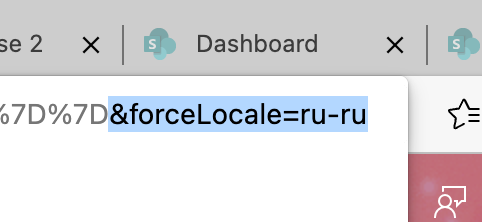
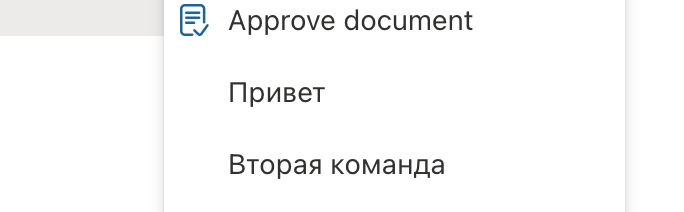
@AJIXuMuK Thanks so much for spending time on this and responding to my questions.
I had cleared my cache and confirmed this by changing some of the text in the button to see it change.
In your screenshot, the main button text still says "Approve document" in English. The reason I bring this up is because most of the text in my extension is translating correctly (e.g. the popup text that gets shown when clicking on the button), but the actual button itself isn't being translated. I believe this text is driven from the manifest and not the locale files. Are your manifest translations working? If so it must be an issue with my code.
@thaeddavid - "Approve Document" is from another command set that has no localized string :) The two below are getting their localized texts from the manifest.
Issues that have been closed & had no follow-up activity for at least 7 days are automatically locked. Please refer to our wiki for more details, including how to remediate this action if you feel this was done prematurely or in error: Issue List: Our approach to locked issues