
selenium-ide
 selenium-ide copied to clipboard
 SeleniumHQ
Test Results / Reports for Test execution status
🚀 Feature Proposal
Can we have back the functionality to generate and view reports? The reports would summarize the results of testing.
Motivation
Reports/Results are a standard output of testing and the previous versions of Selenium IDE supported Test Results and Pretty Reports (both plugins)
Example
You would run a test suite and then review the results either in an HTML, XML or Markup File. Here are the plugins that satisfied this requirements with the old versions of the Selenium IDE tool.
https://addons.mozilla.org/en-US/firefox/addon/test-results-selenium-ide/ https://addons.mozilla.org/en-US/firefox/addon/selenium-ide-pretty-report/


Reporting is an area where Selenium IDE is currently lacking. It would be a welcome addition to the standard lib, or as a plugin (at the very least).

@tourdedave I think report is an essential feature and a must have function for Selenium IDE tool because We will need to publish the test result somewhere. Otherwise we lost all the result.
I have been using the Test result plugin before to export the test result into a html file and then publish it in my web server so that people can view the result.
Can we have this feature back in the new Selenium IDE? That is to provide an option from the UI for user to export test case and test suite report?
I am considering to move to the new Selenium IDE and this lack of test report problem is the only issue that is preventing me from moving on.
I really hope we can treat this is high priority lack of functionality issue (not enhancement).
Thanks!

@ianhe1 How are you running the tests? Through the IDE or from the command-line runner? Right now, the best option available is the CLI runner since it can output a standard format like JUnit XML and be tied to a CI server, which can store historical test run results.
@tourdedave I am currently running the test through the New Selenium IDE UI. I understand that there is an option for the test result when I run it from command line, however, that test result either in xml format or JUnit format does not look good and not really helpful compare to the log I see from the UI with all test steps and details.
I would like to see an option in the UI for user to save the test result into a file. HTML file would the best. That can be directly published in the web server.
For the command line option, I think we need to improve the output format to contain each test step. Current format does not look good to me.
Remember the previous test result plugins which works only on the older version of Firefox with older version of Selenium IDE. Is it possible to port the same plugin into the new Selenium IDE? That would be a great help.
Test Result is one of the key component of the test tool. We should treat this as a must have and get it implemented as soon as possible.
I am still using the old browser with old Selenium IDE. I am considering to move to the new IDE but this test result issue prevented me from doing the upgrade. I am looking forward to seeing this missing feature be added in the New Selenium IDE soon.
In my opinion, we should fill in this gap before we do anything else.
Thanks,
I am also looking into Katalon Studio where they have test report and monitoring that are pretty good. However Katalon is missing a key feature compare to Selenium IDE. That is, I cannot fix the test case failure due to the UI change on the fly (direct record the new UI in the existing test case script). Selenium IDE allows me to do that. That is SO convenient and efficient. Because of this feature, I still prefer Selenium IDE.
@ianhe1 I'm pretty sure you can record in an existing test script in Katalon if you're using the web recorder. If you open it while you have a test case open, it will ask you if you want to record in that test case or a new one.
@jess-palmer Yes. I realized that Katalon can do that but it does not seem to work as well as Selenium IDE. Maybe I am used to Selenium IDE. I found Katalon recording is hard to use.
@tourdedave Back on the test result report issue, do you have any ETA for this item? As I said this is a key component of the new Selenium IDE. Can we implement the test report in the new Selenium IDE UI so that user can save the test result in html file?
I tried the command line option. I don't think the result generated from the command line option is good enough to be used as test report. It does not contain the detailed test steps.
My +1 vote for the feature to allow the Reporting of Selenium IDE run results.

Selenium IDE without reporting is useless. Please implement a protractor export for test cases. Katalon can only import html files. Importing Selenium IDE with Version 3 is not possible for *.side files. UI.Vision can import Selenium IDE files but is missing some actions (e.g. wait for element). With selenium comand line a basic report can be generated, but guys you can be much more better. There is stell missing a bridge between Selenium IDE and Allure reports.

First off if you want to get help you might want to consider not calling the thing we built useless... I'm sure that you wouldn't appreciate that either.
I'm going to split what you've said into 2.
Your first point is reporting which we have, you can export either to jest or JUnit reports with the runner.
Secondly is code export (unclear from what you said), I don't understand why we need that, because we don't have any protractor commands in the IDE.
Cheers, Tomer On 19 May 2020, 10:00 +0300, tscharmi [email protected], wrote:
Selenium IDE without reporting is useless. Please implement a protractor export for test cases. Katalon can only import html files. Importing Selenium IDE with Version 3 is not possible for *.side files. UI.Vision can import Selenium IDE files but is missing some actions (e.g. wait for element). With selenium comand line a basic report can be generated, but guys you can be much more better. There is stell missing a bridge between Selenium IDE and Allure reports. — You are receiving this because you are subscribed to this thread. Reply to this email directly, view it on GitHub, or unsubscribe.

@corevo Make no mistake, the work you guys have done in providing the community with the new Selenium IDE tool is very much appreciated and we are very thankful to you and all people who have contributed to this tool. Selenium has bee the number 1 test automation tool for public use.
All suggestions and requests are just feed backs from users who would like to see the improvement of the tool. For the test report, it is indeed much needed.
-
I understand we do have a command line runner and that has an option to save the test result in a file. However, that file does not contain sufficient information. It is just a summary of the test result. Here is the example of the JUnit output format of the command line result.
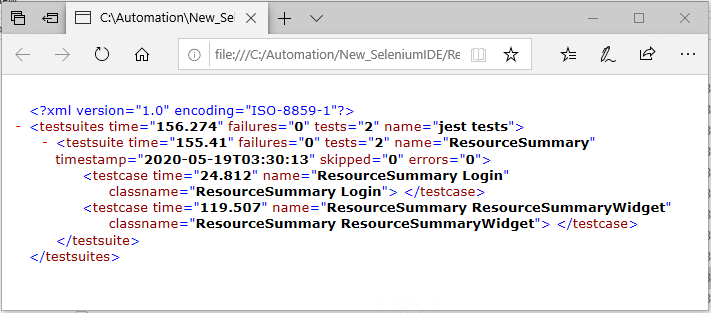 Unless I missed something, I don't see this report contains the test case info and detailed test steps. If test case failed we would not know where to find the issue from this report.
 -
The IDE log contains details steps and test case info as well. I was wondering whether we can just add a function that allow user to save the log into a file from IDE. That would be a good first step. Later on if we can add a summary with the test case details in a nice html format that would be great.
At this point, I just manually copy and save the log from IDE and put it in a file and then convert it to html format.
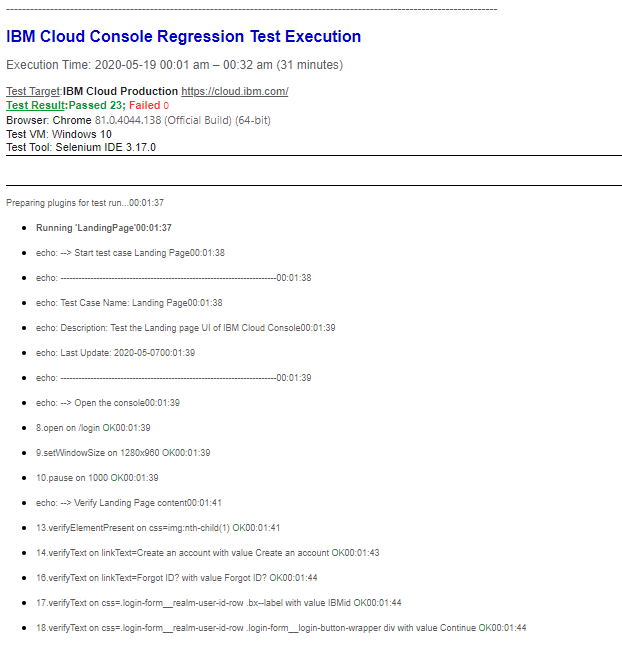
I am hoping we can have a way to let user save the report in a nice format for both IDE user and command line runner users.
The report can be similar to the previous older version Selenium IDE report plugin result

I understand there must be a lot of things in your plate that you need to prioritize. I hope you will take this into your consideration.
Thanks,
Hi, any update on the above request of having ability to export test results? Thanks!

Any update on this? I have some very simple tests that I am using to test website availability - would be great to have an export button to output the results (I'd be happy with straight text output though I can see why folks would want something more elaborate). Thanks!

Hi, is there any update on this issue? A test results report with detailed test steps in readable format is a must have.

Is this still open ? The documentation regarding the command-line runner includes this feature. But it does not work at all.

I'm not doing this in v4. I've exposed a passthrough called '-j' or '--jest-options'. My problem here is that jest-junit has its own settings and then standard coverage reports are a different setting. This was a mistake to support ootb in v3. I'm not going to repeat it. Add whatever jest options you want to jest to do your reporting however, but it doesn't involve me.

This issue has been automatically locked since there has not been any recent activity after it was closed. Please open a new issue for related bugs.
![github-actions[bot] avatar](https://avatars.githubusercontent.com/in/15368?v=4 "Published by a pub.dev verified publisher")