
sceneform-android
 sceneform-android copied to clipboard
 SceneView
Camera's Projection Matrix shows nothing when coming to a particular position
Hey folks,
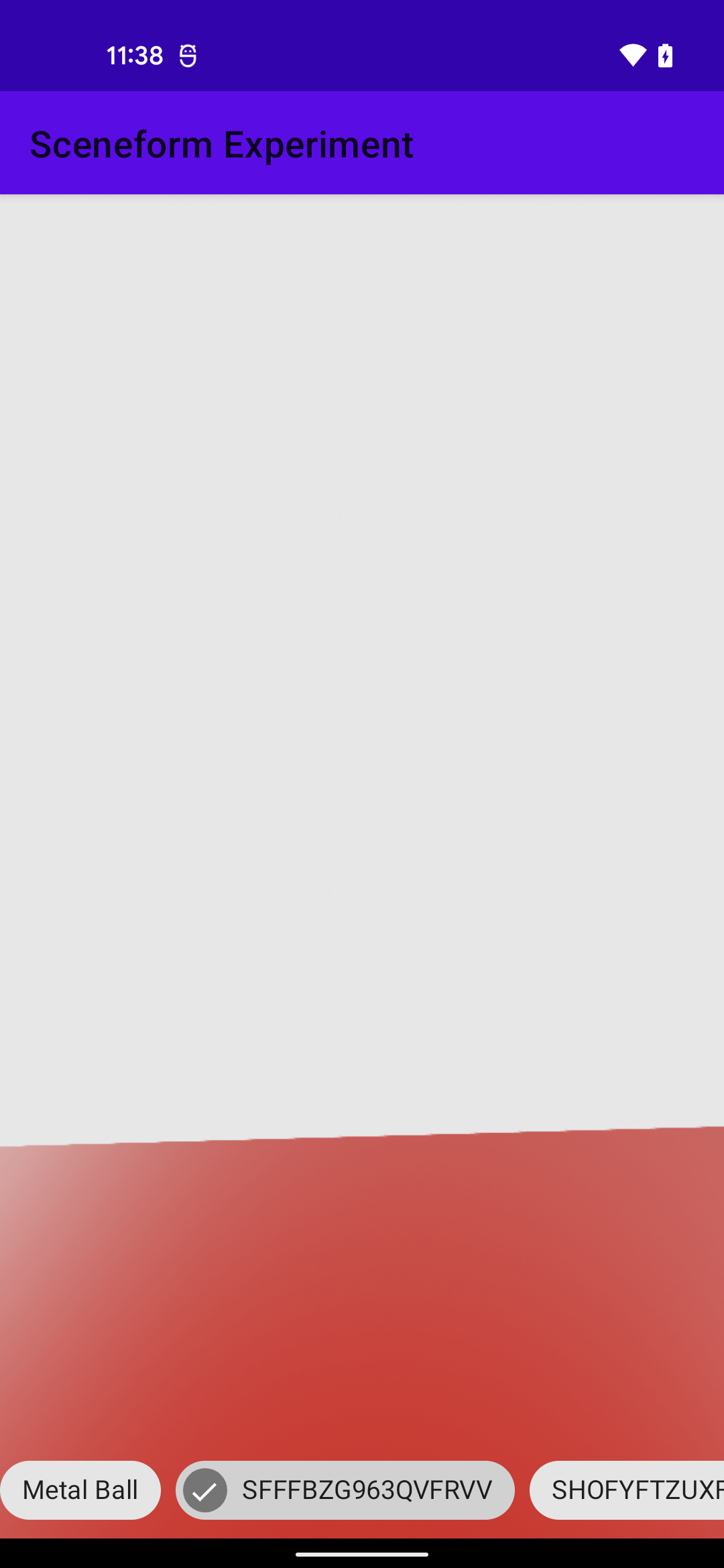
We were implementing CameraManipulator / OrbitControls, we came across this bug when we put the camera at a certain position, around the back of the model (x -> 0, z = back) / (spherical.theta -> (2n + 1) * PI), the camera projection rather than showing the model, goes blank.
Sharing across a video for the same below.
https://user-images.githubusercontent.com/20043762/155079662-6e110931-cd9b-41bb-b221-1867ed08067f.mp4
In our CameraManipulator, we are using spherical angles to map user input, the converting it to vectors, and using the center of the model, we map the Quaternion of it.
The spherical class:
class Spherical(var radius: Float = 1f, var phi: Float = 0f, var theta: Float = 0f) {
    fun set(radius: Float, phi: Float, theta: Float): Spherical {
        this.radius = radius
        this.phi = phi
        this.theta = theta
        return this
    }

    fun copy(sph: Spherical): Spherical {
        radius = sph.radius
        phi = sph.phi
        theta = sph.theta
        return this
    }

    fun makeSafe() {
        // Avoid theta tends to a (2n + 1) * PI
    }


    override fun toString(): String {
        val sb = StringBuilder()
        /** **/
        return sb.toString()
    }
}
Spherical to vector conversion:
fun setFromSphericalCoords(theta: Float, phi: Float, radius: Float): Vector3 {
    val sinPhiRadius = sin( phi ) * radius
    return Vector3(sinPhiRadius * sin(theta), cos(phi) * radius, sinPhiRadius * cos(theta))
}
Camera's values when this particular bug happens
Projection Matrix: [7.055431842803955, 0.0, 0.0, 0.0, 0.0, 3.7985377311706543, 0.0, 0.0, 0.0, 0.0, -1.000666856765747, -1.0, 0.0, 0.0, -0.02000666782259941, 0.0]
Quaternion: [x=0.1418157, y=0.005567789, z=0.019819506, w=0.989679]
Spherical Values: {theta=-3.143966,phi=1.2223562,radius=1.6650295}
Camera Position: [x=0.0037141538, y=0.5684945, z=-1.5649675]
The Z component of the camera is well beyond the radius / extent of the model

Hi,
Thanks for the complete feedback. My first guess is that Filament considers that your model shouldn't be rendered at this specific rotation because some parts of the model became beyond the Camera near clip plane.
Can you try lowering the default one a little bit to see if the issue comes from here? https://github.com/SceneView/sceneform-android/blob/88a7a671c638ec8c11e81a712c294d6746c2765f/core/src/main/java/com/google/ar/sceneform/Camera.java#L89

Ok. It makes me remember some model disappearing when some part of it are not on the camera view.
Could you please try this model https://sceneview.github.io/assets/models/Halloween.glb ? And screen record if it also disappear when rotating/moving.
Very interesting bug. Watching again your screen record, I'm also asking my self if this couldn't be related to the lights. Something like your camera angle matching the main light opposite direction so nothing becomes visible. Just like if you were watching something in front of the sun.
The main light is made like this in Scenform:
new LightManager.Builder(LightManager.Type.SUN)
    .intensity(LightKt.defaultMainLightIntensity)
    .castShadows(true));
@romainguy, Do you think this issue could be related to the lights or something else?
What is the default LightManager.Builder direction if not provided?
BTW, it has been renew in SceneView to match the Filament ModelViewer default light type and temperature and to give it a direction by default;
val defaultMainLight: Light by lazy {
    LightManager.Builder(LightManager.Type.DIRECTIONAL).apply {
        val (r, g, b) = Colors.cct(6_500.0f)
        color(r, g, b)
        intensity(100_000.0f)
        direction(0.28f, -0.6f, -0.76f)
        castShadows(true)
    }.build()
}
https://user-images.githubusercontent.com/20043762/155122172-f9f46a8d-6857-4266-b7e5-1063bfa9a9d2.mp4
There you go! Is there something wrong with the model?
The renderableInstance.filamentAsset.boundingBox shows size and extents are very lower compared to the actual size of the model.
@ThomasGorisse
@ThomasGorisse
We have an IBL environment which lights up the scene and default mainLight which exists on SceneView
There you go! Is there something wrong with the model? The renderableInstance.filamentAsset.boundingBox shows size and extents are very lower compared to the actual size of the model.
Actually that's why I asked you to test this one. Because I had issues with the bounding box on it that could be related. This model is interesting cause it is animated all the ways and the trident generates a big bounding box. It has always been a personal suspended question I have around the bounding box returned by Filament in such a case.
Is there no deterministic way to determine the extents of the animations as well? @ThomasGorisse @romainguy
Untitled.1.mp4 There you go! Is there something wrong with the model? The
renderableInstance.filamentAsset.boundingBoxshows size and extents are very lower compared to the actual size of the model.
I also noticed your model loading toast while the app is inactive.
Just to let you, you wouldn't have this behavior with the introduced SceneView lifecycleScope parameter on lodModel() :wink:
There was a contribution made to filament recently to compute more exact bounding boxes for models with animations. I don't remember if it's on by default because it requires looking at all transformed vertices at all key frames, and it's not necessarily cheap.

See https://github.com/google/filament/pull/4973 for more details. The default behavior is to properly compute the bounding box.
There was a contribution made to filament recently to compute more exact bounding boxes for models with animations. I don't remember if it's on by default because it requires looking at all transformed vertices at all key frames, and it's not necessarily cheap.
Ummmhuumnn, makes sense. Could you help us with this specific issue @romainguy ?
Make sure to use the latest version of Filament.
noted, will try bumping the filament version to see if it causes any effect
@romainguy can reproduce the same issue with 1.19.0 as well ! With the issue, I mean this comment https://github.com/SceneView/sceneform-android/issues/320#issue-1146530445
We can see this happening on more than 30+ assets, this object becomes invisible at a certain angle on all of them
To check whether the issue is a culling issue, try disabling culling on the Renderables in the scene. If the issue still occurs, the problem is somewhere else.
@romainguy
The frustum culling didn't help too.
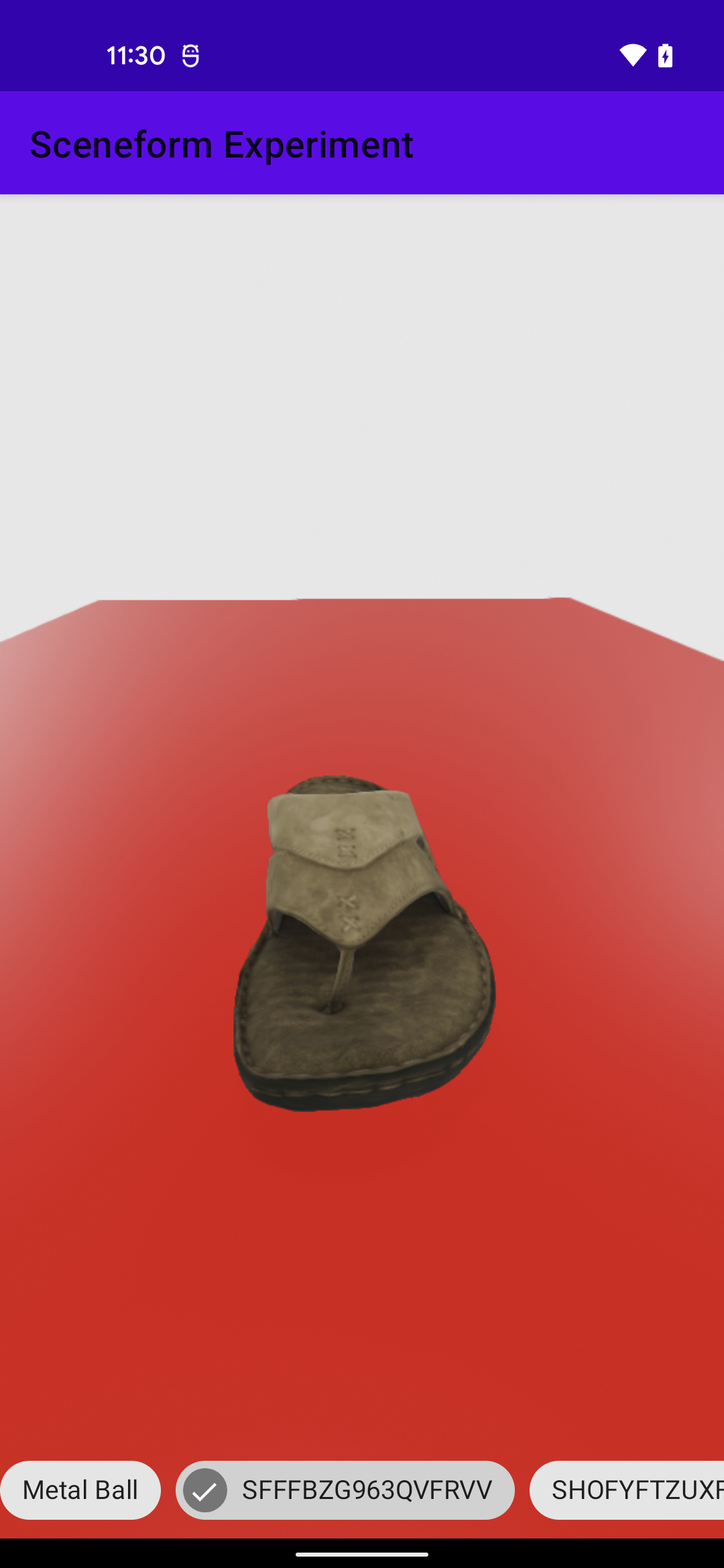
IMO, the camera is projecting forward at the specified angle, because if I make shadow plane red, I see that but not the model in view.
Screenshots below:
Front angle
2n + 1 * PI angle
I checked your camera transformation matrix and it seems to be ok:
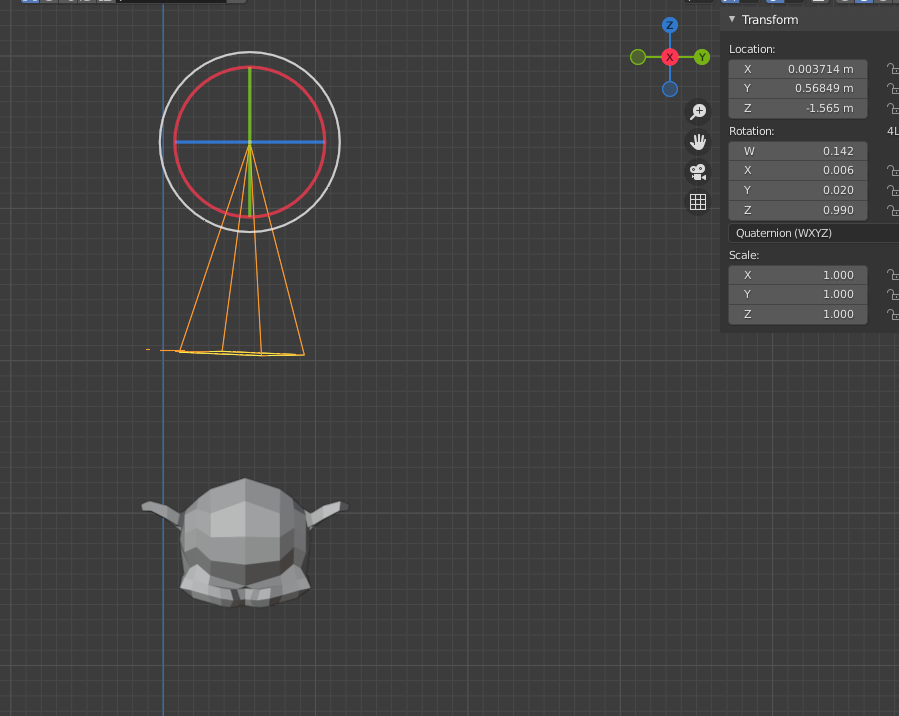
Could you extract a little more camera and object matrices around your disappearing point? Could you also try to change the camera FOV? Maybe try 45° instead of default AR used one (90) and also try to change the far clip plane just to exclude some potential side effects.
Changed the camera FOV -> 45 deg far clip plane -> 1000 View Matrix -> [0.99879766, 0.030591767, -0.038306728, 0.0, -0.04782875, 0.7795239, -0.6245438, 0.0, 0.010755112, 0.6256251, 0.78004974, 0.0, 0.035747252, -0.0937209, 1.629953, 1.0000001] The object is at origin with 0 rotation, it has this matrix data [1.0, 0.0, 0.0, 0.0, 0.0, 1.0, 0.0, 0.0, 0.0, 0.0, 1.0, 0.0, 0.0, 0.0, 0.0, 1.0]
@ThomasGorisse
Just to be sure that it's not a culling issue, can you disable the object culling for your renderable instance?
We added the setter here bdc7ea9c0403e689ad5e915895c0ae6391f7303a.
@romainguy We have a lot of reported issues concerning animated models disappearing when the origin of the entity is not within the camera view. It seems to be a wrong bounding box calculation when the gltf is animated. For now, we advice to disable culling for animated models but do you think that a bounding box refresh on each animation frame would be too consuming?
@ThomasGorisse tried it for no avail :( our light has a direction of (0.0, -1.0, 0.0), could it be that?
Hey there, it looks like there has been no activity on this issue recently. Has the issue been fixed, or does it still require the community's attention? This issue may be closed if no further activity occurs. Thank you for your contributions.
![github-actions[bot] avatar](https://avatars.githubusercontent.com/in/15368?v=4 "Published by a pub.dev verified publisher")
Closing this issue after a prolonged period of inactivity. If this issue is still present in the latest release, please feel free to create a new issue with up-to-date information.