

 SAP-samples
How to add authentication?
Hi-
I have deployed this app on my SCP account successfully. Now, I would need to protect the app and add authentication while consuming the APIs. I was following this tutorial - https://developers.sap.com/tutorials/s4sdk-secure-cloudfoundry.html but unable to proceed from Step3 as we dont have application/src/main/webapp/WEB-INF/web.xml in this project. Could you please me how to protect the APIs by adding XSUAA.
Thanks, Manju

Hi Manju, You can follow the steps in the tutorial https://developers.sap.com/tutorials/s4sdk-secure-cloudfoundry.html for all steps except step 3. instead of step 3, can you try to add
<dependency>
	<groupId>com.sap.cloud.security.xsuaa</groupId>
	<artifactId>xsuaa-spring-boot-starter</artifactId>
	<version>2.3.2</version>
</dependency>
and add the file: https://github.com/SAP-samples/cloud-espm-cloud-native/blob/master/product-service/src/main/java/com/sap/refapps/espm/config/AppSecurityConfig.java to the objectStore projects config folder - https://github.com/SAP-samples/cloud-objectstore-java-sample/tree/master/src/main/java/com/sap/refapps/objectstore/config

Thank you @indusankar89 I will follow the steps and let you know the status. Thank you for your help.
Gettting this error while building the app after following the steps... [47,39] cannot find symbol [ERROR] symbol: method oauth2ResourceServer() [ERROR] location: class org.springframework.security.config.annotation.web.builders.HttpSecurity

Hi @sathisha-bettegowda when did you get the above error? during build/deploy? I tried to build and deploy by adding the mentioned dependency and file and it was successful..
thanks @indusankar89
modifying this helped
<parent>
	<groupId>org.springframework.boot</groupId>
	<artifactId>spring-boot-starter-parent</artifactId>
	<version>2.2.4.RELEASE</version>
	<relativePath /> <!-- lookup parent from repository -->
</parent>
@indusankar89
After deploying the app router, we are getting unauthorized error, when we are trying to post anything to object,
Below are the sample of GET and POST request.
Could you please help us to understand what we are missing here,
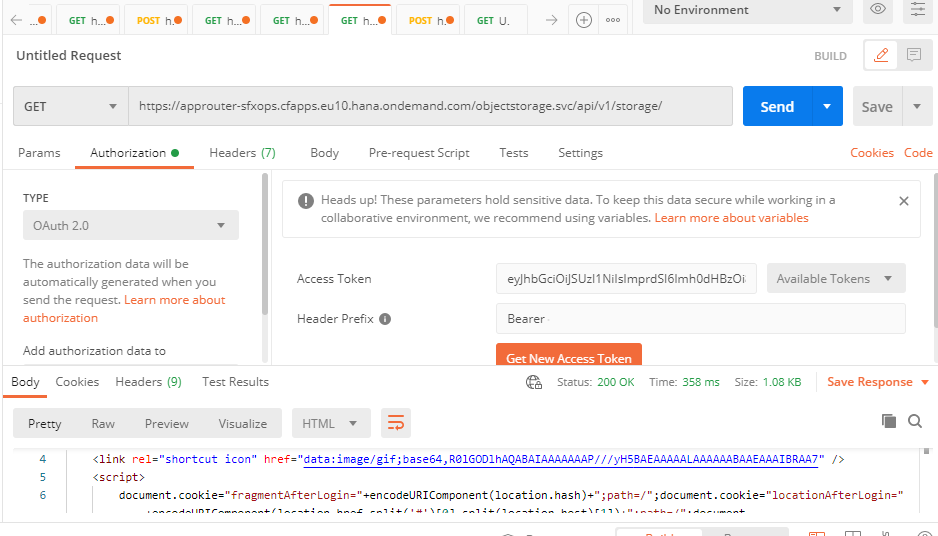

Also in the xs-seurity.json, scope is limited to viewing. "scopes": [ { "name": "$XSAPPNAME.Display", "description": "display" } ], "role-templates": [ { "name": "Viewer", "description": "Required to view things in our solution", "scope-references" : [ "$XSAPPNAME.Display" ] } does this affect uploading/deleting files from object store?