
UnityPlugin-AVProVideo
 UnityPlugin-AVProVideo copied to clipboard
 RenderHeads
Normals for OctahedronSphere8192 VR sphere
Is your feature request related to a problem? Please describe. It's not a problem per se, it's just inconveniences and possibly confusing for those they don't realize.
Describe the solution you'd like I would like to have the mesh of the included OctahedronSphere8192 with inverted normals out of the box. Or at least include two versions. This is the standard way for the geometry in Stereo 360 situations. Right now the mesh that comes with the package is made to be looked from the outside.
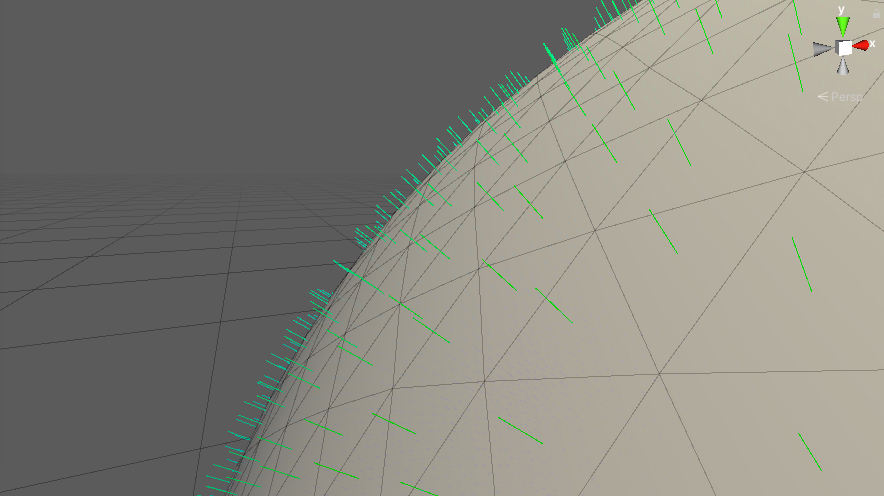
Yes, the shaders from Avpro handled everything to look right, but if you are using other shaders like me, you are forced to handle this by your own.
People using their own shaders would think that something is not working in their shader or the player it self.
Describes alternatives you've considered Alternatives are:
- Handle this issue on your shader :(
- Invert manually the normals by c# script :(
- Edit the mesh on an external 3D editor :(
- Bring another sphere from another 3rd party :(
- Make your own sphere in an external 3D editor :(
Also you have to consider how the UVs are mapped to the mesh.

Would something like this help: https://gist.github.com/AdrianaVecc/20ae99182d89848086e95cbb6ed523e2
