
UnityPlugin-AVProVideo
 UnityPlugin-AVProVideo copied to clipboard
 RenderHeads
When using DisplayUGUI with Android OES, the default texture is not displayed after playback is finished.
When using DisplayUGUI with Android OES, the default texture is not displayed after playback is finished.
When the video is playing, the image is displayed properly, but when the video is not playing, only the last scene of the video is displayed, and the default texture is not displayed.
This is happening when using Android OES Rendering and displaying in DisplayUGUI.
Thank you.
Unity version : 2021.3.1f1 AVPro : 2.5.2 (core) OS : Android Device : Galaxy Note 10
[ AVPro Android Settting ] Video API : Exo Player Use OES Rendering : enabled

Hi, that is normal behaviour. What you need to do is write a script to close the media player when it has stopped playing.

@Chris-RH I of course use close media player and also DisplayUGUI.Player = null .
My project supports Windows, Mac, and iOS as well as Android. Except for Android, it works fine on other platforms.
I am currently using the DisplayUGUI source code modified because of this problem. If the media is in use then use the shaderAndroidOES shader, if there is no media use shaderAlphaPacking .
I have reproduced this on Android. Looking at what/where the difference is and how we might address it.

@cseheon Are you using your own material? Or is the material field set to 'None' ?
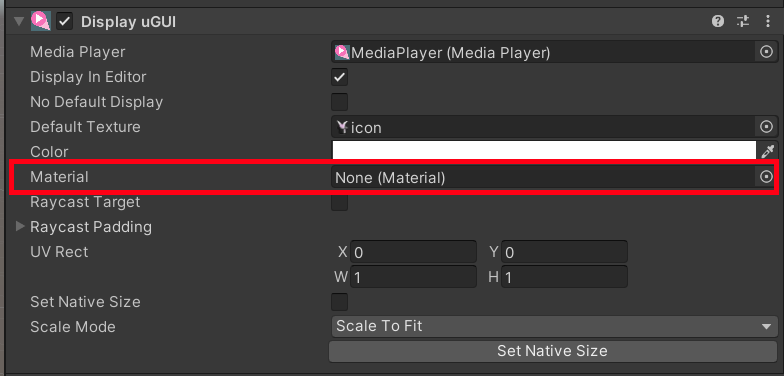
The problem is that when the default texture is set on the material, the OES shader does not know what to do with it, as it is not an OES texture. At this point we need to swap material (so a different shader is used. If the answer to the above question is 'no, not using your own material', then you can make one change to the DisplayUGUI.cs script and things will work as expected.
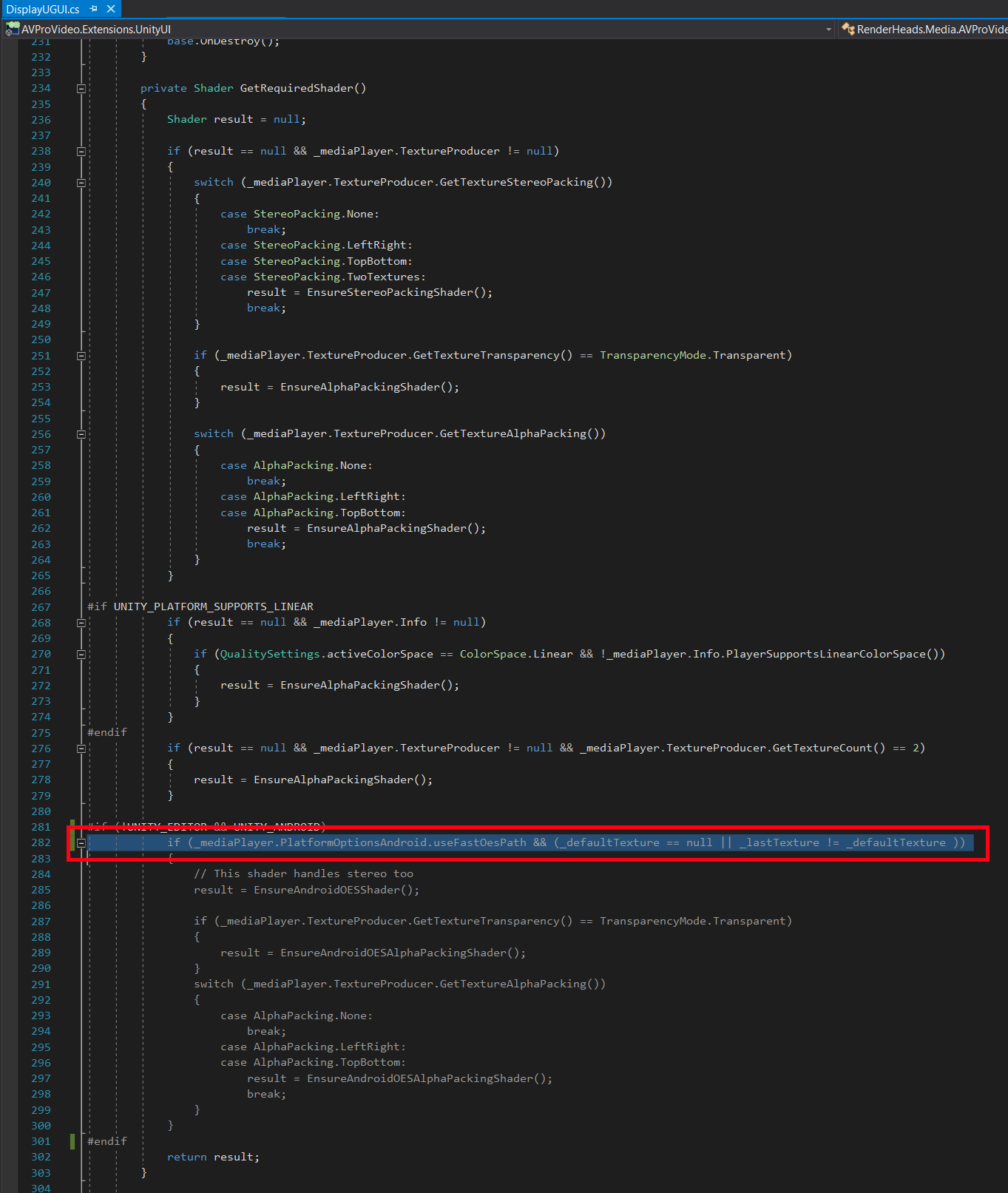
@cseheon Are you using your own material? Or is the material field set to 'None' ? Are you still having problems with this?
@cseheon Are you using your own material? Or is the material field set to 'None' ? Are you still having problems with this?
@Chris-RH Sorry for the late reply. I do not use own material. It was set to none. I found out that the one I'm using is not the latest version. I will update to the latest (v2.5.5) version and try again.
@Chris-RH The same problem still occurs after the update. After playing the video, it is necessary to change from the OES shader to the normal shader when DisplayUGUI.Player = null is set. I'm solving this problem by adding code to change the shader when _mediaPlayer is null in DisplayUGUI.UpdateInternalMaterial() .
This issue has been automatically marked as stale because it has not had recent activity. It will be closed if no further activity occurs. Thank you for your contributions.
![stale[bot] avatar](https://avatars.githubusercontent.com/in/1724?v=4 "Published by a pub.dev verified publisher")
This issue has been automatically closed because it has not had recent activity. If you wish to continue this issue, then please create a new issue as we do not monitor closed issues.
This issue has been automatically marked as stale because it has not had recent activity. It will be closed if no further activity occurs. Thank you for your contributions.
This issue has been automatically marked as stale because it has not had recent activity. It will be closed if no further activity occurs. Thank you for your contributions.
This issue has been automatically marked as stale because it has not had recent activity. It will be closed if no further activity occurs. Thank you for your contributions.
Closing as stale and an edge case at best that can be addressed with C# level changes as required on a per-use-case basis