
rehansaeed.github.io
 rehansaeed.github.io copied to clipboard
 RehanSaeed
[Comment] ASP.NET Core Caching in Practice


hmmm, I'm doing similar things by adding the following to my Configure method in startup.cs:
app.UseStaticFiles(new StaticFileOptions
{
    OnPrepareResponse = ctx =
    {
        const int durationInSeconds = 60 * 60 * 24 * 1; //one day!
        ctx.Context.Response.Headers.Add("cache-control", new[] { "public,max-age=" + durationInSeconds });
        ctx.Context.Response.Headers.Add("Expires", new[] { DateTime.UtcNow.AddSeconds(durationInSeconds).ToString("R") }); // Format RFC1123
    }
});
I'm only concerned with caching "big" things like images etc (which is why its for static files).

Thanks for sharing. Yet again, a very nice blog indeed. I have a question for you.
I know that Response Caching cannot be used if Authorization header is present in the request. I have a scenario where multiple API subscribers need to pass in a Bearer token in the Authorization header so the request can be authenticated/authorized. However, the response of a REST API call is exactly the same regardless of who is calling, as far as they are authenticated.
How would you approach to solve this particular problem? Would you recommend implementing a custom caching layer using ResourceFilters or something as they will be second in a row after the AuthorizeFilters? What are your thoughts on it?
Thanks

hmmm, I'm doing similar things by adding the following to my Configure method in startup.cs:
app.UseStaticFiles(new StaticFileOptions
{
    OnPrepareResponse = ctx =
    {
        const int durationInSeconds = 60 * 60 * 24 * 1; //one day!
        ctx.Context.Response.Headers.Add("cache-control", new[] { "public,max-age=" + durationInSeconds });
        ctx.Context.Response.Headers.Add("Expires", new[] { DateTime.UtcNow.AddSeconds(durationInSeconds).ToString("R") }); // Format RFC1123
    }
});
I'm only concerned with caching "big" things like images etc (which is why its for static files).
Looks reasonable. Setting Cache-Control, Expires and Pragma HTTP headers is complicated, which is why I use the helper method.
Thanks for sharing. Yet again, a very nice blog indeed. I have a question for you.
I know that Response Caching cannot be used if
Authorizationheader is present in the request. I have a scenario where multiple API subscribers need to pass in aBearertoken in theAuthorizationheader so the request can be authenticated/authorized. However, the response of a REST API call is exactly the same regardless of who is calling, as far as they are authenticated.How would you approach to solve this particular problem? Would you recommend implementing a custom caching layer using ResourceFilters or something as they will be second in a row after the
AuthorizeFilters? What are your thoughts on it?Thanks
This GitHub issue in the aspnet/ResponseCache repository deals with caching being turned off when the Authorization HTTP header is present.
In my opinion, the best way to go might be to override or replace the logic in the ResponseCache middleware where caching is turned off based on the Authorization HTTP header.
This GitHub issue in the aspnet/ResponseCache repository deals with caching being turned off when the Authorization HTTP header is present.
In my opinion, the best way to go might be to override or replace the logic in the
ResponseCachemiddleware where caching is turned off based on theAuthorizationHTTP header.
Ok, Thanks. Makes sense, l will have a look.

Nice post. The way you controller works it's kind confusing me. You always hit the db to fetch all the data anyway.. so no much optimization there. Or maybe was just a silly example? Thanks!
Nice post. The way you controller works it's kind confusing me. You always hit the db to fetch all the data anyway.. so no much optimization there. Or maybe was just a silly example? Thanks!
Yes, that's a good point. The code I've shown optimises what gets sent over the wire but not the database calls. If you wanted to optimise the database call, you could start with a query that returns the count for the number of items and the latest modified timestamp and use that to figure out if you need to do another query to get all of the data or return a 304 not modified response.

Great article about caching. While, I have read HTTP-based cache mechanism here, and I want to know does HTTP-based cache make sense for an Web API application? Back to your example for Last-Modified & If-Modified-Since, is it reasonable for an API client receiving 304 response? Could you provide some advice and best practices about implementing HTTP-based cache for a Web API application? Thanks.
Great article about caching. While, I have read HTTP-based cache mechanism here, and I want to know does HTTP-based cache make sense for an Web API application? Back to your example for
Last-Modified&If-Modified-Since, is it reasonable for an API client receiving 304 response? Could you provide some advice and best practices about implementing HTTP-based cache for a Web API application? Thanks.
It does make sense sometimes. If the resource you are getting has a last modified date that you store in the database, you can take that and turn it into Last-Modified & If-Modified-Since HTTP headers. If your client is a web browser, then it will respect the header. If the client is custom code such as C#'s HttpClient, then you will need to write some extra code to respect the HTTP headers and cache responses.
Great article about caching. While, I have read HTTP-based cache mechanism here, and I want to know does HTTP-based cache make sense for an Web API application? Back to your example for
Last-Modified&If-Modified-Since, is it reasonable for an API client receiving 304 response? Could you provide some advice and best practices about implementing HTTP-based cache for a Web API application? Thanks.
I can make sense for an API. You just need to know when the resource was last changed. Also, the client has to support caching headers and store resources in some way that makes sense.

Hi,
Thank you for good article,
I am getting error on the line
var cacheProfiles = this.configuration.GetSection<Dictionary<string, CacheProfile>>();
GetSection not supporting..
.netcore 2.1 framework

Hi,
Thank you for good article,
I am getting error on the line
var cacheProfiles = this.configuration.GetSection<Dictionary<string, CacheProfile>>();GetSection not supporting..
.netcore 2.1 framework
Abhi,
I hit the same thing too, you need to change it to the following:
var cacheProfiles = this.configuration.GetSection("CacheProfiles").Get<Dictionary<string, CacheProfile>>();
Hope that helps.

I'm trying to do the same thing you described in the 'Last-Modified & If-Modified-Since' section. However, after the initial call to the controller, Chrome (and I tested FF too) doesn't even call back to my controller. I simply returns like this:
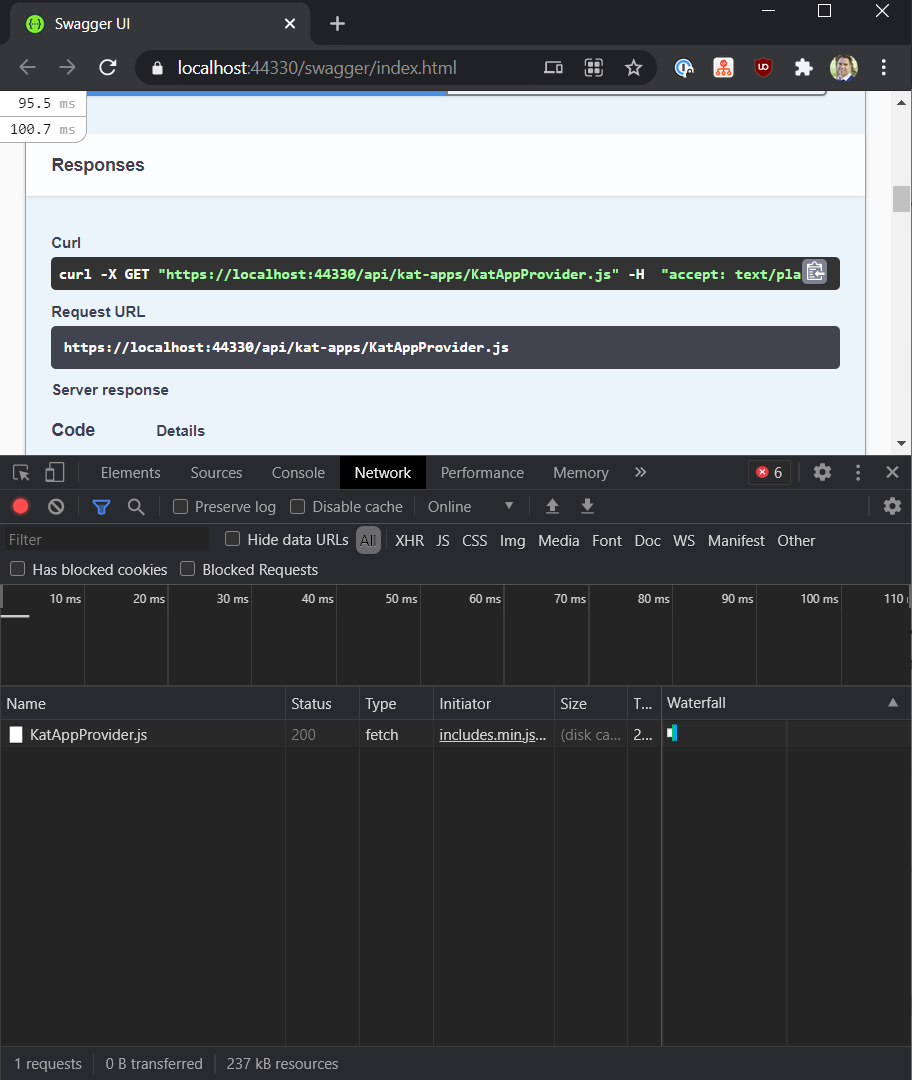
It says (disk cache). I haven't done any 'configuration setup' in Startup. I simply implemented code for checking if-modified-since against our database timestamp. Do I need code in Startup to make this work?

@terryaney If you've implemented the headers you mention correctly and the header is telling the browser that a resource has not been modified since it last made a request to the resource then the browser will cache that resource. This is why you get a 'disk cache' in the browsers network tab. Is that not what you want?
I'm just saying that it doesn't even post back to my action so that I can check 'if-modified-since' against my database. The browser just caches it itself. So when I update the resource in our database, the new version is never returned because it doesn't hit my code.
protected async Task<IActionResult> CachedOrModifiedAsync( CacheDownloadInfo cacheDownloadInfo, IDbConnectionFactory dbConnectionFactory )
{
	var lastModifiedDate = cacheDownloadInfo.LastModifiedDate.Value.ToUniversalTime();

	// https://rehansaeed.com/asp-net-core-caching-in-practice/#last-modified--if-modified-since
	// https://www.geekytidbits.com/efficient-caching-dynamic-resources-asp-net-304-not-modified/
	var requestHeaders = HttpContext.Request.GetTypedHeaders();
	if ( !requestHeaders.IfModifiedSince.HasValue )
	{
		// Set Last Modified time
		HttpContext.Response.GetTypedHeaders().LastModified = lastModifiedDate;
	}
	else
	{
		// HTTP does not provide milliseconds, so remove it from the comparison
		if ( lastModifiedDate.AddMilliseconds( -lastModifiedDate.Millisecond ) == requestHeaders.IfModifiedSince.Value )
		{
			return NotModified();
		}
	}

	var bds = new SqlBinaryDataStream<Guid>( dbConnectionFactory.GetDataLockerConnectionString(), "Cache", "UID", "Content", cacheDownloadInfo.Token.Value );
	return new FileStreamResult( await bds.ContentIsCompressedAsync ? new GZipStream( bds, CompressionMode.Decompress ) : bds, cacheDownloadInfo.ContentType );
}
Perhaps consider creating a small sample app and posting the question on StackOverflow to get some eyes on it (I'll also take a look).
I didn't make a 'sample app'. I just pasted my controller and caching code. https://stackoverflow.com/questions/66052852/asp-net-core-web-api-checking-if-modified-since-header-not-working-because-brows Will see if anyone has ideas.
FYI, I updated my stack overflow answer here. But to make this work with Swagger (maybe other clients as well), I had to put the following:
responseHeaders.CacheControl = new Microsoft.Net.Http.Headers.CacheControlHeaderValue
{
	Public = true,
	MustRevalidate = true,
	MaxAge = new TimeSpan( 0, 0, 0 ),
};
responseHeaders.Expires = DateTime.UtcNow;