
FiltaQuilla
 FiltaQuilla copied to clipboard
 RealRaven2000
The UNC \\ path is lost
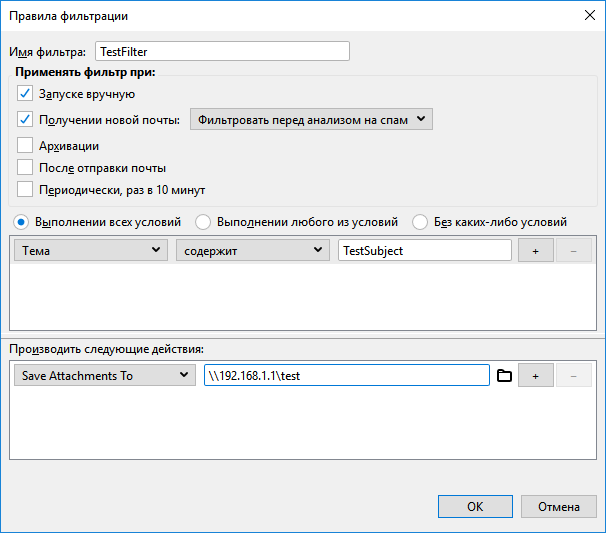 after reload


TB 78.5.1 64bit FiltaQuilla 3.0pre51
great. I will pin the issue for high priority - shouldn't be too hard to fix.
I believe this happens when Thunderbird reads the filters from file: https://searchfox.org/comm-esr78/source/mailnews/search/src/nsMsgFilterList.cpp#696 Unfortunately I would need a working Visual Studio environment to debug this in C++, which is difficult to set up.
Good mornig to all,
this morning I've spent some time on the issue and probably I've solved.
on my PC, I've closed thunderbird

I modified the msgFilterRules.dat inserting three slashes (\) instead of two before the address 192.168.0.xyz ....; saved and closed

I've locked the msgFilterRules.dat for any users (SYSTEM, Administrator, Users) from any writing, leaving only in reading and execution.

I've restarted and closed Thunderbird several times and ALL WORKS!!!!!
The address in the filter is always \192.168.0.xyz ... (two slashes)
Thank you
Best regards
A. Borriero

I modified the msgFilterRules.dat inserting three slashes () instead of two before the address 192.168.0.xyz ....; saved and closed
I've locked the msgFilterRules.dat for any users (SYSTEM, Administrator, Users) from any writing, leaving only in reading and execution.
I've restarted and closed Thunderbird several times and ALL WORKS!!!!!
what happens if you edit any other filter in the account and then save? I definitely fear Thunderbird will overwrite the three \\\ if you allow it to save filter rules - the problem is fundamental in the way Thunderbird stores them.
... yes, I'm quite sure tha TB will overwrite.
But - probably - no problem; we can:
- unlock the file . dat,
- modify the filter with other items in TB, as we wish
- close TB
- fix manually (TB closed) the three slashes
- lock the .dat file
- open TB
Could be a good solution up to you?
Bye
Andrea
... and yes, I agree that it is not a radical and final solution: it is only a by-pass.
Bye
andrea
I did try using // instead of \\ for a UNC path, and / instead of \ for directory separators, which sometimes works on Windows apps. On the plus side it remained in place after Thunderbird restarts, but unfortunately the path isn't resolved so the save/detach action doesn't occur.

that may be a good workaround. I will look into the code whether I can replace that (on Windows) during the file operation. The main problem here is that when you select the path (with Windows Explorer) it will always end up being \\ . I do not have control on how thunderbird stores this value (this is all built in and hidden to the Add-ons / JavaScript layer)
The main problem here is that when you select the path (with Windows Explorer) it will always end up being
\\. I do not have control on how thunderbird stores this value (this is all built in and hidden to the Add-ons / JavaScript layer)
I agree with this entirely, and think it would be acceptable to include a clear warning in the add-on documentation about this whole issue around UNC paths.