
revanced-manager
 revanced-manager copied to clipboard
 ReVanced
Stuck after successfully patching and installing.
Type
Functionality
Branch
Flutter
Issue

After patching and installing an app, screen gets stuck (shown in photo). I tried giving the manager all permissions and also disabling any battery optimizations, tried again from the beginning but the result is the same. This prevents the successfully installed app from being detected by the manager.
Feature
If this is fixed it'll enable the installed apps to appear under "installed apps" and it will help to keep the patched app itself updated.
Motivation
Because it's an essential part of the functionality of the app.
Additional context
For additional context refer to
https://discord.com/channels/952946952348270622/1019692986096955523


Go to settings and hold About about section and paste it here.
Version: 0.0.1 Model: SM-N975F Android Version: 12 Arch: arm64-v8a
I have the same issue
Version: 0.0.1 Model: 2201116SG Android Version: 12 Arch: arm64-v8a

Fixed on https://github.com/revanced/revanced-manager/commit/9f3a30d9f2d06f00250623142a7e2e2c119d4aaa.

He can install the patched YouTube but the manager doesn't recognize it that it has been installed
Edit: I even allowed it to see installed apps
He can install the patched YouTube but the manager doesn't recognize it that it has been installed
Edit: I even allowed it to see installed apps
Same thing for me, I have YouTube, YT Music and Tiktok install but only shows YouTube and Tiktok

@estebanxz Did you allow unknown install apps for Manager?
Yes, all permissions including media access and installation of apps from unknown sources (in this case manager) are allowed, I tried multiple times, clearing data, reinstalling, same result.
I found a workaround for now.
You basically want to install the apk you downloaded and then select app and patch normally. When patched you can remove the original YouTube and leave the patched one installed and now it shows it in the installed screen
Mine problem same manager doesnot recognise the installed patched youtube apk file, all permissions given.

I found a workaround for now.
You basically want to install the apk you downloaded and then select app and patch normally. When patched you can remove the original YouTube and leave the patched one installed and now it shows it in the installed screen
Unable to install youtube 17.33.42 over latest youtube, says package invalid.
Forgot to mention that if you have YouTube preinstalled it won't work as this version is older and you can't downgrade apps. Also the App signature might be different
Forgot to mention that if you have YouTube preinstalled it won't work as this version is older and you can't downgrade apps. Also the App signature might be different
I have removed the youtube over adb and tried to install youtube v.17.33.42 but still same issue that package invalid.
You have to install the full apk and not the split APK file .xapk
I have managed to install youtube 17.33.42 and revanced manager also showing in patched applications.
As of 0.0.10 this issue seems to be fixed (albeit with a side-effect) I uninstalled everything, installed manager and proceeded to patch YouTube, it patched successfully and after install I was at the main menu and the app was there, the issue now is the duplication of installed apps in manager, which is already documented.
EDIT: Hmmm after this, I decided to patch YouTube music and the issue reappeared, stuck at the same screen again.
Those are not duplicates. You have installed ReVanced version of YouTube Music in parallel with an existing installtion of regular YouTube Music right?
Nope, for YouTube that could be somewhat true (pre-installed YouTube app that is disabled) but i don't have YouTube music installed and patched version will too duplicate in the installed apps screen, so I don't see that being the reason of the issue.
Those are not duplicates. You have installed ReVanced version of YouTube Music in parallel with an existing installtion of regular YouTube Music right?
Nope, for YouTube that could be somewhat true (pre-installed YouTube app that is disabled) but i don't have YouTube music installed and patched version will too duplicate in the installed apps screen, so I don't see that being the reason of the issue.
Ok. I'll take a look into it. Thanks
Duplicates should be fixed on incoming v0.0.11.
I also have same duplication upto 5 or 6 times in manager v0.0.13. I do have youtube preinstalled.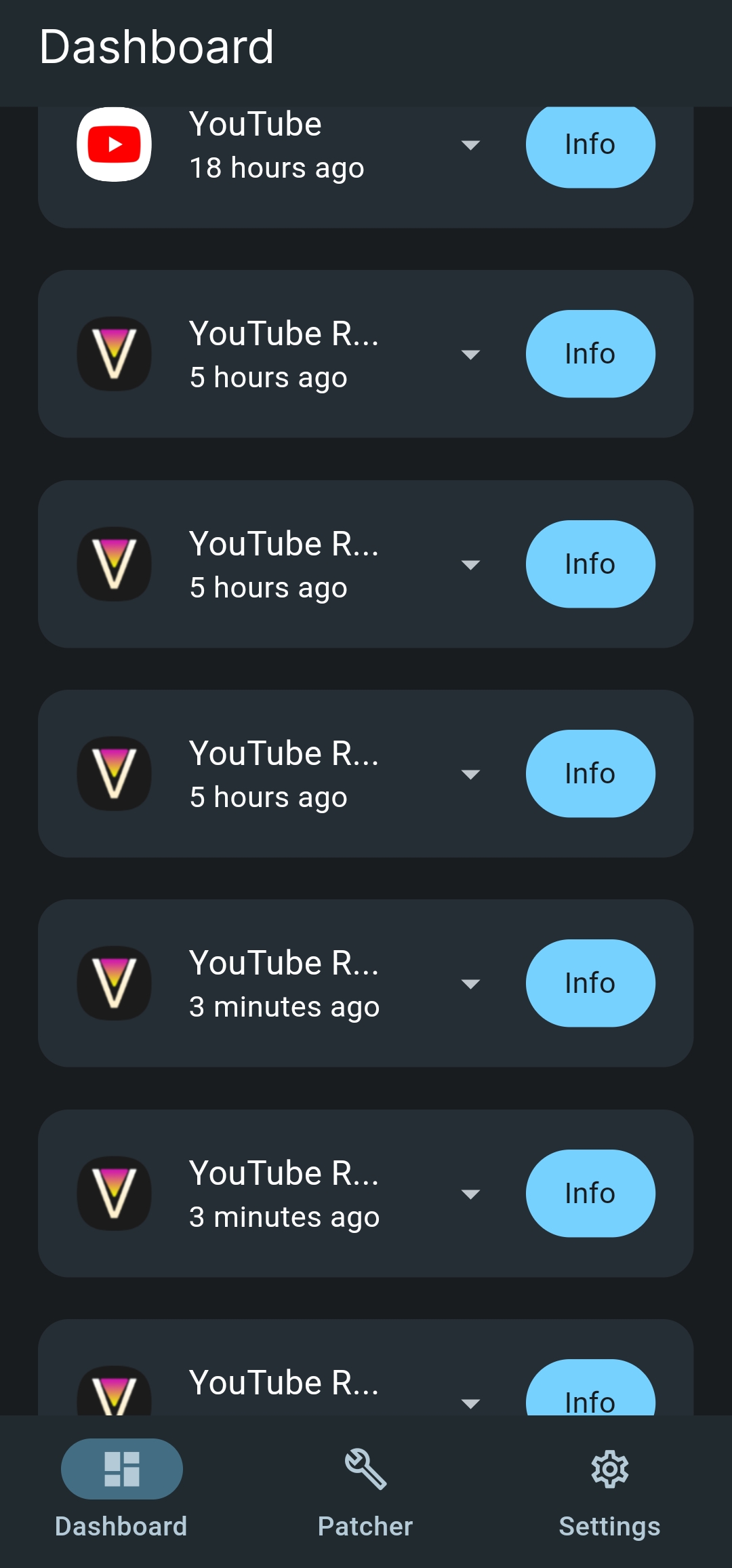
I don't think they will remove by themselves you probably have to reinstall the manager
I don't think they will remove by themselves you probably have to reinstall the manager
Yep i think so bec everytime manager is updated it creates duplicates like that.
Clean manager data or uninstall and start it over. This is fixed now. But currently saved manager data can still keep this duplicates.
As for the OP problem, this still exists. Tested on the latest version 0.0.26. You can use ADB at the moment of the installation as a workaround, but it seems that even if the app appears on the manager it won't be checked if an update is available, it will keep staying on the Installed tab.

Does this still exist on the latest version of manager?

I was having the same issue, but I realized what the issue is. When you hit install, the OS will warn you saying "installing this app could be harmful for your device!"
The main button available will say "Got It!", but this actually just prevents the installation of the .apk
Instead, you need to hit the drop down in the warning pop up and there should be a button that say "install anyway".
