
maptool
 maptool copied to clipboard
 RPTools
[Bug]: MapTool freezes when launching frame5 from another frame5
Describe the Bug
Under some conditions, clicking on a link which opens a frame5 from a frame5 causes MapTool to consistently freeze and requires it to be force-quit (Windows 10).
I'm able to replicate this bug with a particular library token, but I believe it is revealing a deeper MT bug.
This is not a bug in the code. Firstly, this works fine in 1.10.4; Secondly, there is a workaround which fixes the problem for the instance of MapTool running. After the workaround you have to open a whole new instance of MapTool to get it to work, creating a new campaign is not enough.
I'm sorry to say I haven't managed to narrow down the bug at all and this has been affecting quite a few peoples' games (people who use my Framework with Merudo's spell library) ever since 1.11 came out by causing game-losing application freezes.
This is the 5e spell library which exhibits the issue; by the way, this works just fine up to 1.10.4: https://github.com/Merudo/spell-library/releases/tag/1.4.2
To Reproduce
In 1.11.4, this library can crash MapTool on Windows 10; to do so:
- Download the Spell Library lib token and drag it into a fresh campaign.
- Run this command in chat: [macro("Show a Spell@Lib:SpellLibrary"): "Mind Blank"]
- A frame appears. Click the 'Wish' link in the spell description.
- See crash: You can move windows / panels to some degree, but can't change anything and autosave doesn't run.
- The error only happens when triggering the "Show a Spell" macro from a macrolink. frame.
Evidence this is a Maptool Bug: Instance-wide Workaround
The following workaround fixes it for the instance of MapTool running, even if you create a new campaign and repeat the procedure to reproduce the bug - you have to close MapTool to get the bug to resurface once it has been 'fixed':
- Edit 'Show a Spell' and enable the 'Auto Execute' option in the Details tab. Save the macro.
- Run the macro. 'Fireball' opens by default; go ahead and close it.
- Repeat the bugtest; now, the macro links work fine.
- Start a new campaign and repeat the bugtest; macro links work fine.
- Save the updated token, restart MapTool, and retest with the saved token. The bug returns and MapTool freezes.
I tried replacing the older getMacroCommand pattern to grab the JavaScript into the Show a Spell macro with the newer lib:// format and a few other tricks, but I couldn't get it to work.
I sometimes stumbled into fixing it, and it always fixed it for the whole MT instance even when reopening campaigns, etc. - no changes I make keeps the problem from happening in the first place, and I can't seem to distill the issue down to a sample case. 😦
Expected Behaviour
Since there is no bug in the library's code, opening the frame5 from a macro link in another frame5 should work without freezing in MapTool 1.11.x. It worked fine in prior versions.
Screenshots
No response
MapTool Info
1.11.4 & 1.11.5
Desktop
Windows 10
Additional Context
Logs from MapTool after the crash: maptool.log

Only two steps are needed to lock up MapTool 1.11.5 on macOS Monterey (latest version, fully updated):
1. Download the Spell Library lib token and drag it into a fresh campaign.
2. Run this command in chat: [macro("Show a Spell@Lib:SpellLibrary"): "Mind Blank"]
When I force-quit the application, the stack traces weren't terribly useful to me (I saw references to park/unpark calls which are used for thread sync at the C++ level); I'm happy to share what I've got for whoever looks into this.

@Azhrei Does checking 'Auto-execute' on the Show a Spell macro before running the chat command bypass the error like in my tests on Windows?
No, it still fails. It's weird because I get two panels that open, one has the typical JIDE title bar, border, and buttons in the upper right (with the name "Fireball Spell") yet has no visible content, and the other is the exact same size and appears at (0,0) on my screen, and it also has no content along with no title, border, or buttons.
I've seen this before somewhere. I think the JIDE library creates a panel and then adds the decorations to it, and Java on the Mac is displaying the empty panel in its state prior to JIDE initializing it, then after it is initialized, the empty one normally goes away. It happens so fast that it can't be caught (I tried using a screen recording tool one time). This time, the empty panel doesn't disappear, though.
Once those panels open, MT is locked. I get no cpu usage from MT, hence my guess of a synchronization issue.
Hi,
I get the same behavior with all of my framewoks too. I figured out that the line "" causes the crash on my libs. Replace getMacroLocation with the lib name fixes the crash. So I assume the problem is based in getMacroLocation which not work anymore when dealing with more than one frame 5? Hope this will help fixing the issue. This is a major bug. All my frameworks didn't work in 1.11.4 and 1.11.5.
best regards Flaedda

I did a small test to open multiple frames using links in frame5 and they work fine. I think there may be some formatting issue where the parser is getting confused. This usually happens when you have a string defined with single quotes and some {}'s inside the string.
My simple code:
[H, if(argCount() >= 1): var = number(arg(0)+1); var = 0]
[H: broadcast("test: "+ macro.args)]
[H: link = macroLink("click me","openFrame5@"+getMacroLocation(),"all",json.append("",var))]
[frame5("Test "+var,"value="+var): {
   [R: link]
}]
Just create this macro on any lib token. I do have to have auto execute checked otherwise I get the error Must specify a location for the macro "openFrame5" to be run from.

I haven't looked at the library code, but it would be helpful to generate all the frame output to a variable first, then put that in the frame5 block as above. This way you can examine the html being printed.
I did same more tests and I can reproduce the error without the GetMacroLocation and without "{}" in the Frame. I don't think it is a missformating, because it works in the older Maptool versions. I can provide a Campain to reproduce the error if needed.
I've hit this issue now as well - and I did some digging to see what caused it - no HTML, or plain text was fine, it was something in my HTML. So I started paring the HTML down, putting it into a var, and printing the var in the frame, slowly removing each part of the string.
It wasn't the loop adding table rows, nor was it the inline json.get() stuff. Nor was it the <table>. Eventually, I found that the only line I had to remove to avoid the error entirely was <link rel="stylesheet" type="text/css" href="calendarCSS@Lib:DateTime">
This is strange - as noted, the bug occurs when opening a frame5 from a frame5 - this is the same CSS link line used in the parent/calling frame5. Just for safety, I duplicated that CSS macro and made the child frame5 call a different one. Same error.
Not sure if this helps narrow it down at all.

I had a look at the area of code that will be causing this issue. Unfortunately its not going to be a straightforward fix. I see if I can come up with something over the weekend, but there is every chance the only fix for this will be to move to the URI format for frame 5. (https://rptools-doc.craigs-stuff.net/blog/lib-token-uri) I think that should avoid the issue.

We also ran into this issue after changing my dialogs to dialog5. The problem occured only on one of my players, that was using MAC. The windows users did not run into this problem. We mentioned that the to the CSS was causing the problem. Removing the OR replacing dialog5 to dialog results in prohibiting the crash for my player. The workaround with the URI format also seems to work. I think that will be the way to go now. What i also mentioned: The crash does not only happen when calling a dialog5 from another dialog5. It also happens when opening a dialog5 from a macro that is called by the macro of a campaign-button.

I'm pretty sure I'm having a related issue. Maptool crashes when a frame5 is opened via <a> tag from an overlay (which is html5 by auto).
If i remove the frame5 and use a regular frame no crash happens. Also, calling the same frame5 from a macro button inside a token prevents this.
My problem is that this happens to my players, not to me. I'm hosting and I can't manage to reproduce this, even if i open a client and a server . But this happens constantly to my players.

I'm pretty sure I'm having a related issue. Maptool crashes when a frame5 is opened via
<a>tag from an overlay (which is html5 by auto).If i remove the
frame5and use a regularframeno crash happens. Also, calling the same frame5 from a macro button inside a token prevents this.My problem is that this happens to my players, not to me. I'm hosting and I can't manage to reproduce this, even if i open a client and a server . But this happens constantly to my players.
Can you try changing to the URI format mentioned in the comment above to see if that resolves the problem?
Can you try changing to the URI format mentioned in the comment above to see if that resolves the problem?
I tried but using lib:// URI inside an overlay actually just opens the content of the macro inside the overlay.
I changed macroLinkText("showSpellbook@Lib:Spellbook", "self", json.set("{}", "id", character, "sourceAction", "user") to
<a href="{'lib://Lib:Spellbook/macros/showSpellbook?'+encode(json.set("{}", "id", "Bjorn Djursundson", "sourceAction", "user"))}">click here</a>
Overlay
(notice the click here anchor down left)

Expected result
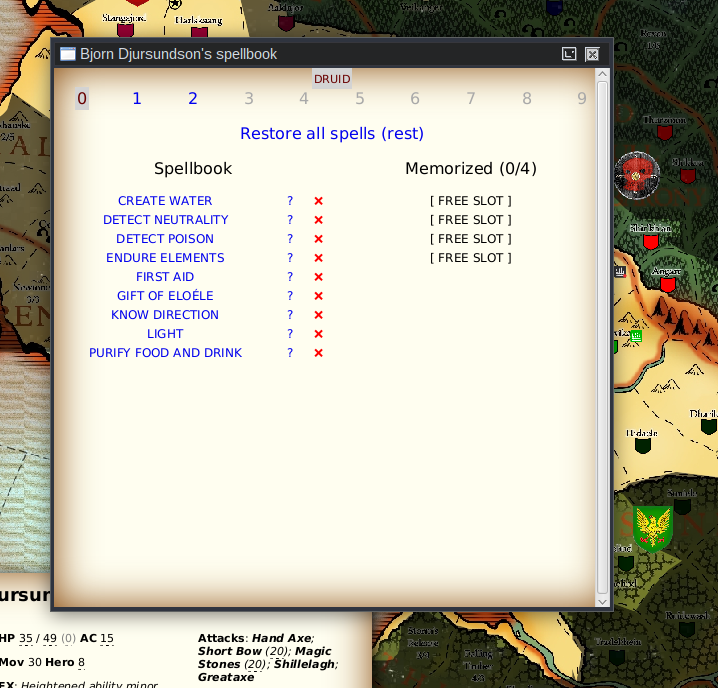
After opening an anchor
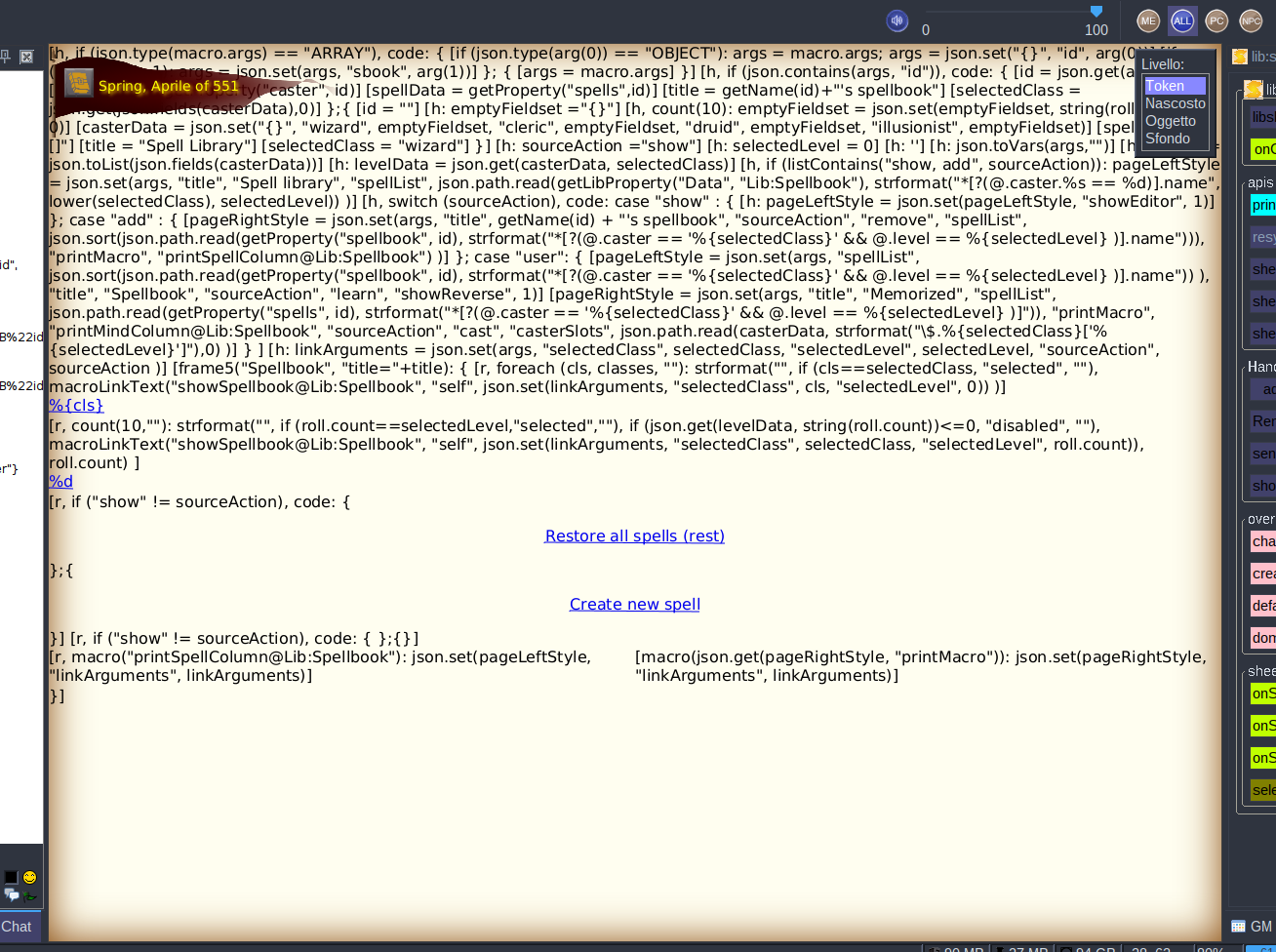
This is the same overlay, only now is 100% and the macro content is handled as text.
Can you try changing to the URI format mentioned in the comment above to see if that resolves the problem?
I tried but using
lib://URI inside an overlay actually just opens the content of the macro inside the overlay.I changed
macroLinkText("showSpellbook@Lib:Spellbook", "self", json.set("{}", "id", character, "sourceAction", "user")to<a href="{'lib://Lib:Spellbook/macros/showSpellbook?'+encode(json.set("{}", "id", "Bjorn Djursundson", "sourceAction", "user"))}">click here</a>
The lib uri change above is to use the uri syntax to include any CSS (I guess javascript too) rather than the old method
Can you try changing to the URI format mentioned in the comment above to see if that resolves the problem?
I tried but using
lib://URI inside an overlay actually just opens the content of the macro inside the overlay. I changedmacroLinkText("showSpellbook@Lib:Spellbook", "self", json.set("{}", "id", character, "sourceAction", "user")to<a href="{'lib://Lib:Spellbook/macros/showSpellbook?'+encode(json.set("{}", "id", "Bjorn Djursundson", "sourceAction", "user"))}">click here</a>The lib uri change above is to use the uri syntax to include any CSS (I guess javascript too) rather than the old method
Ok. Then I can say that even when removing any css link reference (removing entirely) from the frame5, the crash still happens. Only a switch to frame prevents freezing.
Ok. Then I can say that even when removing any css link reference (removing entirely) from the frame5, the crash still happens. Only a switch to
frameprevents freezing.
Ah, this is a case where a macro called from an overlay is not allowed to update the overlay. You can try running the part of the macro that updates the frame as a deferred maco as this may work around the issue .
Odd, i do something similar with overlays pooping up a frame5, but use form submission instead of just calling the links and it works fine? Using 1.11.4

@cwisniew I'm not sure about the whole "css" issue. As I have stated, the issue persist wherever there is css involved or not. and the issue is not about updating the overlay, rather opening a new frame using specifically frame5. Removing any css does not change anything, but maybe it is a different issue or css is involved in a deeper way. I will try to make a test that opens an overlay from an html anchor and see if the freeze happens.
@Akaku-Keninari I've tried that and unfortunately this does not solve the issue. This started to happen during the last part of my previous campaign, and we started with maptool 1.11.x, so It's not impossible that this is a maptool 1.12 issue. Unfortunately it's a bit too complicated for me and my players to downgrade to 1.11 and confirm this.
@cwisniew I'm not sure about the whole "css" issue. As I have stated, the issue persist wherever there is css involved or not. and the issue is not about updating the overlay, rather opening a new frame using specifically frame5. Removing any css does not change anything, but maybe it is a different issue or css is involved in a deeper way. I will try to make a test that opens an overlay from an html anchor and see if the freeze happens.
Any macro called from an overlay/frame5/dialog5 can not directly update the contents of any overlay/frame5/dialog5. Opening a new one counts as the contents need to be updated. Do you try my suggestion of using a defferd macro call for the update (or open in this case). It may not work but it's worth a try.
@cwisniew I'm not sure about the whole "css" issue. As I have stated, the issue persist wherever there is css involved or not. and the issue is not about updating the overlay, rather opening a new frame using specifically frame5. Removing any css does not change anything, but maybe it is a different issue or css is involved in a deeper way. I will try to make a test that opens an overlay from an html anchor and see if the freeze happens.
Any macro called from an overlay/frame5/dialog5 can not directly update the contents of any overlay/frame5/dialog5. Opening a new one counts as the contents need to be updated. Do you try my suggestion of using a defferd macro call for the update (or open in this case). It may not work but it's worth a try.
Thank you, it is now clear what you meant. Yes, I tried using the deffed method you suggested, and I tried switching from anchors to form submit. The issue persisted. What bothers me is that this happens only when my players try to open a new frame5 from another frame5/overlay, this does not happen to me.
EDIT I think this maybe could be important, I've realized I never mentioned this. The issue is specifically in opening a new frame. Any link or form that updates an already opened frame will refresh the frame without issues. Also, it seems that once the frame is openend the refreshing may occur from an external source. Opening a frame directly from the overlay crashes only if the frame is not already opened.