
vscode-R
 vscode-R copied to clipboard
 REditorSupport
Sourcing an arbitrary script before running R/radian
Is your feature request related to a problem? Please describe.
On cluster-like machines, we usually don't have a default R installation on the PATH on startup. Instead, we activate modules that load the desired versions of anything for each project before starting. So, if for example I wanted to use R 3.4.4 with the curl library 7.58 a common workflow is to source a project-specific shell script, for example load_R.sh here:
#!/bin/bash
# load_R.sh contents
module load curl/7.58
module load R/3.4.4
and then proceed to start R or run Rscript. A similar case applies to e.g. conda environments in more common settings.
Apparently options such as r.rterm.linux do some kind of check of whether it points to a "default" R wrapper script or something. So just prepending a source load_R.sh leads to a "Cannot find R client at " error.
Describe the solution you'd like
I believe a good, simple solution would be to create an option e.g. r.rterm.sourcescript.linux with a path to a shell file to be sourced before the R extension calls anything. This would allow a lot more fine tuning of the environment exclusively for the extension.
Describe alternatives you've considered
Although sourcing the script on .profile or the like can be a workaround (although I was never able to make it work), it's very messy since we don't always want to source the same things in an R IDE-like setting, an interactive shell and a submission script.

Hi @gabriel-abrahao, thank you for the suggestion. In this case like this one approach is to set "r.alwaysUseActiveTerminal": true. This will mean that any 'send code' command will send the code to the active terminal, rather than starting a new R terminal. You can then run something like this when you want to start R:
source load_R.sh; R
People use this approach when they have special ways of starting R. Other use cases are starting R within tmux sessions, or activating a Python environment before starting radian.

Thanks for the tip! Mostly works fine, but the session doesn't get attached to VSCode. I tried setting r.sessionWatcher as well but it still doesn't attach if I press the button with the R console on. Maybe it's not supposed to work with Remote-SSH?
It is supposed to work with remote ssh. Did you put the init code into your ~/.Rprofile as the wiki says at https://github.com/Ikuyadeu/vscode-R/wiki/R-Session-watcher#advanced-usage-for-self-managed-r-sessions?

I did. What ended up fixing the issue, and actually solves the problem here in the first place, was this issue on vscode-remote-release.
The trick is to add an argument to the shell initialization via terminal.integrated.shellArgs.linux which runs an arbitrary command string that ends by invoking the shell again. So if anyone runs into this, just add whatever initialization stuff you need in place of source $HOME/load_R.sh here.
    "terminal.integrated.shellArgs.linux": [
        "-c",
        "source $HOME/load_R.sh ; exec $SHELL -l"
    ]
@gabriel-abrahao Thanks for digging into this and your solution looks nice! We should probably add this to the wiki.
@gabriel-abrahao Thanks for digging into this and your solution looks nice! We should probably add this to the wiki.
Where do you think would be the best place to add it? I can write something and make a PR if you think it's a good idea.
This is a very helpful discussion. I think I followed all the steps but I'm still getting an error when starting up a new workspace.
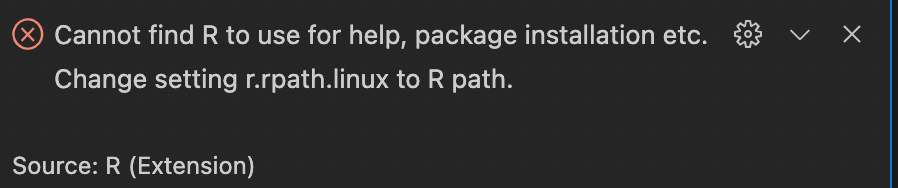 . Do you call R from within load_R.sh?

This issue is stale because it has been open for 365 days with no activity.
![github-actions[bot] avatar](https://avatars.githubusercontent.com/in/15368?v=4 "Published by a pub.dev verified publisher")
This issue was closed because it has been inactive for 14 days since being marked as stale.