
WaveFox
 WaveFox copied to clipboard
 QNetITQ
Firefox CSS Theme/Style for manual customization
WaveFox
Minimum Requirements
- Firefox 103 / ESR 102.1 (ESR has limited support. Some options may not work or work with limitations)
- Windows
- MacOS
- Linux
Installation
-
Download the
chromefolder and put it in your user profile folder. For convenience, useabout:profiles -
Go to
about:configand activate the keys belowtoolkit.legacyUserProfileCustomizations.stylesheetssvg.context-properties.content.enabledlayout.css.color-mix.enabled
-
Specify the desired shape of the tabs.
Creation of keys
Restart your browser for the changes to take effect.

Proton

userChrome.ProtonTabs-Enabled
Photon

userChrome.PhotonTabs-Enabled
WaveFox

userChrome.WaveFoxTabs-Enabled
Chrome

userChrome.ChromeTabs-Enabled
Edge

userChrome.EdgeTabs-Enabled
Australis

userChrome.AustralisTabs-Enabled
Chrome (Legacy)

userChrome.LegacyChromeTabs-Enabled
Optional
Windows System Effects
Works with modern versions of Windows 11 / Windows 10. System effects must be supported on the operating system side. Otherwise, you need third-party software, such as MikaForEveryone. Works only with the system theme.

Download and install MicaForEveryone from the link below.
https://github.com/minusium/MicaForEveryone/releases
userChrome.WindowsSystemEffects-Enabled
Toolbar Transparency
Works only with the system theme.

userChrome.SemiTransparentToolbar-EnableduserChrome.TransparentToolbar-Enabled(Proton Tabs Only)
Linux Transparency
Requires Linux with transparency support. Tested on Linux Manjaro KDE + ForceBlur. Transparency is active for all modes, but does not work everywhere. This may change with future browser updates. Works only with the system theme.

userChrome.LinuxSemiTransparency-EnableduserChrome.LinuxTransparency-Enabledgfx.webrender.all(Required key)
Colorways
https://www.reddit.com/r/firefox/comments/uq26ao/bringing_back_your_preferred_colorways/?utm_source=share&utm_medium=web2x&context=3
Additional Container Indicator

userChrome.AdditionalContainerIndicator-Enabled
Tab Bar Highlight
It is also possible to turn on the border and the shadow at the same time.

Border
userChrome.LowBorderSaturation-EnableduserChrome.MediumBorderSaturation-EnableduserChrome.HighBorderSaturation-EnableduserChrome.VeryHighBorderSaturation-Enabled
Shadow
userChrome.LowShadowSaturation-EnableduserChrome.MediumShadowSaturation-EnableduserChrome.HighShadowSaturation-EnableduserChrome.VeryHighShadowSaturation-EnableduserChrome.IncreaseShadowBlur-Enabled(Increases shadow blur above the default value)
Tab Separators

userChrome.TabSeparators-Enabled
Menu Density
By default context menus follow the selected interface density, but it is possible to set a fixed size.
| Compact | Normal | Touch |
|---|---|---|
 |
 |
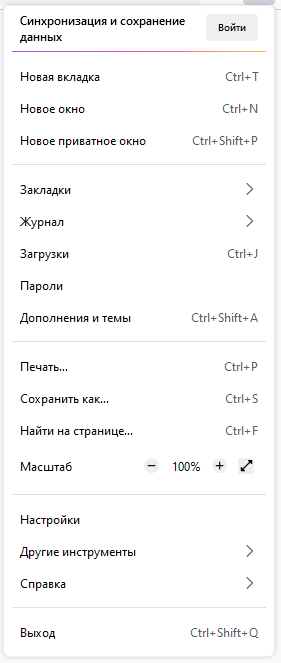 |
userChrome.CompactContextMenu-EnableduserChrome.NormalContextMenu-EnableduserChrome.TouchContextMenu-Enabled
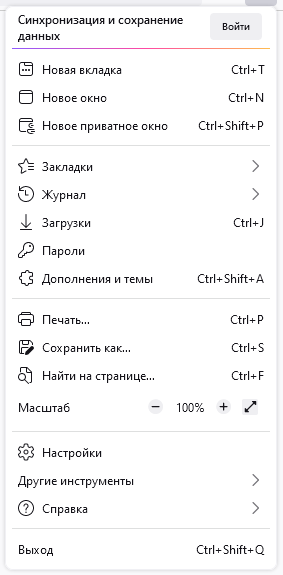
Icons
| Regular | Filled |
|---|---|
 |
 |
userChrome.RegularMenuIcons-EnableduserChrome.FilledMenuIcons-Enabled
Drag Space

userChrome.LeftSideDragSpace-DisableduserChrome.RightSideDragSpace-DisableduserChrome.DragSpaceAboveTabsWindowedMode-DisableduserChrome.DragSpaceAboveTabsMaximizedMode-EnableduserChrome.DragSpaceAboveTabsFullscreenMode-Enabled
Selected Tab Highlight

userChrome.SelectedTabHighlight-Enabled
Pinned Tabs Width

userChrome.PinnedTabsWidthLowIncrease-EnableduserChrome.PinnedTabsWidthHighIncrease-Enabled
Compact Plus (v1.5.105)
Works only with compact mode.

userChrome.CompactPlus-Enabled
One Line (Bookmarks bar changed in v1.5.105)
The toolbar uses as much space as is needed for its contents. Leave only the most necessary elements. Place the optional ones in the hidden menu.

userChrome.OneLine-Enabled(Proton Tabs Only)userChrome.ResponsiveBookmarksBar-Enabled(In this mode, the bookmarks bar will never take up more than 20% of the available screen space. Not relevant for v1.5.105)
Tabs On Bottom
Activation of the title bar in browser personalization may be required.

userChrome.TabsOnBottom-Enabled
 QNetITQ