

 PySimpleGUI
[Bug] Mousewheel Scrolling for Columns
Type of Issue (Enhancement, Error, Bug, Question)
Bug
Operating System
Windows 10 64-bit
PySimpleGUI Port (tkinter, Qt, Wx, Web)
tkinter
Versions
Version information can be obtained by calling sg.main_get_debug_data()
Or you can print each version shown in ()
Python version (sg.sys.version)
3.7.3
PySimpleGUI Version (sg.__version__)
4.0.0
GUI Version (tkinter (sg.tclversion_detailed), PySide2, WxPython, Remi)
None
Your Experience In Months or Years (optional)
Years Python programming experience
Years Programming experience overall
Have used another Python GUI Framework? (tkinter, Qt, etc) (yes/no is fine)
Anything else you think would be helpful?
Troubleshooting
These items may solve your problem. Please check those you've done by changing - [ ] to - [X]
- [ ] Searched main docs for your problem www.PySimpleGUI.org
- [ ] Looked for Demo Programs that are similar to your goal Demos.PySimpleGUI.org
- [ ] If not tkinter - looked for Demo Programs for specific port
- [ ] For non tkinter - Looked at readme for your specific port if not PySimpleGUI (Qt, WX, Remi)
- [ ] Run your program outside of your debugger (from a command line)
- [ ] Searched through Issues (open and closed) to see if already reported Issues.PySimpleGUI.org
- [ ] Tried using the PySimpleGUI.py file on GitHub. Your problem may have already been fixed but not released
Detailed Description
Is there a way to enable mousewheel scrolling for column elements, or is this feature currently not available? In the provided example code, the column cannot be scrolled with the mousewheel, only using the scrollbar will work. I think this may also involve #97 and #243.
Code To Duplicate
import PySimpleGUI as pSG

layout = [
    [pSG.Column([[pSG.Text(f"Testing{i}", font=("Courier New", -20))] for i in range(10)],
                scrollable=True)]
]
window = pSG.Window("test", layout, margins=(0, 0))

while True:
    event, values = window.Read()
    if event is None or event == 'Exit':
        break
window.Close()
Screenshot, Sketch, or Drawing
Watcha Makin?
If you care to share something about your project, it would be awesome to hear what you're building.

You should be able to scroll when your mouse is located in the column, or perhaps it has to be over the scrollbar right now?
I don't know, but I'm wondering if Focus has anything to do with it. SetFocus should be available to all Elements now.
Additionally, Element.Widget is available for all widgets now. I have not yet added the new, upcoming, section on "Expanding PySimpleGUI". I've opened up access to all widgets, across all ports, using this property.
In the case of columns, I'm afraid it's going to be not set to a typical tkinter widget. Instead it's a TKScrollableFrame class that's part of PySimpleGUI and doesn't have the docstrings completed for. I'm getting there!

Oh yes, the mousewheel only scrolls the column when the mouse pointer is over the scrollbar.
This kind of behaviour is rather strange. Are the contents of a column and the scrollbar not 'connected' in regards to mouse position? By that, I mean that the scrollbar doesn't know when the mouse is 'inside' the column, it only knows when the scroll is inside the scrollbar itself? Sorry for my simple word-choices, I don't really know the technical details and the proper terminology to describe when a particular element or widget is aware of the position of the mouse, relative to other elements and widgets.
I spent over a week trying to fix the scroll wheel behavior and eventually had to say "that's the best I can do at the moment". I was lucky to be able to provide scrolling at the time.
Greatly appreciate the scrollable columns as they work nicely so far! Just want to voice my support for an enhancement as far as mousewheel scrolling goes. I am currently showing a very large PNG in a window that prevents scrolling unless the mouse is directly over the scrollbar. This is definitely acceptable but I imagine it would be nicer from a UX standpoint if they could have the cursor over the image and still scroll up and down. Thanks again for maintaining PSGui so well!

I totally understand the frustration of this. As mentioned before, I worked a lot on this problem. If someone can tell me how to do this in tkinter, I'll do my best to get it into the code and working. It may be a very simple fix, but wasn't one I could figure out.

Fixed! (I think).
Your sample code runs and scrolls with the mouse wheel when over the list.
I think this time it's done! LONG TIME COMING! But it really had to be fixed or else scrollable columns were not really a very useful feature. Now anything should scroll that's in the column!
OK, will get it released to PyPI as soon as I can. Trying to get together a mass-update of all 4 ports since the PEP8 work is done. PySimpleGUIWx is currently holding me up a little.
Vertical scrolling seems to be working fine, though could you also make the mousewheel scroll horizontally when the shift key is held?
Oh wait, it looks as though the column will scroll even when the mouse is over other elements, like multiline.
import PySimpleGUI as sg

text = '\n'.join([str(i) for i in range(10)])
font = ("Courier New", 15)
layout = [
    [sg.Multiline(text, size=(20, 5), font=font)],
    [sg.Column([[sg.Text(text, font=font)]], size=(245, 115), scrollable=True)]
]
window = sg.Window("test", layout, margins=(0, 0), finalize=True)

while True:
    event, values = window.read()
    if event is None or event == 'Exit':
        break
window.close()

That's strange, the previous example seems to be working fine now, but making the column wide enough to scroll horizontally seems to break scrolling.
import PySimpleGUI as sg

num = 16
text = '\n'.join(
    ['.'.join(hex(k * num + i)[2:].zfill(2) for i in range(num)) for k in range(num)]
)
font = ("Courier New", 15)
layout = [
    [sg.Multiline(text, size=(20, 5), font=font)],
    [sg.Column([[sg.Text(text, font=font)]], size=(245, 115), scrollable=True)]
]
window = sg.Window("test", layout, margins=(0, 0), finalize=True)

while True:
    event, values = window.read()
    if event is None or event == 'Exit':
        break
window.close()
I also noticed some weird behaviour. Columns can scroll even when the contents aren't tall enough to warrant scrolling.
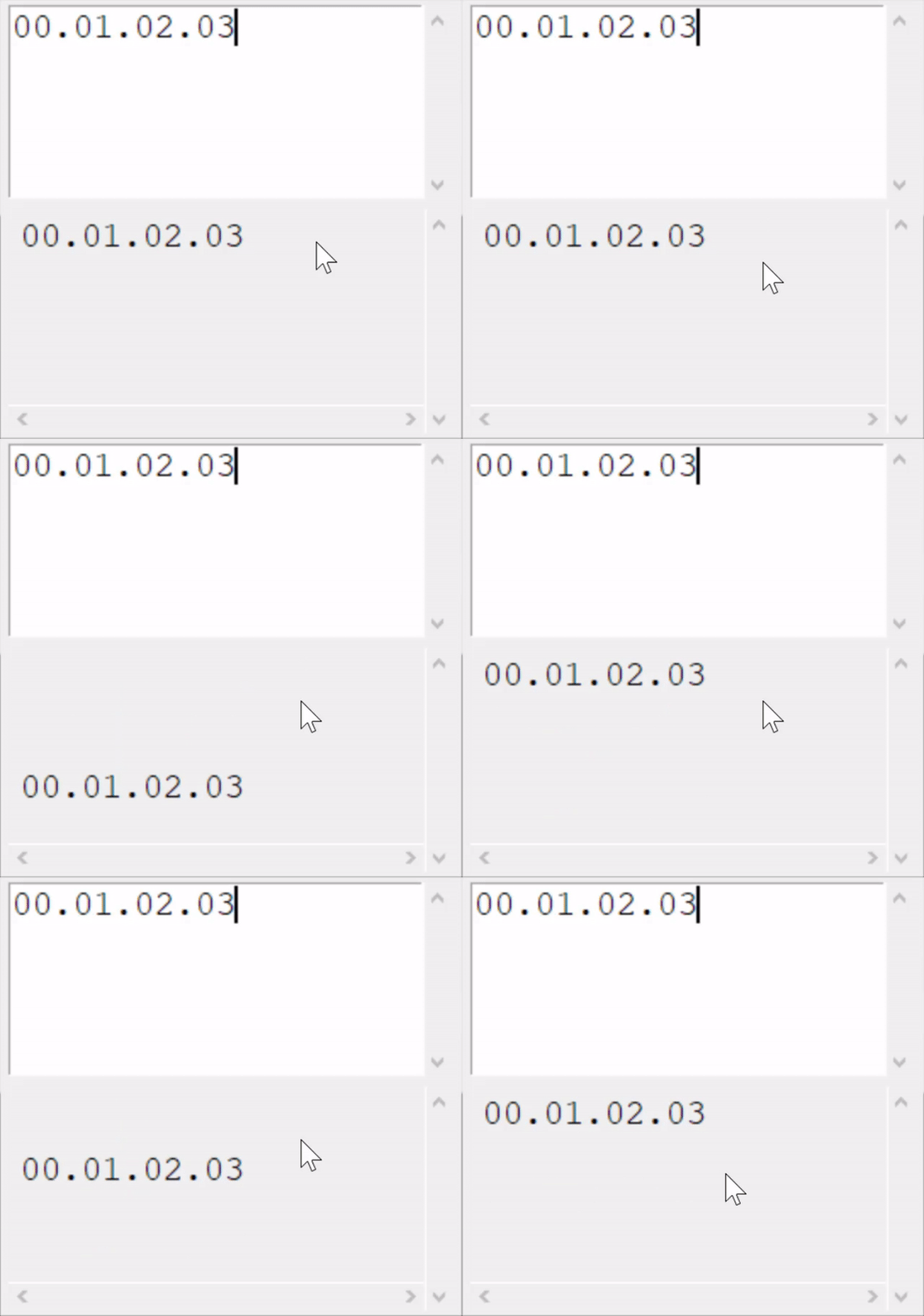
Yea, It's all a big problem. At the moment, I'm at a "best I can do" situation. I believe this is an area I've asked for assistance on before without luck. I just can't seem to get these scrollable columns to work. My multi-column / sync'd listboxes aren't scrolling at all either.
I'll get back on it as soon as I can.
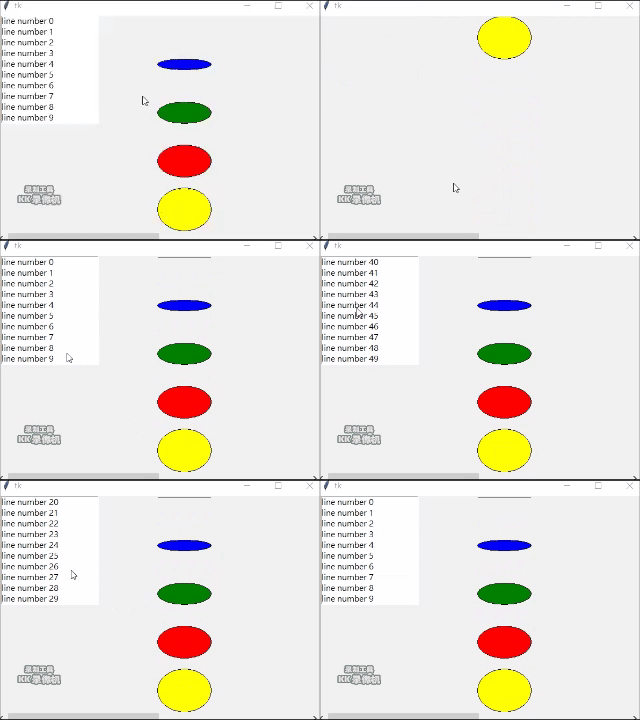
Just find this issue when I work on a scroll window. Not sure how the source code of PySimpleGUI built for this function. Here, just provide some ideas, hope it help ! All followings are for tkinter....
-
command option in Scrollbar: A procedure to be called whenever the scrollbar is moved. So move scrollbar, will can call canvas.yview or canvas.xview (if command option with these) to scroll canvas.
-
xscrollcommand or yscrollcommand in Canvas: If the canvas is scrollable, set this option to the .set() method of the horizontal scrollbar. If means if Canvas scrolled, will update scrollbar. In 1 & 2, it just say that canvas can be scrolled by move scrollbar.
-
Now we need to scroll canvas by us, or by mouse wheel event, so add binding for it
def wheel(event):
    canv.yview_scroll(-1*int(event.delta/120), "units") # Yscroll set here
canvas.bind_all("<MouseWheel>", wheel)
- Next, I didn't find any statement talked how about widget on canvas. I just checked that widget on Canvas won't be scrolled as canvas scroll. There's way to make it possible, create one window on canvas as following:
window = canv.create_window(x, y, window=my_widget_on_canvas)
- Example here
from tkinter import *

def keydown(event):

    if event.keycode==81:
        root.destroy()
        quit()

def wheel(event):

    canv.yview_scroll(-1*int(event.delta/120), "units")

color = ('black', 'blue', 'green', 'red', 'yellow')

root = Tk()
root.bind(sequence='<KeyPress>', func=keydown)

canv    = Canvas(root, width=600, height=400,scrollregion=(0, 0, 1200, 800))
canv.pack_propagate(0)
canv.grid(row=0, column=0)
canv.bind("<MouseWheel>", wheel)

scrollY = Scrollbar(root, orient=VERTICAL, command=canv.yview)
scrollY.grid(row=0, column=1, sticky=N+S)
scrollX = Scrollbar(root, orient=HORIZONTAL, command=canv.xview)
scrollX.grid(row=1, column=0, sticky=E+W)

for i in range(5):
    canv.create_oval(300, i*100, 400, i*80, fill=color[i])

canv.configure(yscrollcommand=scrollY.set, xscrollcommand=scrollX.set)

mylist = Listbox(canv)
mylist.pack()
for line in range(50):
   mylist.insert(END, "line number " + str(line))

window = canv.create_window(100, 100, window=mylist)

root.mainloop()
Anyway, I belive sometime, they should scroll together, sometime not. Final, hope it will help !

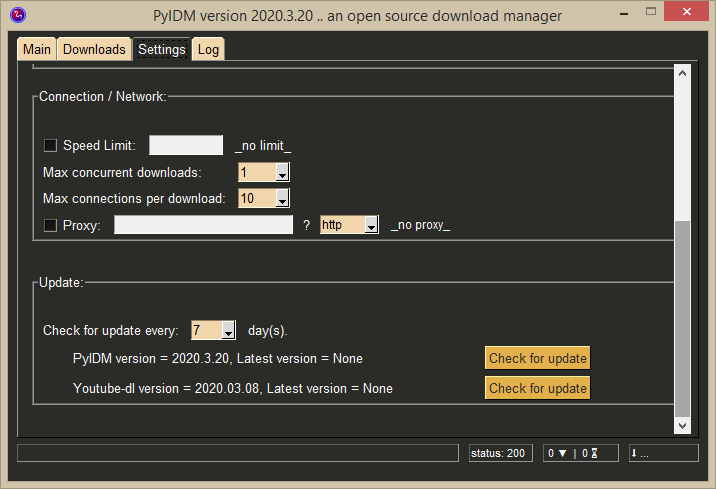
@PySimpleGUI I wonder if there is a progress done in this issue I have a settings tab in my application and hope i can find a way to scroll with mouse wheel currently i can scroll only if mouse on top of scrollbar which is not enough
these are 2 screenshots for settings tab


I expected to see this today.... I saw the issue posted on your GitHub.
I don't have an update for you on it other than it's still a problem. Qt and Web are getting a few cycles as soon as I get this date stuff finished up. I'll get this scrolling problem into the priority queue.
Update.... this is and continues to be a high-priority-item. I brought in hired guns, which I've no problem doing when needed and this has gotten past the 'is needed' point. I'm confident in a solution soon.
@pyIDM - give the version 4.18.0.14 a try!
Tested on Windows and Linux and it's working GREAT for me! Hoping it certainly does for you too!
tried with "4.18.0.14 Unreleased" and I confirm it do works, and i am happy with it,
"apart from column scrolling"
the combo boxes change their contents with mouse wheel also,
I am no sure how this could be fixed maybe if it possible to disable combo scroll with mousewheel if is not active
if you wish i can open another issue for combo boxes since i don't like to change their values accidentally without selecting them, still mouse wheel scrolling required from inside combo boxe's values
here is a gif

The problem I see if that if you're mouse is on top of a scrollable element inside the column, then it scrolls along with the column. As you mentioned, it should only scroll if it has focus or maybe the column shouldn't scroll if the mouse if over one of those other scrollable elements. Only the interior one should. Both seem like OK options. But having them both scroll clearly isn't good.
Will keep plugging on this!
It's going to get fixed, damnit.
There are other items that I would really like to get posted to PyPI. Wondering if this scroll is working well enough to go ahead with. If it's better than what was there before.
The behavior I'm seeing is that it will only scroll the internal items with scrollbars is the mouse is over one of those items. If it's not, then only the column scrolls.
What I've asked for is for the internal items to scroll if the mouse is over one of them, but not scroll the column at the same time. Choose one. I like not having to click to give focus and instead hover. That's how the Column itself should scroll (not having to click somewhere inside of it.
in my opinion, the scrollable elements inside columns should only scroll if it has focus, this is the logical choice
plus i don't like the idea of combo boxes changes their contents accidentally by mouse wheel without having focus, since it happened a lot while using the application
Elements already scroll when you have the mouse over them, without focusing. Try your existing app's behavior. Note that scrolling a Combobox does not change the selection. It changes the cursor. To change the selection, the user will still have to take action. The current selection is retained. Hmmmm... maybe it does change it. However it does it in or outside of columns.
The current selection is retained
No, it does change the actual selection and submit an event change
However it does it in or outside of columns
That's correct, we shouldn't mix both issues, I believe the problem of scrolling the column already solved, and it scroll with mouse wheel as expected.
we should make another issue for combo box, which shouldn't scroll without focus whether it is inside or outside a column, user expect to click combo box first, then selections shows up and then can scroll with mouse wheel
The column isn't solved. The interior items should scroll only when the mouse is over them.
I'm not concerned about the combobox, as long as it doesn't scroll unless the mouse is right over it. No one has mentioned it so far and you didn't notice it until the damned thing accidentally got scrolled. I think people would be understandable if they had their mouse right over that single line combobox, scrolled the scroll wheel, and the item changed. They've been fine so far with that so I'm inclined to leave it.
I would like columns to scroll only when the mouse is not over something that is scrollable itself. If it is, then that thing is scrolled, not the column.
I prefer to scroll scrollable element when mouse over it, and also scroll all child elements, but not scroll parent elements until element scrolled to top or bottom. Selection for item in any element should be by mouse click. columnbox is selected by scroll now, it maybe not a good idea because it may changed the selection accidentally when scroll parent elements, even it is easy for selection.
I understand the concern about the potential for an accident, but I'm OK with that at the moment. I do not want to force a click to focus an item to scroll it. If the elements were not inside of a column they wouldn't require being clicked. I'm OK with taking the risk and taking the blame when there's a problem. Kinda do that already with everything else in the package so nothing new.
The Comobox selecting when scrolling isn't ideal, but it may be how tkinter works. It should be a separate issue if it's a concern to someone. No one has said that's it's happened to them so my assumption is that it's not a big problem in the community.
I would like columns to scroll only when the mouse is not over something that is scrollable itself. If it is, then that thing is scrolled, not the column..
can we combine both worlds? I mean leave combox with the default behaviour, and only disable scroll on mouse hovering if it is inside a scrollable parent column.
if not possible, I think your above suggestion has more logic and most gui behave that way
Let me switch to "blunt mode."
I understand the desire for a specific definition where elements have definitions of how they behave inside and outside of a Column element, and differently if the column scrolls or not.
My priority - get columns to scroll using a mouse scroll-wheel.
Full stop. Period. The other discussions mean nothing without the basic capability working. When/if we get to that point, then a more detailed refinement can happen.
Every person that's filed an issue believe's their issue is important (or else they wouldn't take the time to fill out an Issue), some feel it's the most important Issue posted here. Others feel their issue is so important that they don't understand why I've not stopped doing everything else in my life, short of breathing, to fix their specific problem.
While entirely unsatisfactory to some people, "good enough" is sometimes going to be the best I can do. My philosophy is "good enough' is a lot better than "none at all".
We're at a "none at all' moment with scrollable Columns and I'm doing my best to get us out of this condition.
Update - Sorry to have been "blunt". The two biggest things that bother me:
- When sh*t doesn't work
- Disappointing people/users
I really want to get to stage 1 of this... when it basically works. That's what I'm shooting for at the moment. Get there, then I can move on to look at the more detailed picture.
Last night I was given what I think is a good implementation, but I have a lot to look at as it touched many places in the code. Hoping to get something for you to look at early today... get some feedback... move on to fixing whatever isn't quite right at that point. The ultimate desired feature was passed on to my help, so hopefully I've got something here that nails it. It really comes down to under promise, over-deliver. I'm sorry it didn't come out that way.
Experimental Scrollable Columns on GitHub
I've uploaded an experimental version. Please try it when you get an opportunity. I'm still testing everything out. I would normally wait a little longer, but it's a Sunday and feels like the risk is low in posting it.
My test harnesses aren't very pretty mid-programming, so sorry this one's such a mess. @pyIDM , your code is more of an accurate real-world test.
import PySimpleGUI as sg

choices = ('Red', 'Green', 'Blue', 'Yellow', 'Orange', 'Purple', 'Chartreuse')

col1 = [[sg.T(f'                                 {i}')] for i in range(8)]
col1 += [[sg.Listbox(choices, size=(15, len(choices) - 3), key='-COLOR-')]]
col1 += [[sg.Combo(choices, size=(15, len(choices) - 3), key='-COLOR3-')]]
col1 += [[sg.ML('\n'.join(str(list(range(10)))), size=(20,8), key='2'+sg.WRITE_ONLY_KEY)]]

layout = [  [sg.Text('My Window')],
            [sg.Col([[sg.Col(col1, scrollable=True, key='COL1'), sg.T('      .')]], scrollable=True)],
            [sg.Col([[sg.T(f'                                 {i}')] for i in range(30)], scrollable=True, key='COL2')],
            [sg.ML('\n'.join(str(list(range(25)))), size=(30,8), key='1'+sg.WRITE_ONLY_KEY)],
            [sg.Listbox(choices, size=(15, len(choices) - 3), key='-COLOR2-')],
            [sg.Combo(choices, size=(15, len(choices) - 3), key='-COLOR4-')],
            [sg.Input(key='-IN-'), sg.Text(size=(12,1), key='-OUT-')],
            [sg.Button('Go'), sg.Button('Exit')]  ]

window = sg.Window('Window Title', layout)

while True:             # Event Loop
    event, values = window.read()
    print(event, values)
    if event in (None, 'Exit'):
        break
window.close()
ps - sorry about last night's attitude.
@pyIDM
Can you tell me how I can test the columns? It looks like the scrolled column has been replaced by tabs. I'll see if I can create a single tab with everything inside. Let me know if there's another location where there's a column to test.
I figured out how to make a column again. Only needed to do this:
        layout = [[sg.T('')],
                  [sg.Column([[sg.Frame('General ', general)],[ sg.Frame('Network', network)],[ sg.Frame('Update  ', update)]], scrollable=True)]

                  # [sg.TabGroup([[sg.Tab('General ', general), sg.Tab('Network', network), sg.Tab('Update  ', update)]],
                  #              tab_location='lefttop')]
                  ]
The scrolling works for the column, however, it does have the problem of modifying combo boxes if they are scrolled over. With your program having events enabled on the comboboxes, this make them immediate take action, such as changing the skins.
I'm still going through the code. Maybe it can be changed. Still looking. In the meantime, other people that need scrolling columns can give it a shot. Sorry that it doesn't currently fit your needs.
@pyIDM Do you have a moment to try out out version 4.18.0.18? It has changes so that comobox's won't change their values if you scroll a column and they happen to go under the mouse. I tested with a modified version of your setup code as I described above and didn't have a problem with the comboboxes changing values as the column scrolled.
@firedm I have encountered the same issue. All you have to do is unbind the mouse-wheel from combobox. You can do it as follows:
window['Combobox'].TKCombo.unbind_class("TCombobox", "<MouseWheel>")

I've uploaded an experimental version.
where?
edit: aah, its in master branch
3f4734c10215688bb115c7a34106d33c6e4466dd
i was irritated because expand_x=True is ignored
so when i scroll right of the column's content, the column doesnt move

@milahu - If you're looking for help, it would be helpful to get the details from you of environment, example, etc.
Time passed and the version of PySimpleGUI is already upgraded from 4.18.0.18 to 4.59.0.2 now.
Better to post your question on a new issue and fill up issue form to help people to find answer for you.