
pycodestyle
 pycodestyle copied to clipboard
 PyCQA
PyCQA
Version 3 breaking sveltekit
Updating svelvet to version 3 breaks sveltekit. When starting a server just throws 11 cound not resolve "<package_name>" errors. Downgrading to a version <3 fixes the problem.
Steps to reproduce:
npm create svelte@latest test-svelvet
cd test-svelvet
npm install
npm install svelvet
npm run dev -- --open
Error:
> [email protected] dev
> vite dev "--open"


  VITE v3.1.1  ready in 481 ms

  ➜  Local:   http://localhost:5173/
  ➜  Network: use --host to expose
✘ [ERROR] Could not resolve "bluebird"

    node_modules/node.env/api.js:122:19:
      122 │   Promise = require('bluebird');
          ╵                     ~~~~~~~~~~

  You can mark the path "bluebird" as external to exclude it from the bundle, which will remove this
  error. You can also surround this "require" call with a try/catch block to handle this failure at
  run-time instead of bundle-time.

Can confirm the same issue
Is there any timeline for this being fixed? I really need the movement=false attribute for a project, but that doesn't seem to be in v2...
Edit: I just went through PR #115 and re-traced it manually, so I've got v2 working for now :)

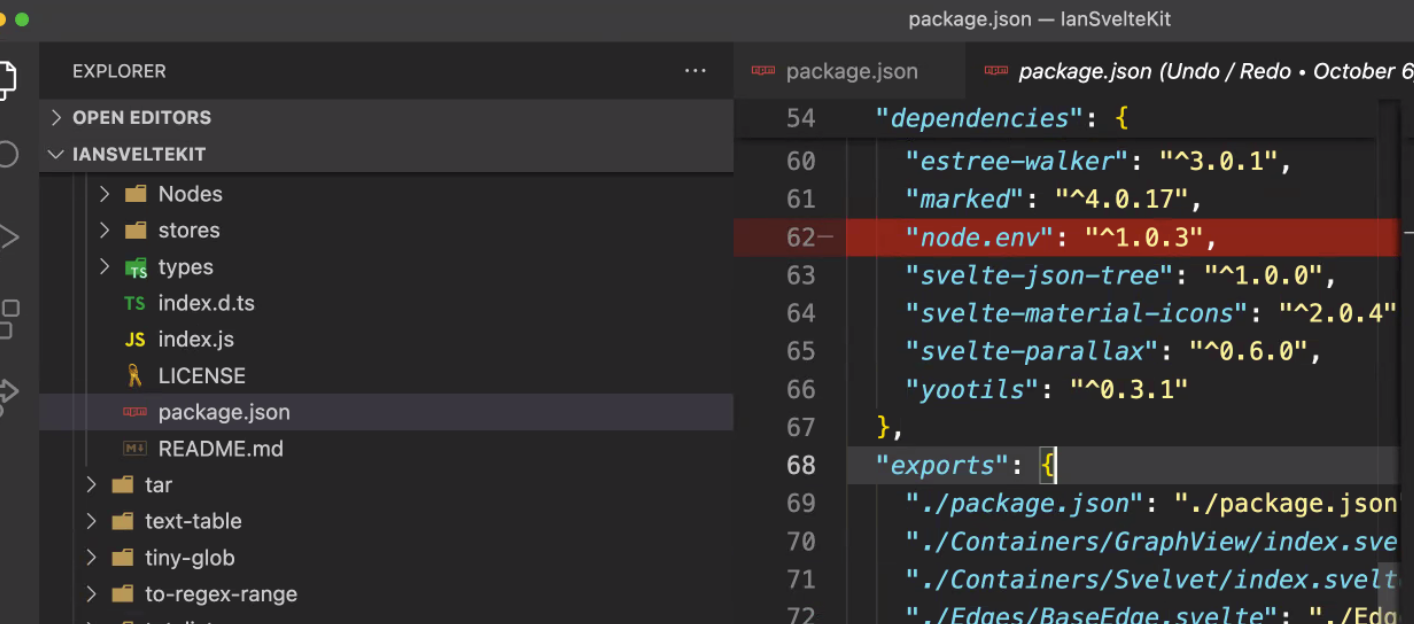
Daniel, thank you much for bringing this to our attention! We have identified a dependency in Svelvet 3.0.0 NPM library that we believe is causing this issue.
Here is a temporary fix that allows SvelteKit users to use Svelvet 3.0.0. Go ahead and fire your SvelteKit app and install the latest version of Svelvet(3.0.0). Inside your SvelteKit application, navigate to node_modules => svelvet => package.json. Deleting line 62 of the package.json, saving, and launching the SvelteKit application resolved the errors & successfully launched the SvelteKit application with the Svelvet diagram.
We are currently testing to ensure this solution does not have any side effects and will release that fix in an upcoming version. For now, we hope this temporary fix will allow you to use Svelvet 3.0 in your applications.

I also got an error that directory imports are not supported. I changed the index.js and imported the types per file:


Hello Ronald! I just wanted to mention that while there is Github repo for Svelvet, that is mainly for the website. In this particular issue, we were discussing the npm package svelvet. perhaps try 'npm install svelvet' and then follow the steps outlined in my temporary fix.
Then you can change your import statement to import Svelvet from 'svelvet'. I hope these steps help you get svelvet up & running!