
code-d
 code-d copied to clipboard
 Pure-D
Make it possible to simply run dub test
First of all, I am aware of the https://github.com/Pure-D/code-d/issues/279 which would be of great help, but what I am asking here is as simple as adding Test <project name> to the list of dub-auto actions (the ones you see when you press Ctrl-B). If it could be configured to run dub test on every save that would be an additional plus, but I do not mind running it manually for the time being as long as I have it in the "Ctrl-B" list. :)

this feature already exists? Can you try serve-d nightly? add user setting "d.servedReleaseChannel": "nightly" then reload window (close other vscode windows if more than 1)

I will give it a try. I use the current release of the plugin - 0.22.0. Can't wait for new release. :)
I use "nightly" version of serve-d now. How do I run the dub test? Ctrl-B still has only two options - run and build.
are you sure you are doing Ctrl-B? For me it only works with Ctrl-Shift-B and Ctrl-B is show/hide sidebar
Ctrl-Shift-B list:
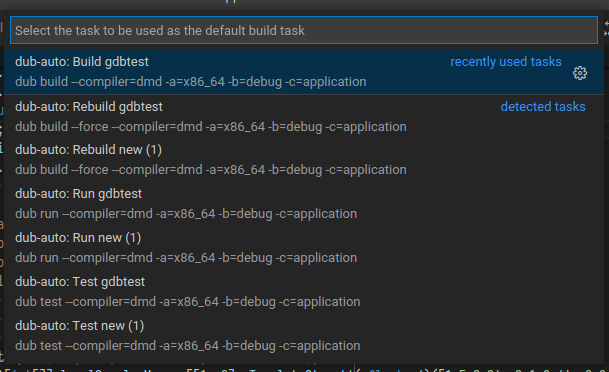

dub test and dub rebuild are in groups "test" & "rebuild", not in "build", so vscode might be doing some filtering here.
Which vscode version do you use? Is there maybe some extra settings or commands to run tests and rebuild?
check in Ctrl-Shift-P / F1 if there are test or clean/rebuild commands maybe provided by some extension which could change this. Or if the user settings contain anything about test or rebuild
In Ctrl-P i had the option to configure test. But I do not get it in the Ctrl-B list.
It creates the following tasks.json:
{
	"version": "2.0.0",
	"tasks": [
		{
			"type": "dub",
			"test": true,
			"compiler": "dmd",
			"archType": "x86_64",
			"buildType": "debug",
			"configuration": "application",
			"_generated": true,
			"problemMatcher": [
				"$dmd"
			],
			"group": {
				"kind": "test",
				"isDefault": true
			},
			"label": "dub-auto: Test aws",
			"detail": "dub test --compiler=dmd -a=x86_64 -b=debug -c=application"
		}
	]
}
Same for me. VS Code 1.56.0, code-d 0.22.0, Ctrl+Shift+B bound to "Tasks: Run Build Task". Only two options there: "Run" and "Build". dub test appears as an only option in "Tasks: Run Test Task" found in Ctrl+Shift+P list.
UPD: if you use hotkey or launcher to run "Tasks: Run Task" (not a "Build Task" or "Test Task" one) - you have all tasks in a single list with task groups there (dub, npm, gulp, whatever VS Code knows).

I have 0.23.2 installed yet I still have only "dub build" and "dub run" options when I press CTRL+SHIFT+B.
You should not close an issue without verification from at least someone who was involved in the discussion and confirmed the issue...