
code-d
 code-d copied to clipboard
 Pure-D
"Error: Connection got disposed." flood
I've encountered an issue with code-d with one specific package. As soon code-d is loaded it starts spamming "Request failed. Connection got disposed."
serve-d v0.6.0 with workspace-d v3.5.0 Included features: "d", "workspaces" Built: Sun May 3 02:09:22 2020 with bundled dub, dfmt, dscanner OS: Windows 10 x64
Steps to reproduce
mkdir codedissue
cd codedissue
dub init -n
dub add evael-ecs
dub build
code .

Please go into your user settings and set "serve-d.trace.server": "verbose" (it will show it can't find it, but just ignore it). Afterwards repeat your reproduction steps and open the Output panel in vscode and open the code-d & serve-d output. Copy-paste the full content into here as code block. (note: it will also contain paths to your dub cache directory, which is in your home/user directory, and the project directory)

It was too long and refuse to post. So here is the gist. https://gist.github.com/Superbelko/0050ebd43649abf2c74504e2e17cc4c2
While examining the problem I found that some other tools that relies on dub describe command were failing as well. Running this command manually on a package prints the following error
Configurations must have a concrete target type.
After few more attempts I found that both evael-ecs and evael-lib (that the former depends on) has no targetType at root level, but only as configurations. Adding targetType library to package's root recipe fixes error flood.
However both these packages are still completely invisible in code-d, i.e. no autocompletion on types, imports, etc, no jump to declaration, no anything. Even though now running dub describe on a project clearly has all sources and import paths in place.
Log for 'evael.' autocomplete attempt
2020-05-30T09:52:25.917 [trace] source\served\commands\complete.d:535:provideDSourceComplete Performing regular D comment completion (DCD=true, Documentation=true, Snippets=true)
2020-05-30T09:52:25.943 [trace] C:\Users\runneradmin\AppData\Local\dub\packages\workspace-d-3.6.0-pre.5\workspace-d\source\workspaced\com\dcd.d:181:__lambda5 Server: 2020-05-30T09:52:25.943:main.d:runServer:286 Getting completions


2020-05-30T09:52:25.946 [trace] C:\Users\runneradmin\AppData\Local\dub\packages\workspace-d-3.6.0-pre.5\workspace-d\source\workspaced\com\dcd.d:181:__lambda5 Server: 2020-05-30T09:52:25.946:first.d:visit:459 Could not resolve location of module 'evael\ecs'


2020-05-30T09:52:25.947 [trace] C:\Users\runneradmin\AppData\Local\dub\packages\workspace-d-3.6.0-pre.5\workspace-d\source\workspaced\com\dcd.d:181:__lambda5 Server: 2020-05-30T09:52:25.946:first.d:visit:459 Could not resolve location of module 'evael\lib\memory'


2020-05-30T09:52:25.948 [trace] C:\Users\runneradmin\AppData\Local\dub\packages\workspace-d-3.6.0-pre.5\workspace-d\source\workspaced\com\dcd.d:181:__lambda5 Server: 2020-05-30T09:52:25.948:util.d:getSymbolsByTokenChain:225 Could not find declaration of evael from position 1697
I have this same crash and have found what causes it in my scenario. With the following dub.json parts the issue surfaces.
"configurations": [
	{
		"name": "normaal",
		"targetType": "autodetect"
	},
	{
		"name": "unittest",
		"targetType": "executable",
		"targetName": "hoekjed-unittests",
		"sourceFiles": [
			"test/legeMain.d"
		]
	}
]
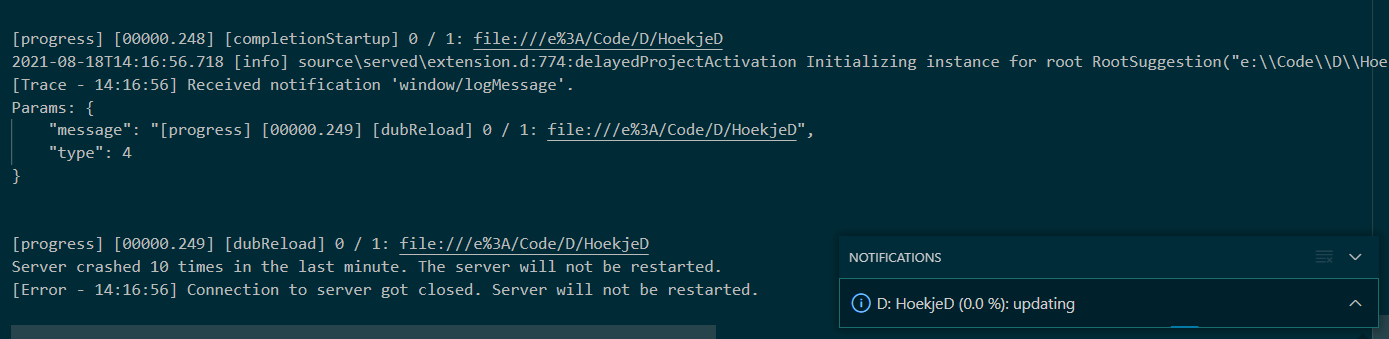
In a nutshell, for me, this only happens when configurations are present. (note the 'normaal' configuration is generally a library) With the error being:
[progress] [00000.343] [workspaceStartup] 0 / 1: file:///e%3A/Code/D/HoekjeD
Server crashed 10 times in the last minute. The server will not be restarted.
[Error - 19:48:47] Connection to server got closed. Server will not be restarted.
[Error - 19:48:47] Request textDocument/codeAction failed.
Error: Connection got disposed.
	at Object.dispose ( . . . . Error identical to Superbelko's.

 I believe so yes. Though the request . . . disposed. part is no longer present in the error message.
there is a segfault somewhere, can you try if it's possible to attach to the serve-d instance before it crashes and then see where it crashes?
ah sorry just saw you posted the dub configuration, can diagnose it myself
If that doesn't work feel free to say thus. Maybe it's something else about my project.
I think I found my personal issue. Was almost about to post an issue about.
I dont know about @Superbelko 's configuration but after a long time of confusion (I never fixed my issue until only today!), I coincidentally found out dub does not support the use of the autodetect targetType inside a configurations configuration.
I'm not sure why this leads to such weird errors. I've created a small example project with the issue, but it doesn't always show the same errors. It's currently stuck on "downloading" (even though there's no dependencies... not sure why this happened this time). It sometimes (though not always) looks comparable to the error also shown in issue #389.
All in all, to me it seems like there's some issues with detecting/printing issues with incorrect/problematic dub.json files. If possible I'd like to ask if this can be improved, though I have no clue if that is viable.
Sidenote: For some reason commandline dub does not complain about my incorrect dub.json file. (It actually uses the incorrect configuration, though, even though a main is included in the source, it decides to use the library targetType given the autodetect targetType. This is very weird to me, I'm not even sure if this is a bug in dub (or if I should report it).
Recreating:
Simply add a configuration that uses the autodetect targetType as one of its configurations:
{
	"authors": [
		"Author"
	],
	"copyright": "Copyright © 2021, Author",
	"description": "Some Description.",
	"license": "proprietary",
	"name":"name",
	"configurations": [
		{
			"name": "name",
			"targetType": "autodetect"
		}
	]
}