
PowerShellEditorServices
 PowerShellEditorServices copied to clipboard
 PowerShell
A common platform for PowerShell development support in any editor or application!

### Summary of the new feature / enhancement This: 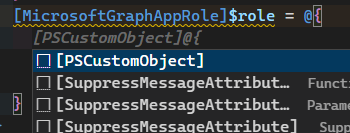 Should work the same as this: 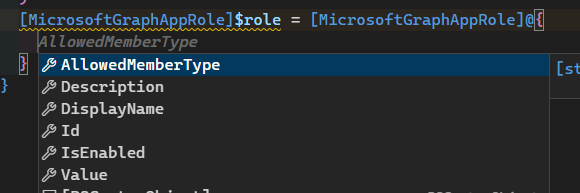 ### Proposed technical implementation details (optional) _No response_

…ReadKey provided by the host instead of Console.ReadKey

Just me trying things. So, weird thing, but in the repro for https://github.com/PowerShell/vscode-powershell/issues/3751, while we're in the debugger, things can't print. Like if you run `Get-Process` at the debug prompt...

Get-EditorServicesParserAst will allow for ExpandAlias or other ast features to look at comment blocks or Functions defined. This also addresses an issue with running the Module in Constrained Language Mode.

This is DRAFT. CI will fail because there's no nuget package on nuget.org! This is the bare minimum work that I would do to adopt the hosted analyzer. It already...

@andschwa recently got PSES v3 working with non-VSCode clients https://github.com/PowerShell/PowerShellEditorServices/pull/1820 We should better document how to integrate with PSES

```ps $Role = [pscustomobject]@{ DisplayName = 'thing' accessPackageResourceScopes = [pscustomobject]@{ DisplayName = 'nestedthing' } } $Role Wait-Debugger ```  The latter watch expression should return null
We have a bunch of issues around logging to fix: * When we look for logs, what we're expecting is never there * The way we use the logger itself...
You can kind of think of it like `.ConfigureAwait(false)` for completion sources. I didn't necessarily need to add it here, it was just a troubleshooting step, *but* we probably should...
Metadata
Owner
Metadata
A common platform for PowerShell development support in any editor or application!