
PowerShellEditorServices
 PowerShellEditorServices copied to clipboard
 PowerShell
Peek/Go to Definition not working on script scoped function
VS Code 1.8.1 / PSES v0.9.0.526
I have a function in a script defined like so:
function script:gitRemoteBranches { ... }
Later in the same script it is called but where it is called, if I try to peek or go to definition, PSES does not take me to the above definition. It does nothing.
I see these relevant messages in the log:
    READ MESSAGE:

    {
      "jsonrpc": "2.0",
      "id": 5,
      "method": "textDocument/definition",
      "params": {
        "uri": "file:///c%3A/Users/Keith/GitHub/dahlbyk/posh-git/src/GitTabExpansion.ps1",
        "position": {
          "line": 261,
          "character": 29
        }
      }
    }
...
1/31/2017 8:32:47 PM [ERROR] - Method "ExecuteCommand" at line 454 of C:\projects\powershelleditorservices\src\PowerShellEditorServices\Session\PowerShellContext.cs

    Execution completed with errors:

    The term 'gitRemoteBranches' is not recognized as the name of a cmdlet, function, script file, or operable program. Check the spelling of the name, or if a path was included, verify that the path is correct and try again.
    The term 'gitRemoteBranches' is not recognized as the name of a cmdlet, function, script file, or operable program. Check the spelling of the name, or if a path was included, verify that the path is correct and try again.
    The term 'gitRemoteBranches' is not recognized as the name of a cmdlet, function, script file, or operable program. Check the spelling of the name, or if a path was included, verify that the path is correct and try again.
BTW if I change the callsite to script:gitRemoteBranches then PSES can find the function. It doesn't seem like that should be necessary.

Scoped variables never really worked before, that's an area we need to improve upon pretty soon. Planning to do that as part of the module-wide analysis effort. I'll mark it for 0.10.0 in case we get a chance to do it then, otherwise it'll probably come with 0.11.0.

Looks like this is no longer reproing 😄 I'm closing it - you know what to do.

Yes, it still repros. You have to a location modifier on the variable e.g.:
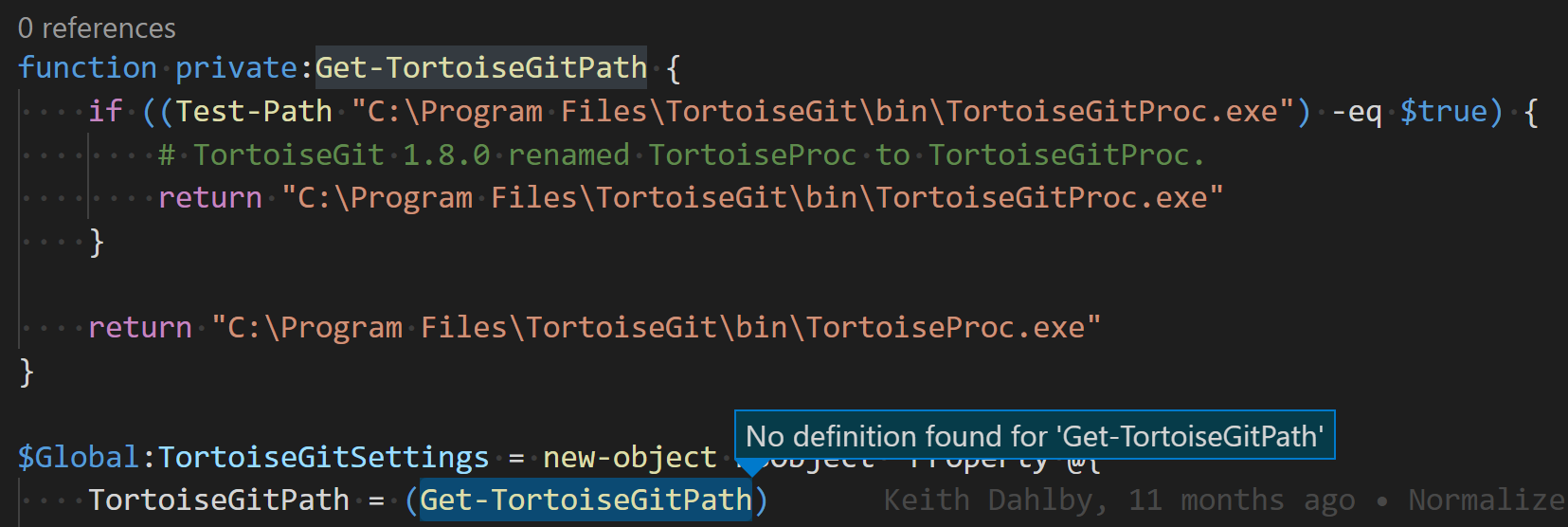
Ah. I did this and that worked:
function script:gitRemoteBranches { ... }

script:gitRemoteBranches
Cool - we'll keep it open
Should this be kept open until proper scoping support is possible? Or would it be an option to trim scope from definition and/or call to match them? Would show multiple definitions and count references wrong if name is reused though.
