
PowerShellEditorServices
 PowerShellEditorServices copied to clipboard
 PowerShell
LSP support for modules
I'd like to get LSP support for modules I use frequently, like MSOnline.
I copied the modules into my bundle_path, but that doesn't seem to import them into the session of powershell that PSES runs
for context, I'm using neovim LSP running in WSL debian, with these settings:


I'm sorry, what are you trying to do? The bundle_path is just for the bundled modules that are necessary for PSES to work. Other PowerShell modules should be installed and loaded like normal.

I'm hoping to have lsp support for the modules I'm using, so I can have goto definitions, autocomplete, etc.
when I use a python, typescript, or c# LSP any imported modules/packages show up in those places.
are you saying that if I have the module loaded in the instance of powershell that PSES is running in, then those features should work?
Yes, it should. Essentially the LSP server hosts a PowerShell session, and any modules installed and imported into that session (the integrated terminal) then become available for the server to answer gotos, completions, etc.
In that case, I'm not entirely sure what's causing my issue.
here are my module paths in powershell:

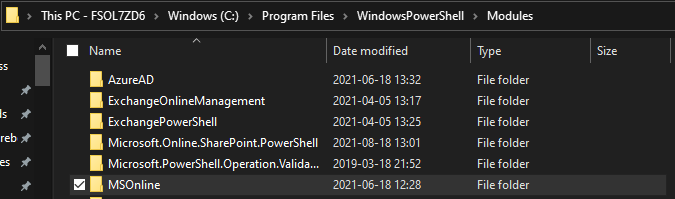
and here is the MSOnline module in two of those paths (I made an extra copy while troubleshooting):

WSL is definitely talking to the windows version of powershell:

the LSP works for some functions:

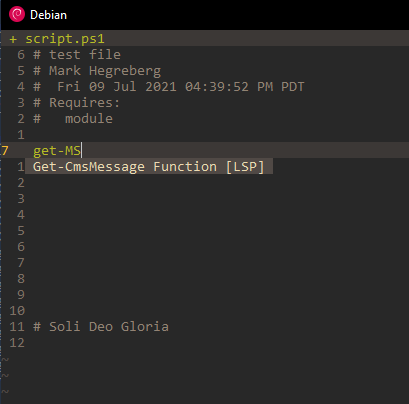
but it is not able to pull anything from MSOnline:
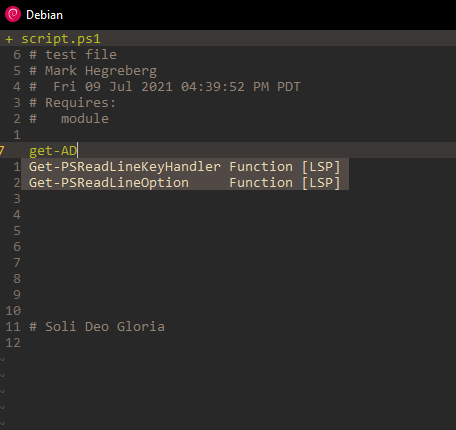
it also seems unable to pull anything from ActiveDirectory, which is also installed:
Is there something I'm missing?
Have you tried Import-Module MSOnline in the integrated console? Also before you do that, show us the output of Get-Module (my guess is that MSOnline does not show up, but should after the import).
I haven't messed with the integrated terminal yet, though I suspect you're right. what do I need to do to hook into the repl? i'm not using coc-powershell, but the lsp engine built directly into neovim
Ohhh. Ok, skip that, and just put Import-Module MSOnline in your script and try executing it with whatever NeoVim integration is available for executing code in the PowerShell session.
I don't see a whole lot in their documentation...a really cheap hack would be to put that import statement in your profile because PSES should execute it. You might have to figure out how to send LSP configurations over from NeoVim. I used to do that with Emacs and it wasn't the easiest thing in the world 😣
@mhegreberg Hey, did you figure this out? Did any of those suggestions help out?
Hey, sorry, I missed this.
I tried importing the module within Start-EditorServices.ps1
 and it didn't make a difference. I'll mess with using my profile today and see if that works.
thanks!
I made a profile.ps1 that only contains "Import-Module MSOnline" and it also doesn't seem to pull it in. I'm going to see if I can figure out the REPL feature.
I have been unsuccessful so far, but I have some time set aside tomorrow I'm going to use to see if I can make vim communicate with the powershell REPL, or at least open it in another shell.
In your original post you have this configuration:
Are you still using the "-NoProfile" switch? Because this does exactly what it says: It prevents loading any profiles.

Once I added the import lines to my profile, i removed the -NoProfile flag, to no avail On Oct 2, 2021 05:00, Lofavreel @.***> wrote: In your original post you have this configuration:
Are you still using the "-NoProfile" switch? Because this does exactly what it says: It prevents loading any profiles.
—You are receiving this because you were mentioned.Reply to this email directly, view it on GitHub, or unsubscribe.Triage notifications on the go with GitHub Mobile for iOS or Android.