
Home-Assistant-custom-components-Xiaomi-Cloud-Map-Extractor
 Home-Assistant-custom-components-Xiaomi-Cloud-Map-Extractor copied to clipboard
 PiotrMachowski
[Feature Request] Negative Trim Values
I'm a robot vacuum fanatic, and I have a home with 7 separate areas that are separated by stairs. So I currently have 5 vacuums and plan on getting more so I don't have to move any around. It would be very convenient if I could set a negative trim value in order to change the aspect ratio of the map. It would be even better if I could set a height and have the map centered in whatever height I set so that I can get my maps to match dimensions more easily on my dashboard.


With your map card. Did I miss a setting that’s already there?
Sent from my iPhone
On Nov 20, 2020, at 8:28 PM, Piotr Machowski [email protected] wrote:
Do you use it with my map card or with a different one?
— You are receiving this because you authored the thread. Reply to this email directly, view it on GitHub, or unsubscribe.
No, but I am rewriting the card, maybe a part of this feature can be added also to it.
It would also be nice to be able to click on the map card when no mode is selected and have it pop up larger like other cards do as well.
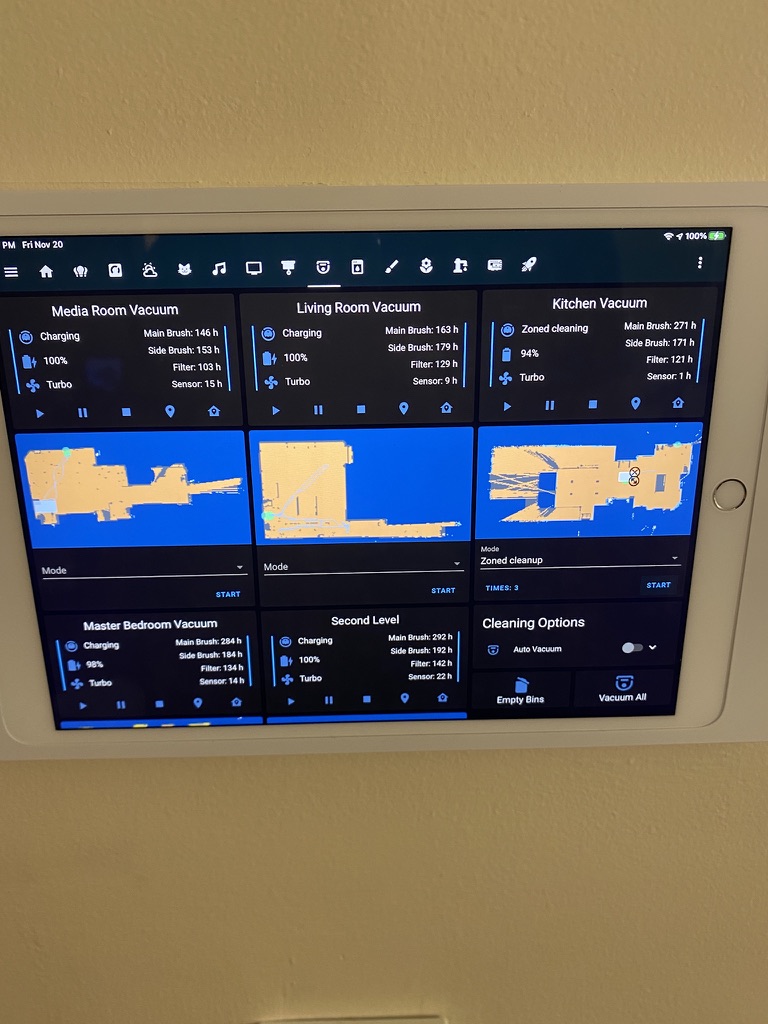 You can see how they're not exactly lined up. Being able to have a background image and overlay the map on it like the other feature request asked would be amazing. In that photo, the Living Room and Kitchen are the same "level" but separated by stairs. Being able to have the same background image with the vacuum path overlayed onto it would be very cool.