
Home-Assistant-custom-components-Xiaomi-Cloud-Map-Extractor
 Home-Assistant-custom-components-Xiaomi-Cloud-Map-Extractor copied to clipboard
 PiotrMachowski
Map Extractor don't show map
I downloaded and configured Map Extractor but unfortunately the result is null, the map is not shown.

My config are:
 camera:
  - platform: xiaomi_cloud_map_extractor
     host: 192.168.6.33
     token: '49454f7663776f65384XXXXXXXXX'
     username: '+39344XXXXXX'
     password: 'XXXXXXXXXXX'
In developer tool I have this:

In error log I have this:
Questo errore ha avuto origine da un'integrazione personalizzata.

Logger: homeassistant.helpers.entity
Source: custom_components/xiaomi_cloud_map_extractor/viomi/vacuum.py:14
Integration: xiaomi_cloud_map_extractor (documentation, issues)
First occurred: 12:30:37 (613 occurrences)
Last logged: 13:21:58

Update for camera.xiaomi_cloud_map_extractor fails
Traceback (most recent call last):
  File "/usr/src/homeassistant/homeassistant/helpers/entity.py", line 514, in async_update_ha_state
    await self.async_device_update()
  File "/usr/src/homeassistant/homeassistant/helpers/entity.py", line 742, in async_device_update
    raise exc
  File "/usr/local/lib/python3.9/concurrent/futures/thread.py", line 58, in run
    result = self.fn(*self.args, **self.kwargs)
  File "/config/custom_components/xiaomi_cloud_map_extractor/camera.py", line 261, in update
    self._handle_map_data(map_name)
  File "/config/custom_components/xiaomi_cloud_map_extractor/camera.py", line 318, in _handle_map_data
    map_data, map_stored = self._device.get_map(map_name, self._colors, self._drawables, self._texts,
  File "/config/custom_components/xiaomi_cloud_map_extractor/common/vacuum.py", line 28, in get_map
    map_data = self.decode_map(response, colors, drawables, texts, sizes, image_config)
  File "/config/custom_components/xiaomi_cloud_map_extractor/viomi/vacuum.py", line 14, in decode_map
    unzipped = zlib.decompress(raw_map)
zlib.error: Error -3 while decompressing data: incorrect header check
System information
I'm using Home Assistant 2022.4.7 Xiaomi Cloud Map Extractor 2.71 Xiaomi Miot Auto 53.08
Best regards Marco

Can you send me raw map file?
piotr.machowski.dev [at] gmail.com

I'm sorry but the map doesn't seem to be generated Following this step
Retrieving map
When store_map_raw: true is added to your config this integration will store a raw map file in /tmp directory. If you don't use Core installation ([installation types](https://www.home-assistant.io/installation/#compare-installation-methods)) you can retrieve this file in the following way:

In [SSH & Terminal add-on](https://github.com/hassio-addons/addon-ssh) enable protected access
Open terminal and use the following command to copy file:
docker exec homeassistant bash -c "mkdir -p /config/tmp/ && cp /tmp/map_* /config/tmp/"
Map file will appear in tmp folder in your config folder
I get this result

In "config" folder there ara not "tmp" folder then there isn't

Is the same

config:
camera:
  - platform: xiaomi_cloud_map_extractor
    host: 192.168.6.33
    token: '49454f7663776f65384665334449437a'
    username: '+39XXXXXX'
    password: 'XXXXXX'
    force_api : viomi
    store_map_raw: true
    store_map_path: "/config"
Error log;
Questo errore ha avuto origine da un'integrazione personalizzata.

Logger: homeassistant.helpers.entity
Source: custom_components/xiaomi_cloud_map_extractor/viomi/vacuum.py:14
Integration: xiaomi_cloud_map_extractor (documentation, issues)
First occurred: 08:30:05 (1366 occurrences)
Last logged: 10:24:44

Update for camera.xiaomi_cloud_map_extractor fails
Traceback (most recent call last):
  File "/usr/src/homeassistant/homeassistant/helpers/entity.py", line 514, in async_update_ha_state
    await self.async_device_update()
  File "/usr/src/homeassistant/homeassistant/helpers/entity.py", line 742, in async_device_update
    raise exc
  File "/usr/local/lib/python3.9/concurrent/futures/thread.py", line 58, in run
    result = self.fn(*self.args, **self.kwargs)
  File "/config/custom_components/xiaomi_cloud_map_extractor/camera.py", line 261, in update
    self._handle_map_data(map_name)
  File "/config/custom_components/xiaomi_cloud_map_extractor/camera.py", line 318, in _handle_map_data
    map_data, map_stored = self._device.get_map(map_name, self._colors, self._drawables, self._texts,
  File "/config/custom_components/xiaomi_cloud_map_extractor/common/vacuum.py", line 28, in get_map
    map_data = self.decode_map(response, colors, drawables, texts, sizes, image_config)
  File "/config/custom_components/xiaomi_cloud_map_extractor/viomi/vacuum.py", line 14, in decode_map
    unzipped = zlib.decompress(raw_map)
zlib.error: Error -3 while decompressing data: incorrect header check
When you add store_map_path: "/config" you don't need to execute docker ... command, file should be already there. Aaaaand you are trying to execute said command using wrong terminal addon
Thanks so much for the directions, I was able to get the file I just sent by email as requested
Best regards Marco
Is the same
config:
camera:
  - platform: xiaomi_cloud_map_extractor
    host: 192.168.6.33
    token: '49454f7663776f65384665334449437a'
    username: '+393440480329'
    password: 'Sviluppo.1864'
    force_api : viomi
    store_map_raw: true
    store_map_path: "/config"
Error log;
Questo errore ha avuto origine da un'integrazione personalizzata.

Logger: homeassistant.helpers.entity
Source: custom_components/xiaomi_cloud_map_extractor/viomi/vacuum.py:14
Integration: xiaomi_cloud_map_extractor (documentation, issues)
First occurred: 08:30:05 (1366 occurrences)
Last logged: 10:24:44

Update for camera.xiaomi_cloud_map_extractor fails
Traceback (most recent call last):
  File "/usr/src/homeassistant/homeassistant/helpers/entity.py", line 514, in async_update_ha_state
    await self.async_device_update()
  File "/usr/src/homeassistant/homeassistant/helpers/entity.py", line 742, in async_device_update
    raise exc
  File "/usr/local/lib/python3.9/concurrent/futures/thread.py", line 58, in run
    result = self.fn(*self.args, **self.kwargs)
  File "/config/custom_components/xiaomi_cloud_map_extractor/camera.py", line 261, in update
    self._handle_map_data(map_name)
  File "/config/custom_components/xiaomi_cloud_map_extractor/camera.py", line 318, in _handle_map_data
    map_data, map_stored = self._device.get_map(map_name, self._colors, self._drawables, self._texts,
  File "/config/custom_components/xiaomi_cloud_map_extractor/common/vacuum.py", line 28, in get_map
    map_data = self.decode_map(response, colors, drawables, texts, sizes, image_config)
  File "/config/custom_components/xiaomi_cloud_map_extractor/viomi/vacuum.py", line 14, in decode_map
    unzipped = zlib.decompress(raw_map)
zlib.error: Error -3 while decompressing data: incorrect header check
@galamarco I suggest you remove you're xiaomi credentials as you're exposing them 😢

@galamarco
You can make your vacuum work by adding force_api: roidmi to your config:
camera:
  - platform: xiaomi_cloud_map_extractor
    host: 192.168.6.33
    token: '49454f7663776f65384665334449437a'
    username: '+39XXXXXX'
    password: 'XXXXXX'
    force_api: roidmi
@galamarco hi,i got a problem,i add force_api: roidmi to my configuratin.yaml but xiaomi vacuum map card still not working,the map is not shown,how can i do?

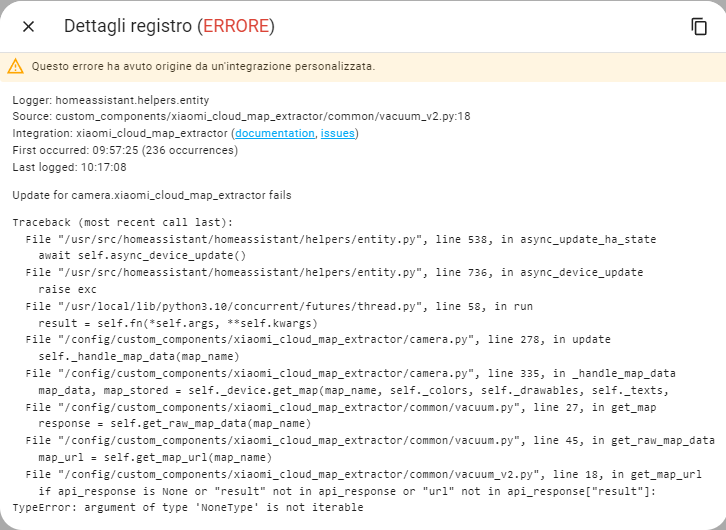
@galamarco hi this is systeam log Logger: custom_components.xiaomi_cloud_map_extractor.camera Source: custom_components/xiaomi_cloud_map_extractor/camera.py:356 Integration: xiaomi_cloud_map_extractor (documentation, issues) First occurred: 04:06:15 (176 occurrences) Last logged: 04:22:44
Unable to retrieve map data

https://github.com/PiotrMachowski/Home-Assistant-custom-components-Xiaomi-Cloud-Map-Extractor/issues/200