
Home-Assistant-custom-components-Xiaomi-Cloud-Map-Extractor
 Home-Assistant-custom-components-Xiaomi-Cloud-Map-Extractor copied to clipboard
 PiotrMachowski
Improve speed and memory usage
Hello,
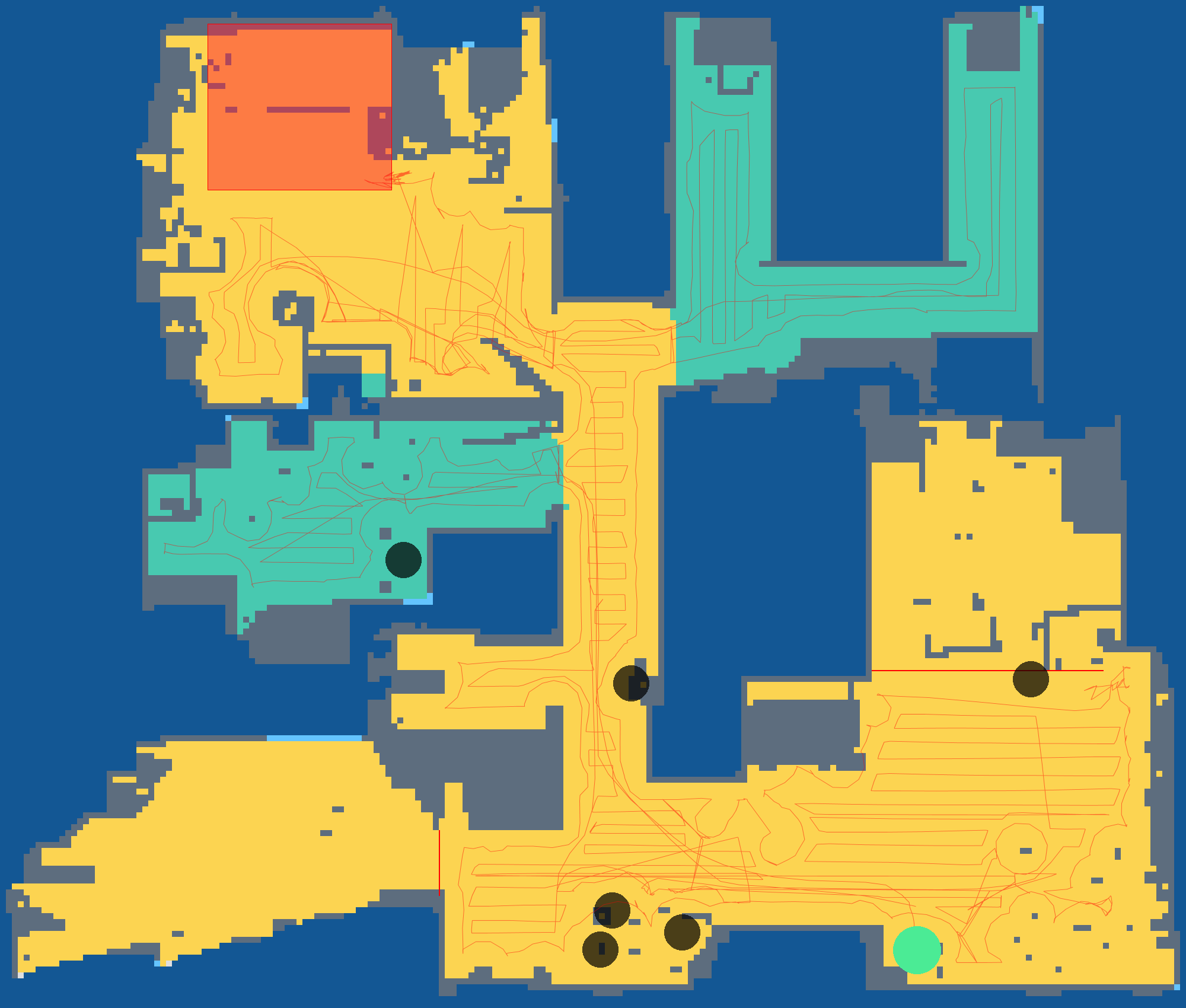
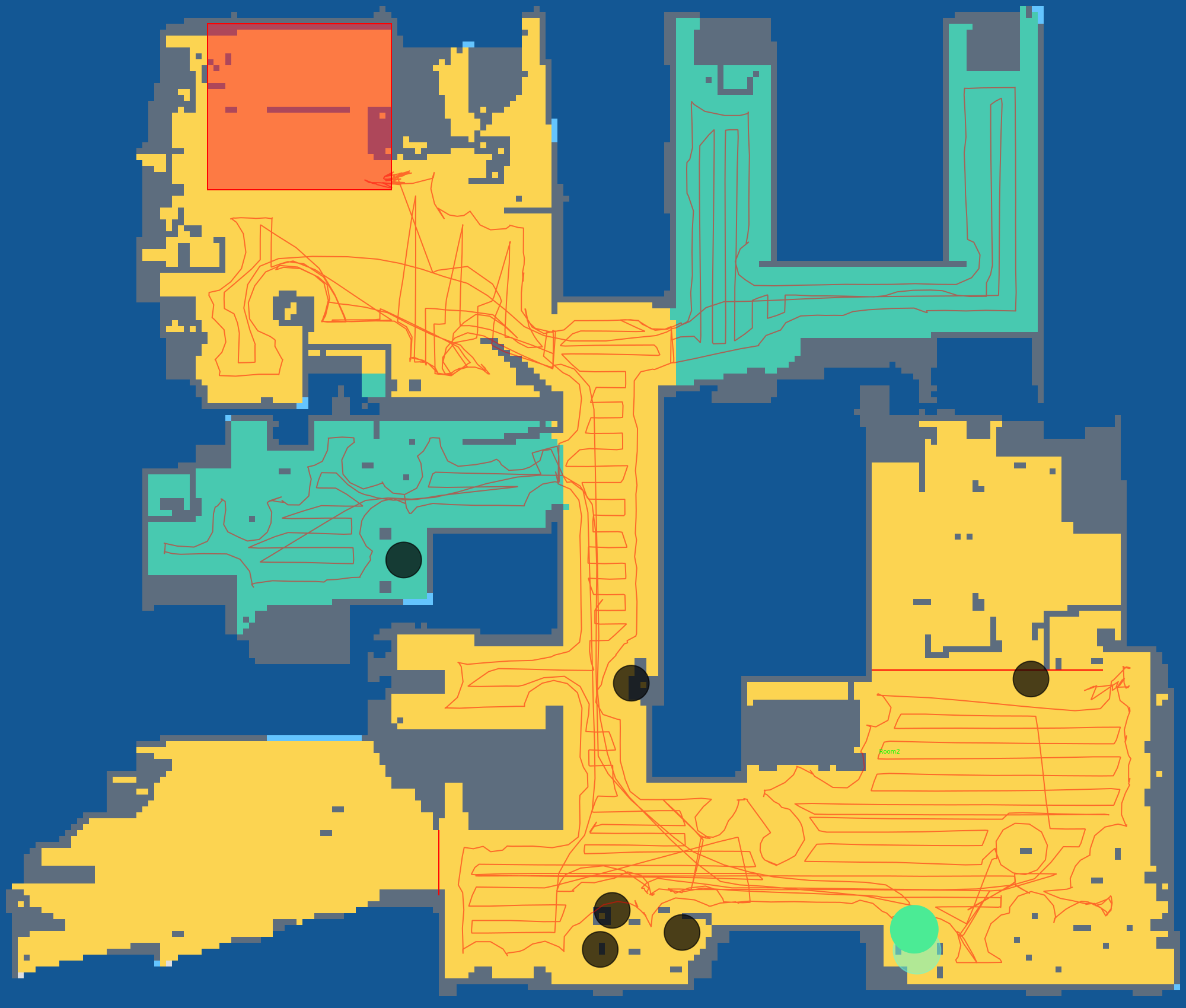
Here a little test about using cairo instead of PIL in python.
For benchmarking it, i use the same file with scale factor at 10:
- PIL / original code: memory peak usage at 2mbytes for a total duration of 3,45s
- cairo: memory peak usage at 32kbytes for a total duration of 0,31s
The patch provided is tester under python / windows, but it should work for raspberry pi
Limit:
- cairo only support save png to filesystem (so you can save it in /tmp and get raw data from file)
- using font file is untested (but it should be ok)
Patch:
diff --git a/custom_components/xiaomi_cloud_map_extractor/image_handler.py b/custom_components/xiaomi_cloud_map_extractor/image_handler.py
index fdc1ac4..48a95e6 100644
--- a/custom_components/xiaomi_cloud_map_extractor/image_handler.py
+++ b/custom_components/xiaomi_cloud_map_extractor/image_handler.py
@@ -1,6 +1,6 @@
 import logging
-from typing import Callable
-from PIL import Image, ImageDraw, ImageFont
+import cairo
+import math

 from .const import *

@@ -63,29 +63,29 @@ class ImageHandler:
         trim_bottom = int(image_config[CONF_TRIM][CONF_BOTTOM] * height / 100)
         trimmed_height = height - trim_top - trim_bottom
         trimmed_width = width - trim_left - trim_right
-        image = Image.new('RGBA', (trimmed_width, trimmed_height))
-        if width == 0 or height == 0:
-            return ImageHandler.create_empty_map(colors)
-        pixels = image.load()
+        image = cairo.ImageSurface(cairo.FORMAT_ARGB32, int(trimmed_width * scale), int(trimmed_height * scale))
+        ctx = cairo.Context(image)
+        ctx.scale(scale, scale)
         for img_y in range(trimmed_height):
             for img_x in range(trimmed_width):
                 pixel_type = raw_data[img_x + trim_left + width * (img_y + trim_bottom)]
                 x = img_x
                 y = trimmed_height - img_y - 1
+                c = None
                 if pixel_type == ImageHandler.MAP_OUTSIDE:
-                    pixels[x, y] = ImageHandler.__get_color__(COLOR_MAP_OUTSIDE, colors)
+                    c = ImageHandler.__get_color__(COLOR_MAP_OUTSIDE, colors)
                 elif pixel_type == ImageHandler.MAP_WALL:
-                    pixels[x, y] = ImageHandler.__get_color__(COLOR_MAP_WALL, colors)
+                    c = ImageHandler.__get_color__(COLOR_MAP_WALL, colors)
                 elif pixel_type == ImageHandler.MAP_INSIDE:
-                    pixels[x, y] = ImageHandler.__get_color__(COLOR_MAP_INSIDE, colors)
+                    c = ImageHandler.__get_color__(COLOR_MAP_INSIDE, colors)
                 elif pixel_type == ImageHandler.MAP_SCAN:
-                    pixels[x, y] = ImageHandler.__get_color__(COLOR_SCAN, colors)
+                    c = ImageHandler.__get_color__(COLOR_SCAN, colors)
                 else:
                     obstacle = pixel_type & 0x07
                     if obstacle == 0:
-                        pixels[x, y] = ImageHandler.__get_color__(COLOR_GREY_WALL, colors)
+                        c = ImageHandler.__get_color__(COLOR_GREY_WALL, colors)
                     elif obstacle == 1:
-                        pixels[x, y] = ImageHandler.__get_color__(COLOR_MAP_WALL_V2, colors)
+                        c = ImageHandler.__get_color__(COLOR_MAP_WALL_V2, colors)
                     elif obstacle == 7:
                         room_number = (pixel_type & 0xFF) >> 3
                         room_x = img_x + trim_left
@@ -98,26 +98,14 @@ class ImageHandler:
                                                   max(rooms[room_number][2], room_x),
                                                   max(rooms[room_number][3], room_y))
                         default = ImageHandler.ROOM_COLORS[room_number >> 1]
-                        pixels[x, y] = ImageHandler.__get_color__(f"{COLOR_ROOM_PREFIX}{room_number}", colors, default)
+                        c = ImageHandler.__get_color__(f"{COLOR_ROOM_PREFIX}{room_number}", colors, default)
                     else:
-                        pixels[x, y] = ImageHandler.__get_color__(COLOR_UNKNOWN, colors)
-        if image_config["scale"] != 1 and width != 0 and height != 0:
-            image = image.resize((int(trimmed_width * scale), int(trimmed_height * scale)), resample=Image.NEAREST)
-        return image, rooms
-
-    @staticmethod
-    def create_empty_map(colors):
-        color = ImageHandler.__get_color__(COLOR_MAP_OUTSIDE, colors)
-        image = Image.new('RGBA', (100, 100), color=color)
-        if sum(color[0:3]) > 382:
-            text_color = (0, 0, 0)
-        else:
-            text_color = (255, 255, 255)
-        draw = ImageDraw.Draw(image, "RGBA")
-        text = "NO MAP"
-        w, h = draw.textsize(text)
-        draw.text((50 - w / 2, 50 - h / 2), text, fill=text_color)
-        return image, {}
+                        c = ImageHandler.__get_color__(COLOR_UNKNOWN, colors)
+                ctx.set_source_rgba(*c)
+                ctx.rectangle(x, y, 1, 1)
+                ctx.fill()
+        ctx.scale(1 / scale, 1 / scale)
+        return [image, ctx], rooms

     @staticmethod
     def get_room_at_pixel(raw_data: bytes, width, x, y):
@@ -154,10 +142,15 @@ class ImageHandler:

     @staticmethod
     def draw_walls(image, walls, colors):
-        draw = ImageDraw.Draw(image.data, 'RGBA')
+        ctx = image.data[1]
+        color = ImageHandler.__get_color__(COLOR_VIRTUAL_WALLS, colors)
+
+        ctx.set_source_rgba(*color)
         for wall in walls:
-            draw.line(wall.to_img(image.dimensions).as_list(),
-                      ImageHandler.__get_color__(COLOR_VIRTUAL_WALLS, colors), width=2)
+            s = wall.to_img(image.dimensions).as_list()
+            ctx.move_to(s[0], s[1])
+            ctx.line_to(s[2], s[3])
+            ctx.stroke()

     @staticmethod
     def draw_zones(image, zones, colors):
@@ -185,88 +178,93 @@ class ImageHandler:
     @staticmethod
     def rotate(image):
         if image.dimensions.rotation == 90:
-            image.data = image.data.transpose(Image.ROTATE_90)
+            image.data[1].rotate(90)
         if image.dimensions.rotation == 180:
-            image.data = image.data.transpose(Image.ROTATE_180)
+            image.data[1].rotate(180)
         if image.dimensions.rotation == 270:
-            image.data = image.data.transpose(Image.ROTATE_270)
+            image.data[1].rotate(270)

     @staticmethod
     def draw_texts(image, texts):
         for text_config in texts:
-            x = text_config[CONF_X] * image.data.size[0] / 100
-            y = text_config[CONF_Y] * image.data.size[1] / 100
+            x = text_config[CONF_X] * image.data[0].get_width() / 100
+            y = text_config[CONF_Y] * image.data[0].get_height() / 100
             ImageHandler.__draw_text__(image, text_config[CONF_TEXT], x, y, text_config[CONF_COLOR],
                                        text_config[CONF_FONT], text_config[CONF_FONT_SIZE])

     @staticmethod
     def __draw_circle__(image, center, r, outline, fill):
-        def draw_func(draw: ImageDraw):
-            point = center.to_img(image.dimensions)
-            coords = [point.x - r, point.y - r, point.x + r, point.y + r]
-            draw.ellipse(coords, outline=outline, fill=fill)
+        ctx = image.data[1]
+        point = center.to_img(image.dimensions)

-        ImageHandler.__draw_on_new_layer__(image, draw_func)
+        ctx.set_source_rgba(*fill)
+        ctx.arc(point.x, point.y, r, 0, 2 * math.pi)
+        ctx.fill()
+
+        ctx.set_source_rgba(*outline)
+        ctx.arc(point.x, point.y, r, 0, 2 * math.pi)
+        ctx.stroke()

     @staticmethod
     def __draw_areas__(image, areas, fill, outline):
         if len(areas) == 0:
             return

-        def draw_func(draw: ImageDraw):
-            for area in areas:
-                draw.polygon(area.to_img(image.dimensions).as_list(), fill, outline)
+        ctx = image.data[1]
+        for area in areas:
+            p = area.to_img(image.dimensions).as_list()
+
+            ctx.set_source_rgba(*fill)
+            ctx.move_to(p[0], p[1])
+            ctx.line_to(p[2], p[3])
+            ctx.line_to(p[4], p[5])
+            ctx.line_to(p[6], p[7])
+            ctx.close_path()
+            ctx.fill()

-        ImageHandler.__draw_on_new_layer__(image, draw_func)
+            ctx.set_source_rgba(*outline)
+            ctx.move_to(p[0], p[1])
+            ctx.line_to(p[2], p[3])
+            ctx.line_to(p[4], p[5])
+            ctx.line_to(p[6], p[7])
+            ctx.close_path()
+            ctx.stroke()

     @staticmethod
     def __draw_path__(image, path, color, scale):
         if len(path.path) < 2:
             return
-
-        def draw_func(draw: ImageDraw):
-            s = path.path[0].to_img(image.dimensions)
-            for point in path.path[1:]:
-                e = point.to_img(image.dimensions)
-                draw.line([s.x * scale, s.y * scale, e.x * scale, e.y * scale], width=int(scale), fill=color)
-                s = e
-
-        ImageHandler.__draw_on_new_layer__(image, draw_func, scale)
+        ctx = image.data[1]
+        ctx.set_line_join(cairo.LINE_JOIN_BEVEL)
+        ctx.set_source_rgba(*color)
+        s = path.path[0].to_img(image.dimensions)
+        ctx.move_to(s.x, s.y)
+        for point in path.path[1:]:
+            e = point.to_img(image.dimensions)
+            ctx.line_to(e.x, e.y)
+        ctx.stroke()

     @staticmethod
     def __draw_text__(image, text, x, y, color, font_file=None, font_size=None):
-        def draw_func(draw: ImageDraw):
-            font = ImageFont.load_default()
-            try:
-                if font_file is not None and font_size > 0:
-                    font = ImageFont.truetype(font_file, font_size)
-            except OSError:
-                _LOGGER.warning("Unable to find font file: %s", font_file)
-            except ImportError:
-                _LOGGER.warning("Unable to open font: %s", font_file)
-            finally:
-                w, h = draw.textsize(text, font)
-                draw.text((x - w / 2, y - h / 2), text, font=font, fill=color)
-
-        ImageHandler.__draw_on_new_layer__(image, draw_func)
+        ctx = image.data[1]
+        ctx.set_source_rgba(*color)
+        if font_file:
+            ctx.select_font_face(font_file)
+        if font_size:
+            ctx.set_font_size(font_size)
+        (_, _, w, h, _, _) = ctx.text_extents(text)
+        ctx.move_to(x - w / 2, y - h / 2)
+        ctx.show_text(text)

     @staticmethod
     def __get_color__(name, colors, default_name=None):
+        c = None
         if name in colors:
-            return colors[name]
-        if default_name is None:
-            return ImageHandler.COLORS[name]
-        return ImageHandler.COLORS[default_name]
-
-    @staticmethod
-    def __draw_on_new_layer__(image, draw_function: Callable, scale=1):
-        if scale == 1:
-            size = image.data.size
-        else:
-            size = [int(image.data.size[0] * scale), int(image.data.size[1] * scale)]
-        layer = Image.new("RGBA", size, (255, 255, 255, 0))
-        draw = ImageDraw.Draw(layer, "RGBA")
-        draw_function(draw)
-        if scale != 1:
-            layer = layer.resize(image.data.size, resample=Image.BOX)
-        image.data = Image.alpha_composite(image.data, layer)
+            c = colors[name]
+        if default_name is None and c is None:
+            c = ImageHandler.COLORS[name]
+        if c is None:
+            c = ImageHandler.COLORS[default_name]
+        if len(c) == 3:
+            c = [ c[0], c[1], c[2], 255 ]
+        return list(map(lambda x: x / 255, c))

Hi! Thank you very much, these numbers look great! I'm a bit afraid about saving PNG to filesystem, it might not be supported for all HA installations.
I also need some time to process this change, especially I haven't event finished the previous one yet 😉

Using /tmp to save image is safe (no write to sdcard) because the directory is always writeable for anyone.
And this patch needs a little more tests ;)