
openvpn-gui
 openvpn-gui copied to clipboard
 OpenVPN
Pre-Logon Access Provider
At long last, here is a Pre-Logon Access Provider for starting OpenVPN connections before logon.
Summary:
- First 3 commits make some minor tweaks to the GUI code (few lines)
- The major chunk of the code is COM interface implementations and some glue to re-use the GUI framework for enumerating and starting connections.
How to test:
- Copy libopenvpn_plap.dll to
C:\Program Files\OpenvPN\bin\ - From an elevated prompt run
reg import openvpn-plap-install.reg - Have at least one profile in config-auto folder with the automatic service running
- The config should have
management 127.0.0.1 <port> [pw-file]
(management-holdis recommended, but not required) - Have some option in the config that requires user input -- e.g.,
auth-user-passLock screen, Logout or switch user to show the login screen, find the PLAP icon at bottom right, select it to see available connection profiles listed. Click on the profile tile and connect.
Once logged in, the connection should show up in the GUI if using a GUI executable post PR #512.
Some limitations: (i) management-query-proxy is limited to the use of system proxy setting, (ii) OPEN_URL is not supported. (iii) there is no option to import a profile from the login screen.

A note on the last commit: I'm not familiar with cmake, so this may not be the best/right way to build a dll.
For potential reviewers: I referred to the MS white paper linked below for this implementation: https://download.microsoft.com/download/3/B/B/3BB20108-E823-4FDB-83DC-2EFA7F353043/Credential_Provider_Technical_Reference.xps
Other than that its pure C, though COM interfaces written in C may look weird these days.
Is there any way to figure out why nothing appears on logon screen? Debug log file openvpn-plap-debug.txt is empty, registry entries are in place,

Could there be something wrong with DLL? When I try to run missing function with rundll32 I got this:
---------------------------
RunDLL
---------------------------
Virhe käynnistettäessä kohdetta: libopenvpn_plap.dll

Käyttöjärjestelmä ei voi suorittaa ohjelmaa %1.


---------------------------
OK
---------------------------
(error running target libopenvpn_plap.dll, operating system cannot execute software %1)
The same action for libcrypto-3-x64.dll produces correct error message:
---------------------------
RunDLL
---------------------------
Virhe: libcrypto-3-x64.dll
Puuttuva määrite: lol
---------------------------
OK
---------------------------
(error: libcrypto-3-x64-dll, missing definition lol)
Could there be something wrong with DLL? When I try to run missing function with
rundll32I got this:--------------------------- RunDLL --------------------------- Virhe käynnistettäessä kohdetta: libopenvpn_plap.dll Käyttöjärjestelmä ei voi suorittaa ohjelmaa %1.
Using the dll from GHA I cannot reproduce this -- I get missing definition lol. I used the one from x64-olls3 build though it shouldn't matter. Also this dll works for me as a credential provider (PLAP icon shows up on login screen and works.
I wrote a test program that instantiates the provider and tries to interactively connect any configs enumerated -- see the last commit of https://github.com/selvanair/openvpn-gui/tree/plap-test
The test exe is named test_plap.exe which is a console program that pops up connection windows and writes a few lines on stdout (and some debug messages in C:\Windows\Temp\openvpn-plap-debug.txt if built with -DDEBUG). Although I've included a manifest in test_plap.exe, it seems not to automatically load version 6 of comctrl32 without which openvpn-plap dll will not work. Adding an external manifest and "touching" timestamp on exe seems to fix that. See comments in the commit message.
It should popup a dialog like
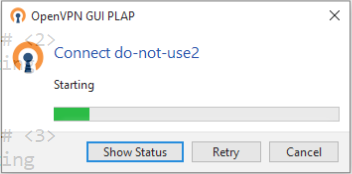
for each config enumerated by the plap dll.

Starting word looks redundant, I suggest to remove it in favour of green progress bar
maybe
Details ...instead ofShow status
"Show Status" was chosen to match the GUI menu which shows the status window. But, agree, "Details" may be better --- this progress window itself acts as a "status" window unlike in the GUI.
Starting word looks redundant, I suggest to remove it in favour of green progress bar
That text above the progress bar is meant to show the current state of OpenVPN which changes as the connection progresses. The word "starting" is just a place holder for that string which should have got replaced by the actual state. But, the sample image was created with the management interface kept busy, so it was hanging, waiting for management interface to get released. In practice it will show a more relevant status text that automatically updates.
That said, feedback on UX as seen in real use (from the login window) would help improve the PR -- could be done after the initial release too.
Also, while connection in progress, can Retry button be disabled ?
When connection fails, the dialog goes back to the PLAP menu where user can try again, so disabling would be same as removing it. In my initial tests it looked useful to have a way to interrupt the connection (say, for lack of progress) and retry. May be we could delay enabling it so that in most cases it will stay disabled.
I got REGDB_E_CLASSNOTREG Class not registered from CoGetClassObject(CLSID_OpenVPNProvider, ctx, NULL, IID_IClassFactory, (void **)&cf);.
maybe
Details ...instead ofShow status"Show Status" was chosen to match the GUI menu which shows the status window. But, agree, "Details" may be better --- this progress window itself acts as a "status" window unlike in the GUI.
Starting word looks redundant, I suggest to remove it in favour of green progress bar
That text above the progress bar is meant to show the current state of OpenVPN which changes as the connection progresses. The word "starting" is just a place holder for that string which should have got replaced by the actual state. But, the sample image was created with the management interface kept busy, so it was hanging, waiting for management interface to get released. In practice it will show a more relevant status text that automatically updates.
That said, feedback on UX as seen in real use (from the login window) would help improve the PR -- could be done after the initial release too.
Also, while connection in progress, can Retry button be disabled ?
When connection fails, the dialog goes back to the PLAP menu where user can try again, so disabling would be same as removing it. In my initial tests it looked useful to have a way to interrupt the connection (say, for lack of progress) and retry. May be we could delay enabling it so that in most cases it will stay disabled.
yes, UX changes may be considered any time later. btw, progressing green bar is lovely.

I took GHA build from https://github.com/OpenVPN/openvpn-gui/actions/runs/2953652770 (openvpn-gui_x64_ossl3) and still can reproduce rundll32 problem:
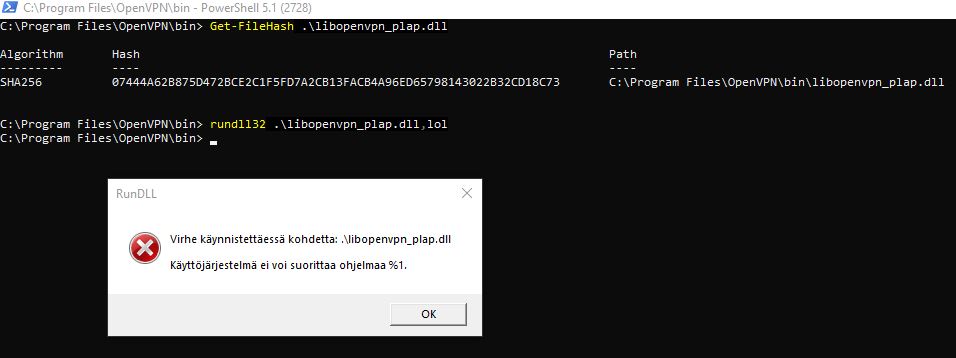
Here is my systeminfo output:
C:\Users\lev>systeminfo

Host Name:                 LAPTOP-4L3N7KFS
OS Name:                   Microsoft Windows 10 Pro
OS Version:                10.0.19043 N/A Build 19043
OS Manufacturer:           Microsoft Corporation
OS Configuration:          Standalone Workstation
OS Build Type:             Multiprocessor Free
Registered Owner:          [email protected]
Registered Organization:   N/A
Product ID:                00330-80000-00000-AA534
Original Install Date:     11.03.2020, 12:12:59
System Boot Time:          06.10.2022, 15:30:14
System Manufacturer:       LENOVO
System Model:              20KHCT01WW
System Type:               x64-based PC
Processor(s):              1 Processor(s) Installed.
                           [01]: Intel64 Family 6 Model 142 Stepping 10 GenuineIntel ~1792 Mhz
BIOS Version:              LENOVO N23ET81W (1.56 ), 25.05.2022
Windows Directory:         C:\WINDOWS
System Directory:          C:\WINDOWS\system32
Boot Device:               \Device\HarddiskVolume1
System Locale:             en-us;englanti (Yhdysvallat)
Input Locale:              fi;suomi
Time Zone:                 (UTC+02:00) Helsinki, Kiev, Riika, Tallinna, Sofia, Vilna
Total Physical Memory:     16 239 MB
Available Physical Memory: 6 312 MB
Virtual Memory: Max Size:  30 063 MB
Virtual Memory: Available: 17 625 MB
Virtual Memory: In Use:    12 438 MB
Page File Location(s):     C:\pagefile.sys
Domain:                    WORKGROUP
Logon Server:              \\LAPTOP-4L3N7KFS
Hotfix(s):                 30 Hotfix(s) Installed.
                           [01]: KB5017262
                           [02]: KB4534170
                           [03]: KB4537759
                           [04]: KB4545706
                           [05]: KB4557968
                           [06]: KB4560366
                           [07]: KB4561600
                           [08]: KB4562830
                           [09]: KB4566785
                           [10]: KB4570334
                           [11]: KB4577266
                           [12]: KB4577586
                           [13]: KB4580325
                           [14]: KB4586864
                           [15]: KB4589212
                           [16]: KB4593175
                           [17]: KB4598481
                           [18]: KB5000736
                           [19]: KB5012170
                           [20]: KB5017308
                           [21]: KB5006753
                           [22]: KB5007273
                           [23]: KB5011352
                           [24]: KB5011651
                           [25]: KB5014032
                           [26]: KB5014035
                           [27]: KB5014671
                           [28]: KB5015895
                           [29]: KB5016705
                           [30]: KB5005699
Network Card(s):           9 NIC(s) Installed.
                           [01]: Hyper-V Virtual Ethernet Adapter
                                 Connection Name: vEthernet (Default Switch)
                                 DHCP Enabled:    No
                                 IP address(es)
                                 [01]: 172.23.192.1
                                 [02]: fe80::8579:fdba:f4d:88fb
                           [02]: Bluetooth Device (Personal Area Network)
                                 Connection Name: Bluetooth Network Connection
                                 Status:          Media disconnected
                           [03]: Intel(R) Ethernet Connection (4) I219-V
                                 Connection Name: Ethernet
                                 Status:          Media disconnected
                           [04]: Intel(R) Dual Band Wireless-AC 8265
                                 Connection Name: Wi-Fi
                                 DHCP Enabled:    Yes
                                 DHCP Server:     100.64.0.2
                                 IP address(es)
                                 [01]: 100.77.196.74
                           [05]: OpenVPN Data Channel Offload
                                 Connection Name: OpenVPN Data Channel Offload
                                 Status:          Media disconnected
                           [06]: Wintun Userspace Tunnel
                                 Connection Name: Local Area Connection 2
                                 Status:          Media disconnected
                           [07]: Hyper-V Virtual Ethernet Adapter
                                 Connection Name: Hyper-V Internal
                                 DHCP Enabled:    No
                                 IP address(es)
                                 [01]: 192.168.100.1
                                 [02]: fe80::5d62:27d4:cd02:9731
                           [08]: TAP-Windows Adapter V9
                                 Connection Name: Local Area Connection 3
                                 Status:          Media disconnected
                           [09]: TAP-Windows Adapter V9
                                 Connection Name: Local Area Connection 4
                                 Status:          Media disconnected
Hyper-V Requirements:      A hypervisor has been detected. Features required for Hyper-V will not be displayed.
I got
REGDB_E_CLASSNOTREG Class not registeredfromCoGetClassObject(CLSID_OpenVPNProvider, ctx, NULL, IID_IClassFactory, (void **)&cf);.
As CoGetClassObject find the objects using the CLSID registered in the registry and then loading the corresponding dll, sounds like the registry settings are wrong. I have the following registry entries
(1) HKEY_CLASSES_ROOT\CLSID{4fbb8b67-cf02-4982-a7a8-3dd06a2c2ebd} default : OpenVPNProvider inprocserver32: default: C:\Program Files\OpenVPN\bin\libopenvpn_plap.dll ThreadingModel: Apartment
(2) HKEY_LOCAL_MACHINE\SOFTWARE\Microsoft\Windows\CurrentVersion\Authentication\PLAP Providers{4fbb8b67-cf02-4982-a7a8-3dd06a2c2ebd} defailut: OpenvPNProvider
I think (1) should be enough for CoGetClassObject to find the class, while (2) is needed for LogonUI to treat it as a PLAP provider.
Virhe käynnistettäessä kohdetta: libopenvpn_plap.dll
Käyttöjärjestelmä ei voi suorittaa ohjelmaa %1.
"The operating system cannot run %1" ? -- googling shows several such reports on error running certain dlls on some installations. Something could be wrong with the dll, but I have no idea why this happens. Writing a test that does LoadLibrary() and tracing it may help?
In #77 at least one user reported success using it, another could not get it to work, though that doesn't say much. I'll try testing more machines and see whether I can reproduce this.
Virhe käynnistettäessä kohdetta: libopenvpn_plap.dll
Käyttöjärjestelmä ei voi suorittaa ohjelmaa %1.
I could reproduce this on another machine. So, possibly, some dependency issue? Will look into it over the weekend.
@lstipakov The issue was caused mainly by a bug in the .reg file and thus incomplete dll registration.
May be fixed manually by editing the default value of HKEY_CLASSES_ROOT\CLSID\{4fbb8b67-cf02-4982-a7a8-3dd06a2c2ebd}\inprocserver32
to read C:\Program Files\OpenVPN\bin\libopenvpn_plap.dll
Or re-run the new reg file.
As for rundll32, the error appears to be a conflicting common control lib (version 5.x) loaded by default (we need version 6).
The manifest in the dll should have handled this, but cmake/msvc build was adding a default manifest to the dll with res-id=2. Fixed by adding /manifest:no to dll linker flags so as not to override the one in the rc file. Also, made the manifest private to the dll. That said, LogonUI loads comctl32 version 6, so PLAP use was not affected.
FWIW, the test-program commit is also added here. Could be disabled in release builds (not done).
This works better - I was able to connect from logon screen to corp VPN using dco-win driver :)
However user prompt part doesn't work for me - when I specify just auth-user-pass, openvpn process got stuck waiting for console input:
 	openvpn.exe!get_console_input_win32(const char * prompt, const bool echo, char * input, const int capacity) Line 119	C
 	openvpn.exe!get_console_input(const char * prompt, const bool echo, char * input, const int capacity) Line 206	C
 	openvpn.exe!query_user_exec_builtin() Line 291	C
 	openvpn.exe!query_user_exec() Line 98	C
>	openvpn.exe!get_user_pass_cr(user_pass * up, const char * auth_file, const char * prefix, const unsigned int flags, const char * auth_challenge) Line 331	C
 	openvpn.exe!auth_user_pass_setup(const char * auth_file, const static_challenge_info * sci) Line 424	C
 	openvpn.exe!init_query_passwords(const context * c) Line 603	C
To make it clear - I tested via logon screen, not via test app. With something like auth-user-pass c:\\Temp\\up this works. Is PLAP supposed to prompt for username/password?
Yes, PLAP should prompt for user/pass and any other interactive input (certificate passphrase, challenge repsonse, pkcs11 pin etc.). Sounds like you do not have --management-query-passwords in the config.
The requirements for the config are the same as what is necessary for it to work as a persistent/prestarted connection from the GUI. A good test is to check whether that works.
Essentially, the config must have
--management 127.0.0.1 <port> [optional-password-file]
and if using auth-user-pass etc.
--management-query-passwords
Similarly --management-query-proxy if required. Two other options that are nice to have are --management-hold and --auth-retry interact though not mandatory.
We need better documentation of this and GUI's persistent connections usage.
After connecting from PLAP and loging in, the GUI should show the connection as up if persistent-connection settings in the GUI is "Auto".
Yeah that works. The icon is somewhat lo-res and not transparent. It is something in CreatePLAPBitmap()? I also tried larger icon from https://raw.githubusercontent.com/OpenVPN/openvpn-build/master/windows-msi/artwork/openvpn.ico and 256x256 size (even though PLAP doc recommends 72x72) - I got much better quality but still no transparency.
Yes, the icon is currently a bitmap converted from the ico file we have in the GUI (yes, CreatePLAPBitmap () in ui_glue.c). I think PLAP recommends 48x48 for tiles and 192x192 for selected tile, but I did not have an ico of that size. Please follow up with a PR if you have high res images.
However, directly loading a bitmap may be even better? As I commented above the CreatePLAPBitmap() function I failed to load a Bitmap. if you can get to load a bitmap into the resources and retrieve it, then returning it in GetBitmapValue() in plap_connection.c would be preferred.
As for transparency, directly using a bitmap may respect it, but I'm not totally sure. PLAP docs say that LogonUI uses circular icons for user login screen and square one's for "PLAP". Not clear what that "square" means.
Edit: Cisco anyconnect seems to show a square icon with a black or white background (no transparency) -- E.g., see https://wikis.utexas.edu/download/attachments/292620038/image2020-12-17_0-46-30.png?version=1 Is this a Windows thing?
I managed to make bitmap loading work. There is still no transparency, thought (and LoadBitmap refuses to load 32bit bitmaps with ERROR_NO_MORE_FILES, lol) but we now have a better quality tile image with less code :) See https://github.com/lstipakov/openvpn-gui/commit/0f4b51622744c346d33d0c082f066f7ec6f96e25 - maybe you could cherry-pick it into your branch so that it will appear in PR?
Will check other parts next.
Thanks, will cherrypick. I had tried this and failed, but it never occurred to me that 32 bit is the problem..
Just realized that I need to "submit" review before comments are visible.
Although MSDN mentions 72x72, the actual image is shown at a much larger size scaled up from the included 80x80. In case you are generating this from vector graphics, here is what the MS whitepaper says about tile image sizes --- may help in choosing a good size that may scale up better than 80x80.
In Windows Vista/7, the image size of the V1 Credential Provider tile is 126x126.
In Windows 8/8.1, the image size of user tile is 200x200, V1 Credential Provider tile continues to be
126x126, but will be centered inside a 200x200 pixel bounding box, background is RGB(70,70,70). The
image size of V2 Credential Provider tile under selected users is 43x43.
In Windows 10, the selected User/V1/PLAP credential provider has an image size of 192x192. The ones
on the bottom left list is of 48x48. Note LogonUI uses circular image for user and square image for
V1/PLAP according to the new design direction. The image size of V2 Credential Provider tile under a
selected user is 48x48.
Please consider updating the image resolution to make sure it does not look blurry on LogonUI.
How should we proceed with that? Shall we modify 2.6 installer and add "Enable PLAP" (proper name and description pending) ? This feature would be depended on automatic service and, if enabled, the service will be started automatically (it is "on demand" by default). Also installer will take care of COM registration.
Is it possible to make it transparent instead of white?
On Fri, Oct 14, 2022, 6:19 PM Lev Stipakov @.***> wrote:
@.**** commented on this pull request.
I starred at this code, sample app and documentation. I also tested it with two profiles in config-auto. Cannot spot anything wrong apart from a few nit-picks. The good thing is that this change is pretty much isolated so should not affect existing use-cases.
- I would move string messages into resources so that they could be localized
- I pushed 192x192 time bitmap https://github.com/lstipakov/openvpn-gui/blob/plap3/res/tileimage.bmp, feel free to use it
In plap/plap_connection.c https://github.com/OpenVPN/openvpn-gui/pull/518#discussion_r994382990:
- OpenVPNConnection *oc = (OpenVPNConnection *) this;
- const wchar_t *val = L"";
- if (index >= _countof(field_desc))
- {
return E_INVALIDARG;- }
- /* we have custom field strings only for connection name and button */
- if (field_desc[index].cpft == CPFT_LARGE_TEXT)
- {
val = oc->display_name; /* connection name */- }
- else if (field_desc[index].cpft == CPFT_SUBMIT_BUTTON)
The doc says that This information is necessary to get values for CPFT_LARGE_TEXT, CPFT_SMALL_TEXT, CPFT_COMMAND_LINK, CPFT_EDIT_TEXT, and CPFT_PASSWORD_TEXT fields. In fact I don't have any text on a button, only localized "Submit" label displayed as a tooltip. [image: signal-2022-10-13-121608] https://user-images.githubusercontent.com/643110/195556378-6525a7bc-34a0-43c1-850e-360d3737c2d9.jpeg
Shouldn't just remove this if condition?
In plap/plap_connection.c https://github.com/OpenVPN/openvpn-gui/pull/518#discussion_r995407043:
+CommandLinkClicked(UNUSED ICCPC *this, UNUSED DWORD field) +{
- dmsg(L"Entry");
- return E_NOTIMPL; +}
+/*
- Collect the username and password into a serialized credential for the usage scenario
- This gets called soon after connect -- result returned here influences the status of
- Connect.
- We do not support SSO, so no credentials are serialized. We just indicate whether
- we got correct credentials for the Connect process or not.
- */ +static HRESULT WINAPI +GetSerialization(ICCPC *this, CREDENTIAL_PROVIDER_GET_SERIALIZATION_RESPONSE *response,
- UNUSED CREDENTIAL_PROVIDER_CREDENTIAL_SERIALIZATION *cs, UNUSED wchar_t * *text,
UNUSED is not needed, since we modify both text and icon.
In plap/plap_connection.c https://github.com/OpenVPN/openvpn-gui/pull/518#discussion_r995611582:
- OpenVPNConnection *oc = (OpenVPNConnection *) this;
- dmsg(L"Entry: profile <%ls>", oc->display_name);
- if (oc->connect_cancelled || !ISCONNECTED(oc->c))
- {
dmsg(L"connect cancelled or failed");/* return _NOT_FINISHED response here for the prompt go* back to the PLAP tiles screen. Unclear the return value* should be success or not : using S_OK.*/*response = CPGSR_NO_CREDENTIAL_NOT_FINISHED;if (text && icon){if (oc->connect_cancelled)hr = SHStrDupW(L"Connection cancelled by user", text);Let's move those messages to string resources so they can be translated.
In plap/plap_connection.c https://github.com/OpenVPN/openvpn-gui/pull/518#discussion_r995611730:
if (oc->connect_cancelled)
hr = SHStrDupW(L"Connection cancelled by user", text);else if (text)hr = SHStrDupW(L"Connection failed to complete", text);*icon = CPSI_ERROR;}- }
- else
- {
/* Finished but no credentials to pass on to LogonUI */*response = CPGSR_NO_CREDENTIAL_FINISHED;/* return CPGSR_RETURN_NO_CREDENTIAL_FINISHED leads to a loop! */if (text && icon){hr = SHStrDupW(L"Connected..", text);Same as above. Also, not sure about two dots in the end.
In plap/plap_connection.c https://github.com/OpenVPN/openvpn-gui/pull/518#discussion_r995612942:
- Sleep(100);
- /* if not immediately connected, show a progress dialog with
* service state changes and retry/cancel options. Progress dialog* returns on error, cancel or when connected.*/- if (!ISCONNECTED(oc->c) && !ISDISCONNECTED(oc->c))
- {
dmsg(L"Runninng progress dialog");int res = RunProgressDialog(oc->c, ProgressCallback, (LONG_PTR) oc);dmsg(L"Out of progress dialog with res = %d", res);if (res == IDRETRY && !ISCONNECTED(oc->c)){wcsncpy_s(status, _countof(status), L"Current State: Retrying", _TRUNCATE);String resource
In plap/plap_connection.c https://github.com/OpenVPN/openvpn-gui/pull/518#discussion_r995613161:
- {
dmsg(L"Runninng progress dialog");int res = RunProgressDialog(oc->c, ProgressCallback, (LONG_PTR) oc);dmsg(L"Out of progress dialog with res = %d", res);if (res == IDRETRY && !ISCONNECTED(oc->c)){wcsncpy_s(status, _countof(status), L"Current State: Retrying", _TRUNCATE);NotifyEvents(oc, status);DisconnectHelper(oc->c);goto again;}else if (res == IDCANCEL && !ISCONNECTED(oc->c) && !ISDISCONNECTED(oc->c)){wcsncpy_s(status, _countof(status), L"Current State: Cancelling", _TRUNCATE);String resource
In plap/plap_connection.c https://github.com/OpenVPN/openvpn-gui/pull/518#discussion_r995613728:
- ShowStatusWindow(oc->c, FALSE);
- oc->qc = NULL;
- SetActiveProfile(NULL);
- dmsg (L"Exit with: <%ls>", ISCONNECTED(oc->c) ? L"success" : L"error/cancel");
- return ISCONNECTED(oc->c) ? S_OK : E_FAIL; +}
+static HRESULT WINAPI +Disconnect(ICCPC *this) +{
- OpenVPNConnection *oc = (OpenVPNConnection *) this;
- dmsg (L"profile <%ls>", oc->display_name);
- NotifyEvents(oc, L"Disconnecting");
String resource
— Reply to this email directly, view it on GitHub https://github.com/OpenVPN/openvpn-gui/pull/518#pullrequestreview-1140397070, or unsubscribe https://github.com/notifications/unsubscribe-auth/AAQ5KUAPXFN6SI53YLFJV6LWDFFTPANCNFSM557JOFIQ . You are receiving this because you commented.Message ID: @.***>
I don't know - I've spent some time and failed - ::LoadImage() refuses to load 32bit ARGB bitmaps, and icon approach originally implemented by Selva also didn't provide transparency. Contributions are welcomed!
I starred at this code, sample app and documentation. I also tested it with two profiles in
config-auto. Cannot spot anything wrong apart from a few nit-picks. The good thing is that this change is pretty much isolated so should not affect existing use-cases.
- I would move string messages into resources so that they could be localized
- I pushed 192x192 time bitmap, feel free to use it
Yes, user-visible strings should be localized. I was being lazy. Will do this in a follow up. Thanks for the 192x192 bitmap.