
open-numismat
 open-numismat copied to clipboard
 OpenNumismat
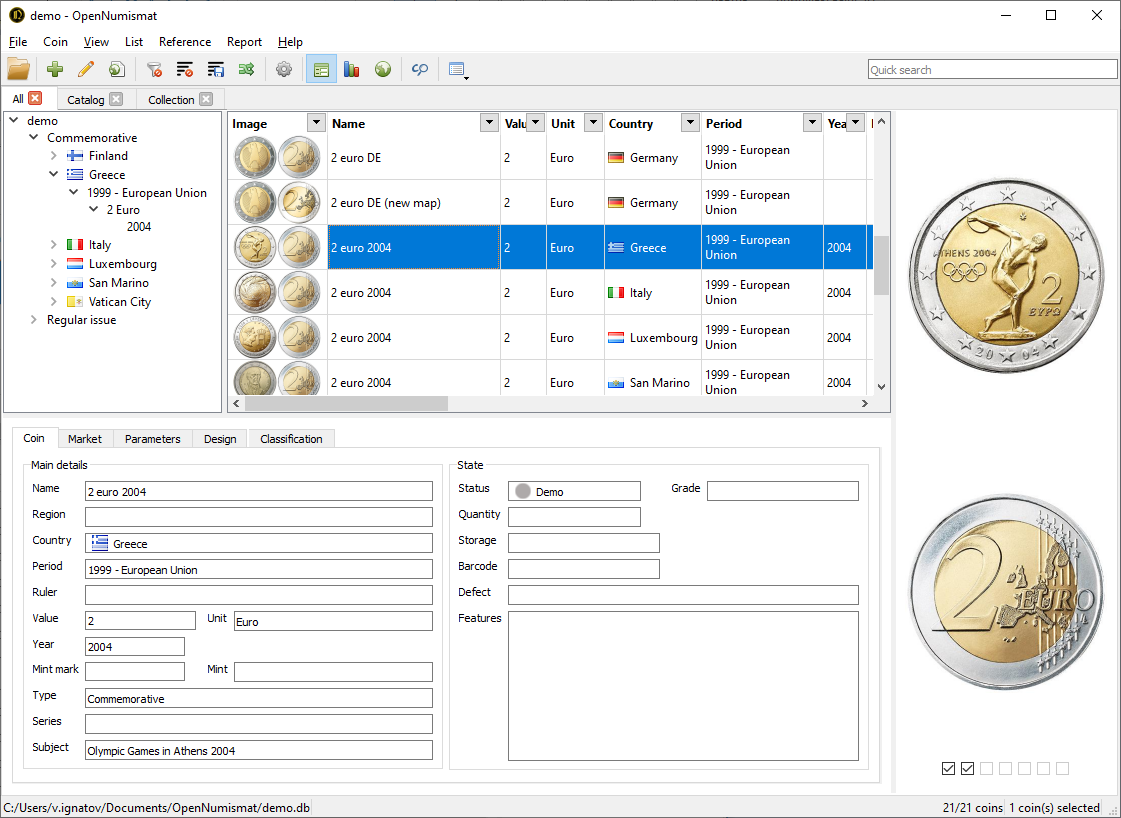
OpenNumismat, is intended primarily for registering a collection of coins. But it is also suitable for other types of collectibles - stamps, postcards, badges and more exotic things.






OpenNumismat
http://opennumismat.github.io/
OpenNumismat, is intended primarily for registering a collection of coins. But it is also suitable for other types of collectibles - stamps, postcards, badges and more exotic things.
Since all components are cross-platform, then OpenNumismat has builds for Windows, Linux (Debian/Ubuntu), macOS.
Requirements
Main Windows version based on:
- Python 3.4.4
- PyQt5 5.5.1
- Jinja2 2.10 (for reports)
- Matplotlib 2.1.0 (for statistics)
- xlwt 1.3.0 (for exporting to Excel)
- pywin32-219 (for saving report as Word Document)
- lxml 3.4.1 (for importing from Tellico)
- xlrd 1.2.0 (for importing from Excel)
- python-dateutil 2.8.2 (for importing from Excel)
- cx_Freeze 4.3.4 (for deploy)
- Inno Setup 5.6.1 (for deploy)
macOS version based on MacPorts:
- py36-pyqt5 +webkit
- py36-lxml
- py36-xlrd
- py36-xlwt
- py36-dateutil
- py36-jinja2
- py36-cx_Freeze (for deploy)
Debian/Ubuntu version depends on following packages:
- python3
- python3-pyqt5
- python3-pyqt5.qtsql
- libqt5sql5-sqlite
- python3-pyqt5.qtwebkit
- python3-jinja2
- python3-matplotlib
- python3-numpy
- python3-lxml
- python3-xlrd
- python3-dateutil
- python3-xlwt (suggests)
- python3-pyqt5.webengine (suggests)
For running from source code and development requirements can be installed like so:
pip3 install -r requirements.txt
Building
Befor building installation package may be necessary:
- compile resorces with:
pyrcc5.exe -no-compress resources.qrc -o OpenNumismat/resources.py - compile translations file with:
python3 tools/i18n.py - create
OpenNumismat/private_keys.pywith content:MAPS_API_KEY = '<your Google API key>'
For Windows
pip3 install cx_Freeze
"C:\Python34\python.exe" setup.py build_exe
"C:\Program Files (x86)\Inno Setup 5\ISCC.exe" tools\setup.iss
For Windows x64
pip3 install pyinstaller
SET PYTHONOPTIMIZE=1
pyinstaller --clean --noconfirm open-numismat.spec
"C:\Program Files (x86)\Inno Setup 6\ISCC.exe" tools\setup-win64.iss
For Windows portable version
pip3 install cx_Freeze
SET PORTABLE=YES
"C:\Python34\python.exe" setup.py build_exe
For macOS
python3 setup.py bdist_mac
cd build
mkdir vol
VERSION=$(grep Version ../OpenNumismat/version.py | grep -o -E "\d+.\d+.\d+")
mv OpenNumismat-$VERSION.app vol/OpenNumismat.app
ln -s /Applications vol/Applications
hdiutil create OpenNumismat-$VERSION.dmg -volname "OpenNumismat-$VERSION" -srcfolder vol -fs HFS+ -size 500m -format UDZO
For Linux
sudo apt-get install devscripts debhelper python3-setuptools dh-python
debuild
Metadata
Owner
 OpenNumismat
Metadata
OpenNumismat, is intended primarily for registering a collection of coins. But it is also suitable for other types of collectibles - stamps, postcards, badges and more exotic things.