

 OpenBuilds
Resume from last gcode line (and ability to start earlier)

We need this as well. Carving jobs often take a long time to run and in our shop interruptions are fairly frequent. Sometimes we can just leave the job running but often the interruption can take us out of the shop and we need to pause the job until we can get back to it.
Ideally we'd be able to scroll back to the most recent rapid and start from there.

It's more one of those things that need a meat-computer to check over the earlier gcode, find the right modals, edit in appropriate entry moves before the line you want to start from. Really quite complicated.
Would advise you look at the causes of your failures, it really shouldn't happen often. Addressing the root cause may be easier.
Implementing an automated resume has been on the wishlist for a long time, because it is no easy task. Proper clamping, sharp endmills, good bit cooling / chip extraction, a reliable machine - and you have no real need for the feature after all.
I am not sure how to share the code and I do not want to screw something up for Openbuilds. I have a working model of this in version 1.0.0 of Basic SENDER. Only tested on a few files, but it seems to work ok. I would be honored if you found it useful.

@rlwoodjr that is great, and thanks for offering to share.
You are welcome to point me to sections of the code that's relevant, or specific Commits - we'd be happy to cherry pick from it. Did a quick check and looks like https://github.com/rlwoodjr/Basic-SENDER/commit/01f991b7b5171e5e60db59f6cbcba6a286794911#diff-e11dedd96127264342c2b083f0eeaa2e632fd0f9374c13aea861915577f949e8R602 - if so - looks good, entry moves, modals etc. Well done!
@rlwoodjr
What does "Run gcode lines to line" mean? The first entry of the 2nd dialog?
It is letting the user know that it will run lines 1 to the given number. The code runs the first few lines until it gets to the first Z+ command. This way the G17, G90 and G20 (or G21) will be run first.
Ahh gotcha, attempt at catching modals in the header. Thanks for clarifying.
Thanks, cherry picked out, cleaned up, updated UI a little, etc.
Will push with next release. Still rethinking Modals just a bit (sometimes they appear after the header too)
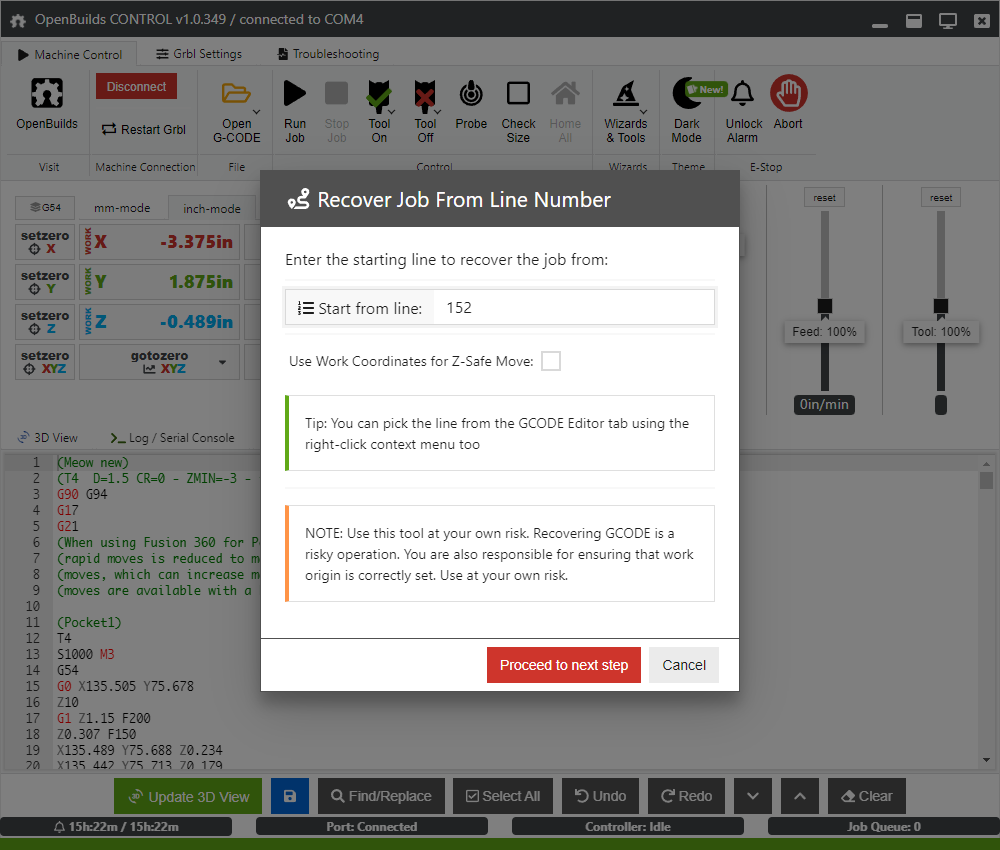
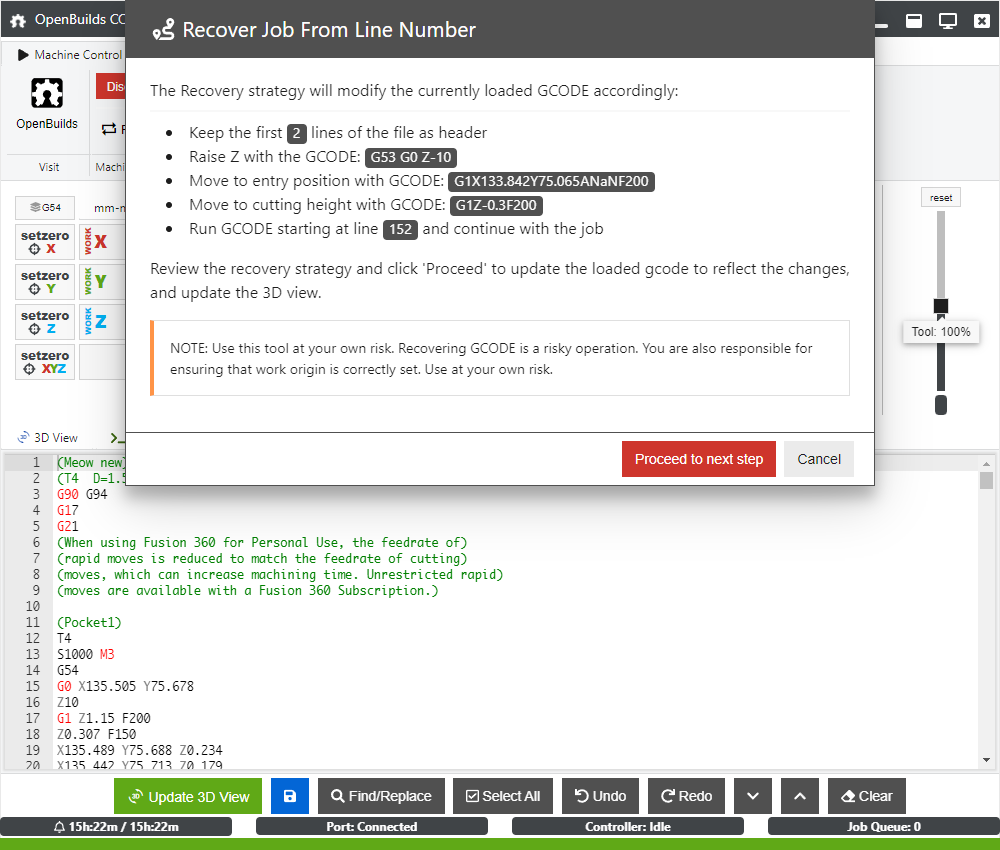
And also added to Gcode Editor context menu
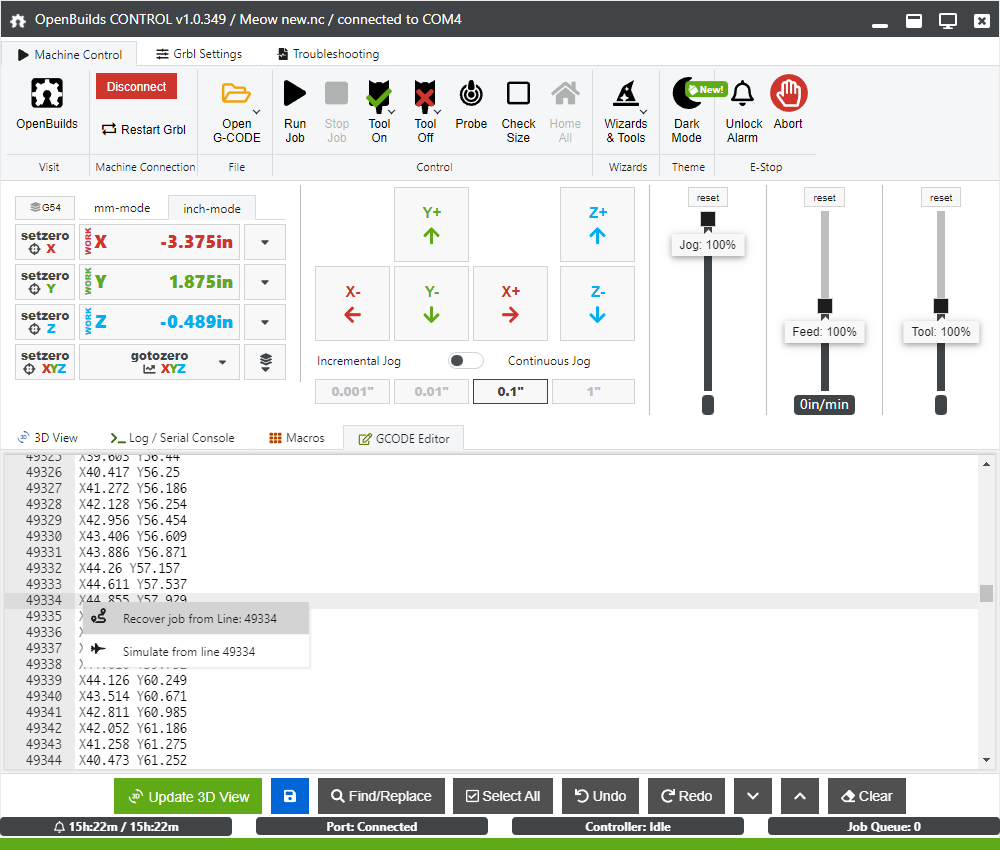
Always welcome! I moved almost all of it into resume.js under wizards/resume Only frontend menu entries and lastgcodeline in websocket.js is outside of that file - I like packing wizards more self-contained so its easier to pull out if needed / share / reuse etc

Please either add a note to the recovery strategy screen that informs people that it wont turn on their router. Maybe in the "You are responsible for..." sentence. Or check out this code that searches for the closest spindle on command.
https://github.com/sharmstr/OpenBuilds-CONTROL/commit/189ddb6b8244cbcff01dc974951be8b2dd15a3f0
Or check out this code that searches for the closest spindle on command.
Pulled yours (: https://github.com/OpenBuilds/OpenBuilds-CONTROL/pull/301 Thanks!
Excellent. Side note: It doesnt look for coolant. The OB vectric post doesnt output it. The fusion post does, but on its own line. If we change the fusion post to output the coolant command on same line as spindle on command, we will automatically pick it up. (My Tormach PP does this so its not unusual) I'll tag this comment in the fusion pp repo.
We might want to disable recovery on laser files. Currently I dont think it works as expected. I dont have a laser to test, but using OB CAM, the recovery code fires the laser and then moves to position. Secondly, I'm not sure how other laser post processors work, but if they dont generate Z moves (OB CAM outputs Z0), then the recovery script short circuits.
I guess the next question is how do we determine laser files. We can look for machine profiles and firmware, but that's not 100%. We could look for 1 - does it contain any z moves and 2 - is the z move something other than 0.
recovery code fires the laser and then moves to position
That means there's a G1 where a G0 should be? https://github.com/gnea/grbl/wiki/Grbl-v1.1-Laser-Mode
Oh. I wasnt aware since I've never used a laser. But I think its still an issue. Here's the first lines of a recovery file
; Recovered GCODE Use at your OWN RISK
; GCODE Generated by cam.openbuilds.com on 2023-03-10
G21 ; mm-mode
G54; Work Coordinates
G21; mm-mode
G90; Absolute Positioning
M4; Dynamic Power Laser On

; Operation 0: Laser: Vector (raster fill) (Beta)
; Laser Spot Diameter: 0.2

G0 Z0; move to z-safe height
M4
G1X75.74Y7.89F1000
So if I understand this correctly, the first move is a G1 so the laser is going to turn on and move to X75.74Y7.89F1000. If that's the case, we'd want to G0X75.74Y7.89F1000 then G1X75.74Y7.89F1000?
Correct, should G0 to starting point (positioning move) and then G1 to the next point
Ok. Let me play with it. My spindle code is adding an additional M4 I see.
What about other laser cam packages. Do most of them generate a Z move?
Weird new report https://openbuilds.com/threads/error-error-26.20334/#post-134220 Wizard adds G10 to top?
Weird new report https://openbuilds.com/threads/error-error-26.20334/#post-134220 Wizard adds G10 to top?
No further feedback from that user. Closing