
Excel-Content-Add-in-Humongous-Insurance
 Excel-Content-Add-in-Humongous-Insurance copied to clipboard
 OfficeDev
Visual Studio fails to open the startup document
When pressing F5 to build and deploy the sample add-in. Excel attempts to launch and display the add-in but fails to load the startup document:

Unfortunately, recovering the document results in missing information that (I believe) is critical for the add-in is unresponsive if we choose to recover the document. Not recovering the document simply results in Excel being unable to open the document and the add-in becomes un-deployable.
Opening the Excel startup document separately (not through the build process) works fine, the error is only displayed when Visual Studio attempts to open the document during the add-in build process.
@davidchesnut

I have a similar issue, but with slightly different symptoms. I cloned the project, ran it, and got this error:
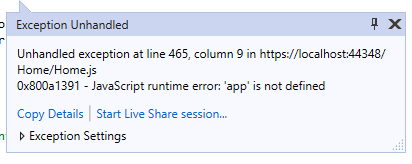 I was able to get the project to run by opening the excel startup document separately, but only after the solution had created a new document. I found that If I opened the excel startup document before running the solution, I would get this error.


Hi @mgjeffries and @AbidRahman-MSFT
I updated the spreadsheet in PR #5. Looks like when VS sideloads it attempts to always sideload the content pane into the 3rd sheet which causes the error. I updated the spreadsheet so an instance of the content pane is on the 3rd sheet which works around the error you are seeing. Can you take a look at the PR and let me know if this fixes the issue for you? Thanks!

@davidchesnut Thanks for working on this. On your branch, I no longer get the "exception unhandled" error when I start up with excel closed, but the worksheet only opens with the agent workspace tab, and the dropdowns don't populate.
I still get errors the same errors as before when I open the HumongousInsuranceExcelSpreadsheet.xlsx before running the solution.
I see that my errors are different than the errors @AbidRahman-MSFT is getting. He may get different results.