

 OSGeo
OSGeo
[Bug] wx.metadata fails to install: no addons metadata available
Name of the addon wx.metadata
Describe the bug It's impossible to correctly install wx.metadata and use it's tools. The installation process fails (despite the final claim!) with the following error:
Downloading precompiled GRASS Addons <wx.metadata>...
Updating addons metadata file...
WARNING: No addons metadata available. Addons metadata file not updated.
Updating private addons metadata file...
WARNING: No addons metadata available. Addons metadata file not updated.
Installation of <wx.metadata> successfully finished
To Reproduce Steps to reproduce the behavior:
- g.extension extension=wx.metadata operation=add
- See error
System description (please complete the following information):
- Operating System: Windows 10 64 bit
- GRASS GIS version 7.8.4 via OSGeo4W installer
g.version -rge version=7.8.4 date=2020 revision=d8fbd49af build_date=2020-10-05 build_platform=x86_64-w64-mingw32 build_off_t_size=8 libgis_revision=d8fbd49af libgis_date=2020-10-05T06:39:31+00:00 proj=6.3.2 gdal=3.0.4 geos=3.8.1 sqlite=3.29.0
python --version
Python 3.7.0
Additional context It seems also that the wx.metadata addon is not listed in https://grass.osgeo.org/addons/grass7/modules.xml

This seems to be Python2/3 related:
In Python3:
try:
    import lib_test_me1233451243234253412332123
except ModuleNotFoundError:
    print("test")
prints test as expected, in Python2 I also get the NameError:
Traceback (most recent call last):
  File "<stdin>", line 3, in <module>
NameError: name 'ModuleNotFoundError' is not defined

The culprit is likely here: https://github.com/OSGeo/grass-addons/blob/ac581a80649fbabf1141fab2bf18d16cac93ad8e/grass7/gui/wxpython/wx.metadata/Makefile#L3 On systems without python2 or where default "python" is python3 this issue will not show, I guess...
I tried making dependency.py Python2 compatibe, but the problem then is that dependencies are checked for Python2 as well.
So, I am afraid, the only feasible solution is to define the addon modules Python3 only as also the validator dependency is not available for Python2...
However, changing this Makefile to Python3, I get another issue when mdlib is build into my $HOME directory...
I tried making dependency.py Python2 compatibe, but the problem then is that dependencies are checked for Python2 as well.
So, I am afraid, the only feasible solution is to define the addon modules Python3 only as also the validator dependency is not available for Python2...
GRASS GIS version >= 7.8 completly use python3, therefore, we don't need compatibility with python2 (which is deprecated).
However, changing this Makefile to Python3, I get another issue when mdlib is build into my
$HOMEdirectory...
I didn't notice any problem during the installation (compilation) on GNU/Linux.
GRASS nc_basic_spm_grass7/PERMANENT:~ > g.extension wx.metadata
Fetching <wx.metadata> from GRASS GIS Addons repository (be patient)...
Compiling...
Installing...
Updating extensions metadata file...
Updating extension modules metadata file...
Installation of <wx.metadata> successfully finished
g.gui.metadata wxGUI module:
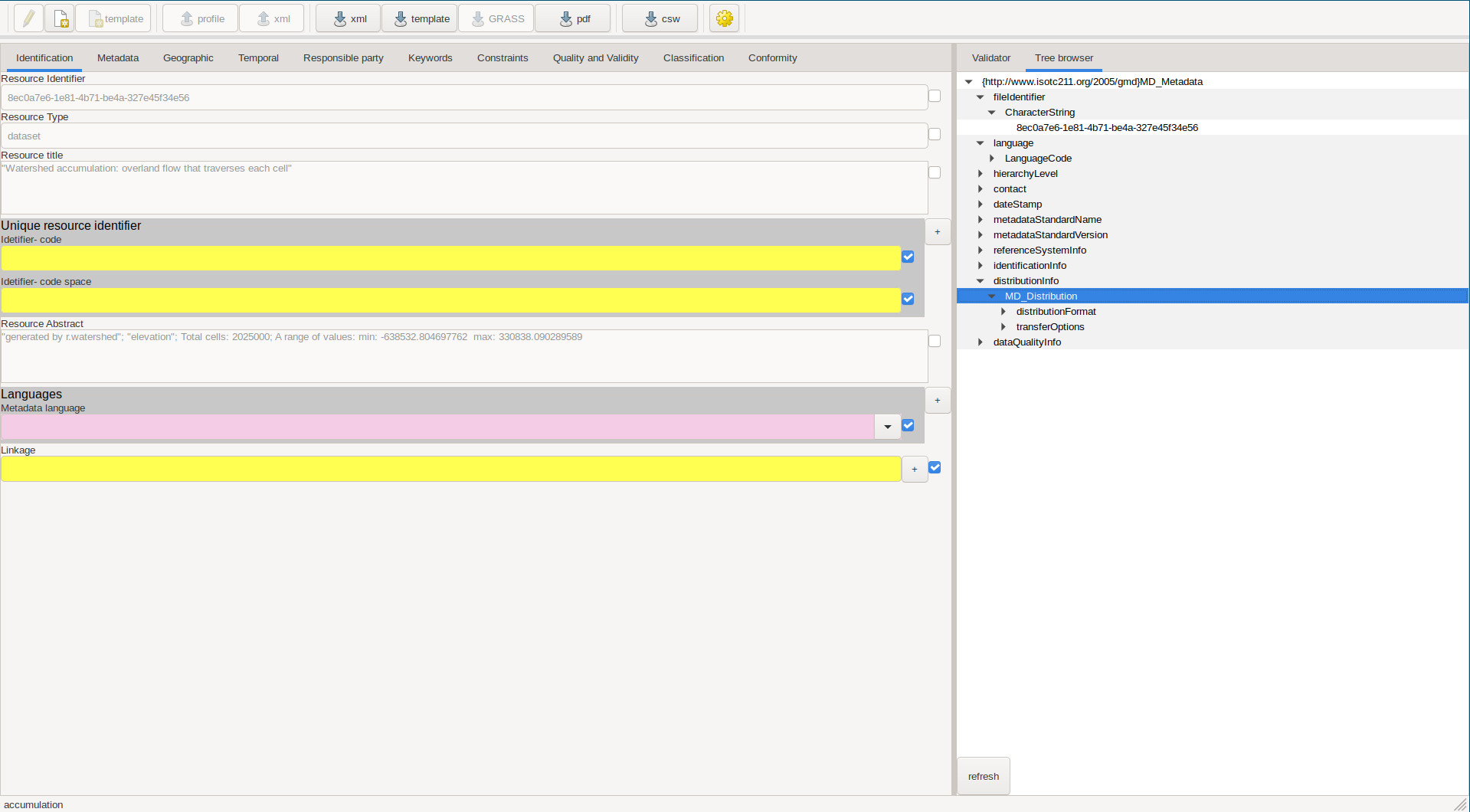
Could you clarify that, please?

Additional context It seems also that the wx.metadata addon is not listed in https://grass.osgeo.org/addons/grass7/modules.xml
I suspect that this cronjob line is causing the remaining troubles:
https://github.com/OSGeo/grass-addons/blob/df0778f6dbb00127b7de3770e5036cc85286a303/tools/cronjobs_osgeo_lxd/cron_grass78_releasebranch_78_build_bins.sh#L266
I am currently testing it on the server with that line commented out...

I am currently testing it on the server with that line commented out...
OK, no change since nothing builds the file yet. It probably depends on the incomplete PR #220
@neteler, the current https://grass.osgeo.org/addons/grass7/modules.xml reports a last build date of "2020-11-19 12:07:48.009362".
The reported issue is about GRASS GIS 7.8.4 (I've modified the original comment accordingly).
With GRASS GIS 7.8.5, the bug https://github.com/OSGeo/grass/issues/1238 occurs instead:
g.extension wx.metadata
Downloading precompiled GRASS Addons <wx.metadata>...
ERROR: Cannot open URL: http://wingrass.fsv.cvut.cz/grass78/x86_64/addons/grass-7.8.5/wx.metadata.zip
Name of the addon wx.metadata
Describe the bug It's impossible to correctly install wx.metadata and use it's tools. The installation process fails (despite the final claim!) with the following error:
Downloading precompiled GRASS Addons <wx.metadata>...
Updating addons metadata file...
WARNING: No addons metadata available. Addons metadata file not updated.
Updating private addons metadata file...
WARNING: No addons metadata available. Addons metadata file not updated.
Installation of <wx.metadata> successfully finished
I get the same warning when I install i.landsat:
g.extension i.landsat
Fetching <i.landsat> from GRASS GIS Addons repository (be patient)...
Compiling...
Installing...
Updating extensions metadata file...
Updating extension modules metadata file...
WARNING: No metadata available for module 'i.landsat'.
Installation of <i.landsat> successfully finished
The installation is successful though and the addons work fine.
System info:
GRASS version: 7.9.dev
Code revision: fd93011d7
Build date: 2021-01-01
Build platform: x86_64-pc-linux-gnu
GDAL: 3.0.4
PROJ: 6.3.2
GEOS: 3.8.1
SQLite: 3.34.0
Python: 3.8.6
wxPython: 4.0.7
Platform: Linux-5.9.16-100.fc32.x86_64-x86_64-with-glibc2.2.5

I am currently testing it on the server with that line commented out...
OK, no change since nothing builds the file yet. It probably depends on the incomplete PR #220
Anyone willing to help to get the creation of https://grass.osgeo.org/addons/grass7/modules.xml running again?
Hi @neteler I'd like to help, but how?
As far as I understand (correct, @landam ?) we need to get the update of tools/addons/build-xml.py proposed in #220 to be completed.