
python-o365
 python-o365 copied to clipboard
 O365
O365
The token contains no permissions, or permissions can not be understood.
When I try the following code :
from O365 import Account, MSGraphProtocol my_credentials = ('XXXXXXX', 'YYYYYYYYY') protocol = MSGraphProtocol(default_resource='PPPPPPPPPPPP') account = Account(my_credentials, protocol=protocol, auth_flow_type='credentials', tenant_id='ZZZZZZZZZZZZZZZZ') if account.authenticate(): print('Authenticated!') m = account.new_message() m.to.add('OOOOOOOOOOOOO') m.subject = 'Testing!' m.body = "Hello World" m.send() print('The End')****
I get the following:
requests.exceptions.HTTPError: 401 Client Error: Unauthorized for url: https://graph.microsoft.com/v1.0/users/PPPPPPPPPPPP/sendMail | Error Message: The token contains no permissions, or permissions can not be understood.

What version are you using? When auth_flow_type is "credentials" you are required to pass the tenant_id.
Also when using "credentials" you need to set a resource.
It seems you didn't read the instructions on the readme as these are pretty basic stuff.

Greetings
Many thanks or your reply I am still getting an error massage when I set a resource:
from O365 import Account
credentials = ('e20fbdf5-8a0c-44aa-88e5-508d51b30903', ‘YYYYYYYYYYYYYYYYYYYYYYYYYYYYYYYYY’)
scopes = ['https://graph.microsoft.com/Mail.ReadWrite', 'https://graph.microsoft.com/Mail.Send']
account = Account(credentials, auth_flow_type='credentials', tenant_id='68c17043-ea02-4621-bce8-2a2e14e99161', main_resource='user:[email protected]')
if account.authenticate(): print('User has Authenticated!')
if account.is_authenticated : print('User is Authenticated!')
mailbox = account.mailbox() inbox = mailbox.inbox_folder() for message in inbox.get_messages(): print(message)
print('The End')
The output is as follows:
/Users/ajcblyth/Python-3.7.3/python.exe /Users/ajcblyth/PycharmProjects/MailTest/MailTest.py
User has Authenticated!
User is Authenticated!
Client Error: 401 Client Error: Unauthorized for url: https://graph.microsoft.com/v1.0/users/[email protected]/mailFolders/Inbox/messages?%24top=25 | Error Message: The token contains no permissions, or permissions can not be understood.
Traceback (most recent call last):
File "/Users/ajcblyth/PycharmProjects/MailTest/MailTest.py", line 20, in
Process finished with exit code 1
Regards
Andrew
From: Alejandro Casanovas [email protected] Reply to: O365/python-o365 [email protected] Date: Sunday, 17 May 2020 at 08:02 To: O365/python-o365 [email protected] Cc: TheMadYak [email protected], Author [email protected] Subject: Re: [O365/python-o365] The token contains no permissions, or permissions can not be understood. (#448)
What version are you using? When auth_flow_type is "credentials" you are required to pass the tenant_id.
Also when using "credentials" you need to set a resource.
It seems you didn't read the instructions on the readme as these are pretty basic stuff.
— You are receiving this because you authored the thread. Reply to this email directly, view it on GitHubhttps://github.com/O365/python-o365/issues/448#issuecomment-629753303, or unsubscribehttps://github.com/notifications/unsubscribe-auth/APS7PQEOEQ74ACDXNMVCOA3RR6DZNANCNFSM4NBRLNMQ.
Maybe the app permissions are not application permissions or the admin did not give an approval for such permissions.
I'm having the same issue. When I run the app with auth_flow_type = credentials, I get True for authenticate(), but when I try to do anything I get a 401. I looked at the app permissions and I believe that they are correct:
- If I login with the default flow I have all the necessary permissions
- All permissions have been approved by our admin
Any ideas? I need to use this library in a background process

Default flow= delegated permissions, credentials flow= application permissions.
You get True because you are authenticated, but you get 401 because you don’t have the permission correctly set or you don’t have access to the resource.
I think they are correct :/ I added Mail.read, Mail.shared etc and they all have admin consent. I need access to a specific mailbox. Is it possible that I need to add that permission somewhere ? Like give the app itself permissions on the mailbox ?
I can't get it working. I created a new account which has rights to the mailbox and no MFA. I set the authentication type to credentials. The account.is_authenticated says true, but I keep getting the same error. I think i have to specify the login (user & password) somehow, but the documentation doesn't mention it. How do I do that ?

A better approach is to check for `account.is_authenticated:
If false just call account.authenticate() otherwise continue your app logic.
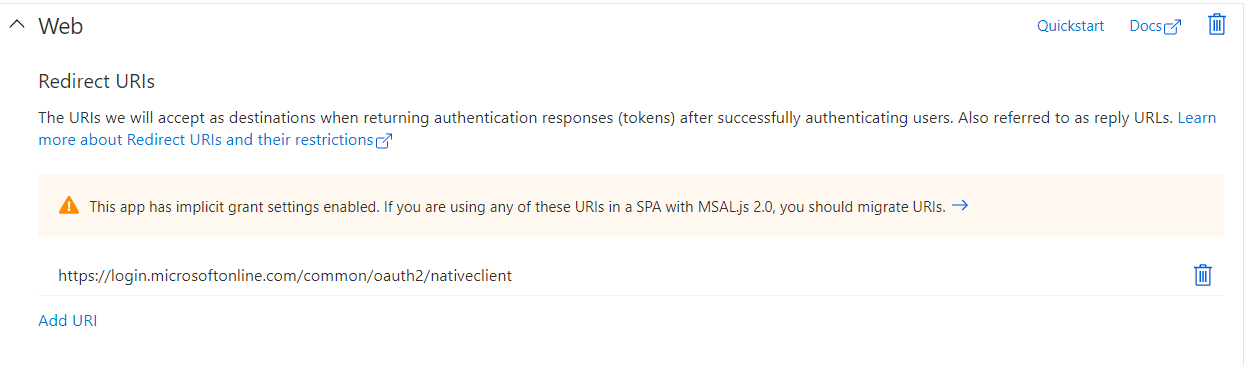
Can you paste some screenshots of the app configuration on azure? Remove sensitive info...
Authentication
Secrets

Permissions:

Roles and administrators

I have code that works. This code gives me a url where I can login and after pasting the return url, it signs in and gives access to the mailbox.
    account = Account(
        (config["client_id"], config["client_secret"]),
        tenant_id = config["tenant_id"],
        scopes = ["Mail.Read", "Mail.Read.Shared", "offline_access"],
        main_resource="<mail>"
    )
    account.authenticate()
    print("is_authenticated", account.is_authenticated)

    mailbox = account.mailbox()
    for m in mailbox.get_messages():
        print(m)
The above snippet works, but I want a service account so that it can run as a background service and I don't have to bother with the signin. To do so, I changed the auth_flow_type to credentials. If I run the code now, it doesn't ask me to sign in, but it also fails to access the mailbox. I think I should in a way, add the service account credentials somewhere. But i don't know where.
    account = Account(
        (config["client_id"], config["client_secret"]),
        tenant_id = config["tenant_id"],
        auth_flow_type = 'credentials',
        main_resource="<mail>"
    )
    account.authenticate()
    print("is_authenticated", account.is_authenticated)

    mailbox = account.mailbox()
    for m in mailbox.get_messages():
        print(m)
Any help is really welcome!
Auth flow type credentials requires application permissions (not delegated) and also those need to be granted by any admin.
Thanks! I found this page (which was linked in your docs). https://docs.microsoft.com/en-us/graph/auth-v2-service?context=graph%2Fapi%2F1.0&view=graph-rest-1.0
I'll check it with my sysadmin.
That's a great link @AndreasDL
I had to delete the delegated granted permission to get things working. Just adding ReadAll to application permission was not enough.
