
python-o365
 python-o365 copied to clipboard
 O365
O365
Error Message: Resource not found for the segment 'sendMail'
Hi,
I think that I am missing something in the code, but I keep getting this error:
requests.exceptions.HTTPError: 400 Client Error: Bad Request for url: https://graph.microsoft.com/v1.0/sendMail | Error Message: Resource not found for the segment 'sendMail'.
Here is a snippet for the code:
def send_email(message, email, email_title, APP_CLIENT_ID, APP_CLIENT_SECRET, TENANT_ID):
    print('Starting send_email function')
    credentials = (APP_CLIENT_ID, APP_CLIENT_SECRET)
    account = Account(credentials, auth_flow_type='credentials', tenant_id=TENANT_ID)
    if account.authenticate():
        print('Authenticated!')
    m = account.new_message()
    m.to.add(email)
    m.subject = email_title
    m.body = 'message'
    m.send()
I've changed m.body to string in this snippet, since originally message variable stores MIMEMultipart value, which (according to another reported issue) is not supported. Could you please have a quick look and see if there is any issue in the code.

Yes, when using the client credentials auth flow, you are authentication with the app identity. So you will have access to all the resources the app has access to.
In order to send or read emails (or whatever action) you need to tell the library on who's account you want to do this action. The app can't guess it...
This is done using resources.
Following you example (and provided that your app has access to "[email protected]" account):
def send_email(message, email, email_title, APP_CLIENT_ID, APP_CLIENT_SECRET, TENANT_ID):
    print('Starting send_email function')
    credentials = (APP_CLIENT_ID, APP_CLIENT_SECRET)
    account = Account(credentials, auth_flow_type='credentials', tenant_id=TENANT_ID)
    if account.authenticate():
        print('Authenticated!')
    m = account.new_message(resource='[email protected]')
    m.to.add(email)
    m.subject = email_title
    m.body = 'message'
    m.send()
If you are going to do a lot of actions it's better to use the mailbox so you define the resource just once:
# ...

account = Account(credentials, auth_flow_type='credentials', tenant_id=TENANT_ID)
example_mailbox = account.mailbox(resource='[email protected]')
msg = example_mailbox.new_message()

# ...

"(...)and provided that your app has access to "[email protected]" account)"
Hello, would you tell something more about it? I'm struggling with the same thing. On the azure portal I logged-in already with the email I'm using in this solution. If I need to add this email as a user in the portal - it also doesn't work, since it says I don't have the access.

Hi @mrtracz, when using credentials auth flow, you need are "connected" as the app. So you have the permissions the app has. It does not depend on your user but on the app permissions.
As long as you have the application permissions set and approved by the azure administrator it should work.
I'm trying to use this example but I'm get the error: The token contains no permissions, or permissions can not be understood.
Please find below the app permissions:
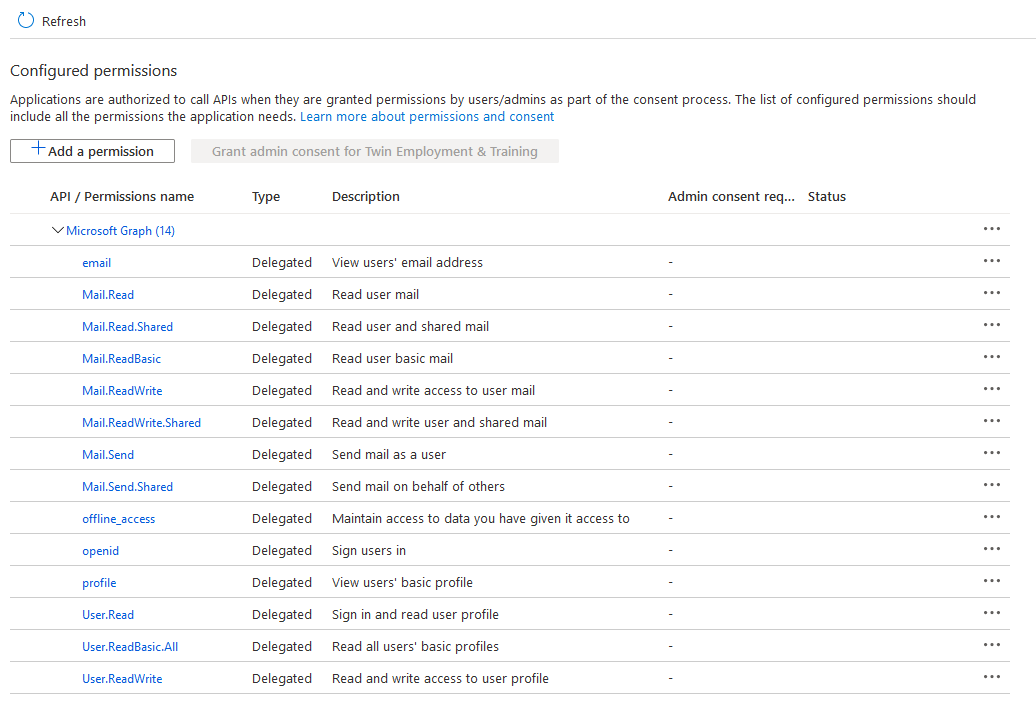

Read the instructions carefully. Client credentials auth flow don’t use delegated permissions.
Hi, This code is working for powershell and I am getting a valid token and able to send mail using Microsoft API and also I am able to get response from Postman.
User="[email protected]" #User to be used for the delegated Permissions $PW="******" #Password
The resource URI
$resource = "https://graph.microsoft.com" $clientid = "XXXX" #Application (client) ID from Azure App registration Page
$tokenBody = @{
Grant_Type = "password"
Scope = "user.read+openid+profile+offline_access"
Client_Id = $clientId
username = $User
password = $pw
resource = $resource
}
Please help me to do in python script, I am using o365 library but I don't know how to use it to create a connection with clientId,username and password. and also how I can set above those properties? I can't find any examples of how to use delegated ("On behalf of a user") access automatically.

in case anyone else comes across this, after creating the app in azure appregistrations:
you must grant the MS graph application scopes (not delegated/user) and THEN hit the "grant admin access" button above the scopes. you will see a warning next to the scopes indicating admin access has not yet been granted until you do this.
