NickAkincilar
A few Enhancement Requests
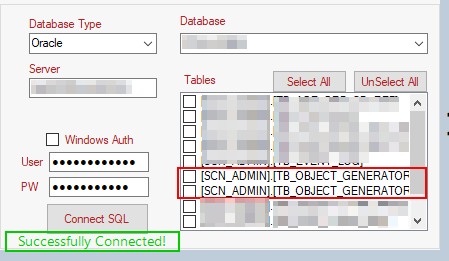
Feedback 1: On the source system (left side) of the screen, when I connect to Oracle using [Connect SQL], it should display "Successfully Connected." similar to how it displays a message/confirmation on the right-side (Target Snowflake side). Please see screenshot attached.
Feedback 2: In the screenshot attached, as you see on the left-side, where I am supplying my Oracle Username and Password, there should probably be another textbox to enter the SCHEMA name (which I believe, you are displaying it currently under the Database drop-down. Here's the logic how this should assist the user -- if I specify the name of the source schema in Oracle where I would like to PROXY CONNECT into, then upon successful connection, the Database drop-down should reflect that SCHEMA name. Example, I use SAMEERPREMJI as my Oracle Username and give a pwd and also, specify the source SCHEMA NAME as SCN_ADMIN, then the Database drop down should default to SCN_ADMIN and automatically, reflect the tables under this schema. However, if a user does not specify a SCHEMA NAME, then upon successful connection to Oracle, the Database drop-down should default to the value of the Oracle USERNAME that was entered to authenticate -- in this case, it would default to SAMEERPREMJI.
Feedback 3: In the screenshot attached, as you see under the TABLES list, I have 2 tables which begin with the same name, however, since there is no horizontal scroll-bar, I have no idea which one to pick! Please add a horizontal scroll-bar.
Feedback 4: On the Snowflake blue section (right-side), please ensure that the tabbing sequence goes from the top-to-bottom, from left-to-right. When I was typing in Account URL text box and hit a tab on my keyboard, it did not move to USER text box but rather, went to another text box in a random order.