
ghidra
 ghidra copied to clipboard
 NationalSecurityAgency
Map Variable
Is your feature request related to a problem? Please describe. Ghidra's decompiler occasionally identifies two distinct variables even though they probably originated from only one variable in the original source code. I think this is something, decompilers will never be able to entirely figure out on their own.
Describe the solution you'd like Since I don't think that this is something, decompiler are even able to figure out on their own in general, I suggest to add a feature to the Decompile View that enables the user to "map" two variables onto each other. The result would be that the decompiler will show the same name for both variables, only show one variable declaration, and ignore assignments of one of the two variables to the other for example.
Describe alternatives you've considered An alternative would be to name the two variables similarly. The resulting code is far unclearer of course and contains a lot of redundant statements making it harder to read.

This would be incredibly useful! This functionality is already present in IDA Pro, where it helps with readability a lot.

XREF https://github.com/NationalSecurityAgency/ghidra/commit/6c6d5f2f1bbddde1f12136e2b1ae5f9cbc5a9073 and https://github.com/NationalSecurityAgency/ghidra/issues/1830. There's no UI for this yet but to merge a var a into another var b:
- make sure the types are the same in the decompiler
- make sure the types are the same in the listing view (sometimes this is out of sync wrt the decompiler)
- rename
atob$1
Now uses of a should be merged into b.

I tried this and it did not work:
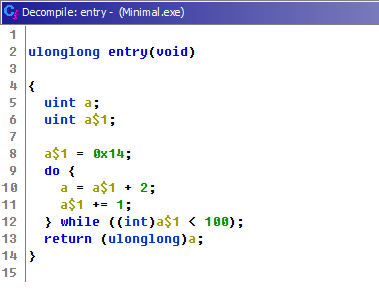
It was attempted for this Windows binary (Base64):
TVqQAAMAAAAEAAAA//8AALgAAAAAAAAAQAAAAAAAAAAAAAAAAAAAAAAAAAAAAAAAAAAAAAAAAAAAAAAAyAAAAA4fug4AtAnNIbgBTM0hVGhpcy
Bwcm9ncmFtIGNhbm5vdCBiZSBydW4gaW4gRE9TIG1vZGUuDQ0KJAAAAAAAAABt/QLDKZxskCmcbJApnGyQKPFlkSicbJAo8W+RKJxskCjxk5Ao
nGyQKPFukSicbJBSaWNoKZxskAAAAAAAAAAAAAAAAAAAAABQRQAAZIYDACNNHF8AAAAAAAAAAPAAIgALAg4WAAIAAAAEAAAAAAAAABAAAAAQAA
AAAABAAQAAAAAQAAAAAgAABgAAAAAAAAAGAAAAAAAAAABAAAAABAAAAAAAAAIAYIEAABAAAAAAAAAQAAAAAAAAAAAQAAAAAAAAEAAAAAAAAAAA
AAAQAAAAAAAAAAAAAAAAAAAAAAAAAAAwAADgAQAAAAAAAAAAAAAAAAAAAAAAAAAAAAAAAAAAACAAADgAAAAAAAAAAAAAAAAAAAAAAAAAAAAAAA
AAAAAAAAAAAAAAAAAAAAAAAAAAAAAAAAAAAAAAAAAAAAAAAAAAAAAAAAAAAAAAAAAAAAAudGV4dAAAAFMAAAAAEAAAAAIAAAAEAAAAAAAAAAAA
AAAAAAAgAABgLnJkYXRhAACwAAAAACAAAAACAAAABgAAAAAAAAAAAAAAAAAAQAAAQC5yc3JjAAAA4AEAAAAwAAAAAgAAAAgAAAAAAAAAAAAAAA
AAAEAAAEAAAAAAAAAAAAAAAAAAAAAAAAAAAAAAAAAAAAAAAAAAAAAAAAAAAAAAAAAAAAAAAAAAAAAAAAAAAAAAAAAAAAAAAAAAAAAAAAAAAAAA
AAAAAAAAAAAAAAAAAAAAAAAAAAAAAAAAAAAAAAAAAAAAAAAAAAAAAAAAAAAAAAAAAAAAAAAAAAAAAAAAAAAAAAAAAAAAAAAAAAAAAAAAAAAAAA
AAAAAAAAAAAAAAAAAAAAAAAAAAAAAAAAAAAAAAAAAAAAAAAAAAAAAAAAAAAAAAAAAAAAAAAAAAAAAAAAAAAAAAAAAAAAAAAAAAAAAAAAAAAAAA
AAAAAAAAAAAAAAAAAAAAAAAAAAAAAAAAAAAAAAAAAAAAAAAAAAAAAAAAAAAAAAAAAAAAAAAAAAAAAAAAAAAAAAAAAAAAAAAAAAAAAAAAAAAAAA
AAAAAAAAAAAAAAAAAAAAAAAAAAAAAAAAAAAAAAAAAAAAAAAAAAAAAAAAAAAAAAAAAAAAAAAAAAAAAAAAAAAAAAAAAAAAAAAAAAAAAAAAAAAAAA
AAAAAAAAAAAAAAAAAAAAAAAAAAAAAAAAAAAAAAAAAAAAALkUAAAAjUEC/8GD+WR89sNMi89Ii/lJi8hID7bCTIvRSMHpA3QgSIvQSMHgCEgLwm
aL0EjB4BBIC8KL0EjB4CBIC8LzSKtJi8pIg+EH86pJi/nDAAAAAAAAAAAAAAAAAAAAAAAAAAAAAAAAAAAAAAAAAAAAAAAAAAAAAAAAAAAAAAAA
AAAAAAAAAAAAAAAAAAAAAAAAAAAAAAAAAAAAAAAAAAAAAAAAAAAAAAAAAAAAAAAAAAAAAAAAAAAAAAAAAAAAAAAAAAAAAAAAAAAAAAAAAAAAAA
AAAAAAAAAAAAAAAAAAAAAAAAAAAAAAAAAAAAAAAAAAAAAAAAAAAAAAAAAAAAAAAAAAAAAAAAAAAAAAAAAAAAAAAAAAAAAAAAAAAAAAAAAAAAAA
AAAAAAAAAAAAAAAAAAAAAAAAAAAAAAAAAAAAAAAAAAAAAAAAAAAAAAAAAAAAAAAAAAAAAAAAAAAAAAAAAAAAAAAAAAAAAAAAAAAAAAAAAAAAAA
AAAAAAAAAAAAAAAAAAAAAAAAAAAAAAAAAAAAAAAAAAAAAAAAAAAAAAAAAAAAAAAAAAAAAAAAAAAAAAAAAAAAAAAAAAAAAAAAAAAAAAAAAAAAAA
AAAAAAAAAAAAAAAAAAAAAAAAAAAAAAAAAAAAAAAAAAAAAAAAAAAAAAAAAAAAAAAAAAAAAAAAACNNHF8AAAAADQAAAGgAAAA4IAAAOAYAAAAAAA
AjTRxfAAAAAA4AAAAAAAAAAAAAAAAAAABHQ1RMABAAAFMAAAAudGV4dCRtbgAAAAAAIAAAOAAAAC5yZGF0YQAAOCAAAHgAAAAucmRhdGEkenp6
ZGJnAAAAADAAAGAAAAAucnNyYyQwMQAAAABgMAAAgAEAAC5yc3JjJDAyAAAAAAAAAAAAAAAAAAAAAAAAAAAAAAAAAAAAAAAAAAAAAAAAAAAAAA
AAAAAAAAAAAAAAAAAAAAAAAAAAAAAAAAAAAAAAAAAAAAAAAAAAAAAAAAAAAAAAAAAAAAAAAAAAAAAAAAAAAAAAAAAAAAAAAAAAAAAAAAAAAAAA
AAAAAAAAAAAAAAAAAAAAAAAAAAAAAAAAAAAAAAAAAAAAAAAAAAAAAAAAAAAAAAAAAAAAAAAAAAAAAAAAAAAAAAAAAAAAAAAAAAAAAAAAAAAAAA
AAAAAAAAAAAAAAAAAAAAAAAAAAAAAAAAAAAAAAAAAAAAAAAAAAAAAAAAAAAAAAAAAAAAAAAAAAAAAAAAAAAAAAAAAAAAAAAAAAAAAAAAAAAAAA
AAAAAAAAAAAAAAAAAAAAAAAAAAAAAAAAAAAAAAAAAAAAAAAAAAAAAAAAAAAAAAAAAAAAAAAAAAAAAAAAAAAAAAAAAAAAAAAAAAAAAAAAAAAAAA
EAGAAAABgAAIAAAAAAAAAAAAAAAAAAAAEAAQAAADAAAIAAAAAAAAAAAAAAAAAAAAEACQQAAEgAAABgMAAAfQEAAAAAAAAAAAAAAAAAAAAAAAA8
P3htbCB2ZXJzaW9uPScxLjAnIGVuY29kaW5nPSdVVEYtOCcgc3RhbmRhbG9uZT0neWVzJz8+DQo8YXNzZW1ibHkgeG1sbnM9J3VybjpzY2hlbW
FzLW1pY3Jvc29mdC1jb206YXNtLnYxJyBtYW5pZmVzdFZlcnNpb249JzEuMCc+DQogIDx0cnVzdEluZm8geG1sbnM9InVybjpzY2hlbWFzLW1p
Y3Jvc29mdC1jb206YXNtLnYzIj4NCiAgICA8c2VjdXJpdHk+DQogICAgICA8cmVxdWVzdGVkUHJpdmlsZWdlcz4NCiAgICAgICAgPHJlcXVlc3
RlZEV4ZWN1dGlvbkxldmVsIGxldmVsPSdhc0ludm9rZXInIHVpQWNjZXNzPSdmYWxzZScgLz4NCiAgICAgIDwvcmVxdWVzdGVkUHJpdmlsZWdl
cz4NCiAgICA8L3NlY3VyaXR5Pg0KICA8L3RydXN0SW5mbz4NCjwvYXNzZW1ibHk+DQoAAAAAAAAAAAAAAAAAAAAAAAAAAAAAAAAAAAAAAAAAAA
AAAA==

I have a case now where this actually "worked", and I assume it worked as intended, but it did not work quite as I anticipated:

While the variable bb$1 has been "merged" into bb in the variable block at the beginning of the function, the symbol is still called bb$1 in the code. I had hoped that I could use this feature to actually have it show up as bb, not bb$1. The way it is implemented now, it seems barely better than renaming the symbols manually to, say, bb_1. The true value of merging symbols is that they actually appear under the exact same name in the decompiled code.
The desired behavior is that (when 'a' is merged into 'b')...
- All references to 'a' now display as 'b'
- 'a' no longer appears as a local variable in the decompiler view. (Add an option to display variable mappings)
- The code is reanalyzed as though 'a' no longer exists, (ie. 'a' is actually 'b') so that silliness like 'b = b' does not appear in the output
- The mapping is reversible (can be undone)

I have had mixed results with this technique. In some cases, I was actually able to map a variable x to a variable y by renaming x to y$1, as in, x actually turned into y and was displayed as such - but in most cases it does not work. I have the hypothesis that this depends on the storage of the variable, i.e. it might work for register variables, but not for stack variables. However, I haven't rigorously tested this.
A few notes and observations:
- I am having quite a bit of success using this on variables that are stored in registers.
- No success for variables stored on the stack.
- Just now I used this to rename a variable whose location is denoted as
HASH:..., and as a result, the routine could no longer be decompiled successfully (the status message indicated that the function was decompiling, but even waiting for 25 minutes did not allow the decompiler to finish).
Here is a simple example where the suggested approach did not work for me: Hackaday U - Introduction to Reverse Engineering with Ghidra / Session 2 - Exercise func-example-1 - Function getLowerCase:
I was using Ghidra 10.3.2 with Java 20.0.1
