
obsidian-footnotes
 obsidian-footnotes copied to clipboard
 MichaBrugger
first footnote doesn't seem to jump down
The first time I press CMD-J (my shortcut) it creates ^1 on the line and adds a ^1 foot note but the cursor does not jump down to edit it. After that when I press CMD-J it adds ^2 and does jump to the right location.
I do have vim mode turned on. So not sure if related.

As discussed on Discord: I'll look into it this weekend and come back to you asap!
@everyone else: If you experience the same issue, please leave a comment with your system specs and let me know if you have vim enabled or not. That would help a lot, thanks 👍🏼

same here, cursor stays in the original position
configs: mba M1, Monterey 12.3; Obsidian version 0.13.33(vim disabled); plugin version 0.0.8

The first time I press CMD-J (my shortcut) it creates ^1 on the line and adds a ^1 foot note but the cursor does not jump down to edit it. After that when I press CMD-J it adds ^2 and does jump to the right location.
I do have vim mode turned on. So not sure if related.
The first time I press CMD-J (my shortcut) it creates ^1 on the line and adds a ^1 foot note but the cursor does not jump down to edit it. After that when I press CMD-J it adds ^2 and does jump to the right location.
I do have vim mode turned on. So not sure if related.
I ran into a similar problem. But I didn't open vim

I am also experiencing the same bug. I am using Windows 10, Obsidian Version → v0.13.33, Vim not enabled

I have this same issue, i am using Mac v0.14.5... would be great if this can be fixed.

Sorry for the long wait, I've been drowning in work lately. But I'll give my best to get to it before end of April. Of course, a PR would be welcome too.
I have done some testing with freshly set up vaults on two different systems (Windows 11 and Arch Linux) and somehow can't recreate the issue you're describing (Obsidian v0.14.6, installer version v0.12.10). Are there any more specifications you could give me that might allow me to identify the cause of the issue?
Has anyone tried this on a freshly set up vault? (There is always a chance it might be caused by some sort of interaction with another plugin)
the problem is that every time I open a new md file, only the first time I use the shortcut the cursor doesn't jump down and from the second time everything works fine. I think maybe the first time you missed it?
Thanks for the quick reply! Have you generally tried to reinstall the plugin? I'll later also try to run it on my machines with the other plugins you mentioned (can't test iOS since I don't own a Mac).
Thanks for the quick reply! Have you generally tried to reinstall the plugin? I'll later also try to run it on my machines with the other plugins you mentioned (can't test iOS since I don't own a Mac).
sorry i made a mistake, the problem still exists in a new vault
Ok! I'm suspecting it might be related to the installer version of Obsidian, but I will need to confirm that. I'll let you know as soon as I know more 👍🏼
this is really odd (good) - the problem has gone away!! i have tested it just now, both in a new vault and also in my old vault. The only different being i have the latest version 0.14.6, as opposed to 0.14.5 when i was seeing the problem. I wonder if the obsidian app update has somehow corrected something?
Update - i misspoke - still happns. i have recorded a GIF here: https://imgur.com/a/WQOjeAI
It happens sometimes, but not all the time.. really strange.
Thanks so much for that recording, that helps a lot! I will recreate your setup there and see if I can reproduce the bug. Once I can reproduce it, I'm pretty sure I can fix it too.
@nagapow, I was able to reproduce the bug with your setup (thanks again for the recording). Unfortunately, I got a few exams this week, but I put in a blocker for the weekend, so by end of the week, it should be fixed 👍🏼
Thank you for reviewing this - i am amazed by what you guys can do. Good luck with your exam, no rush and look forward to the update.
I just came here to report the same issue to discover you've already managed to replicate it! :-) I use quite a lot of plugins for various reasons, but this one is the one I use for almost every note and has transformed my work - it really is a superb plugin. Thank you for writing it and working so hard to maintain it and get to the bottom of this issue. 👍

From what I can see, this is because of this line here, the cursor cannot be set because Obsidian deems it "outside of [the] document":
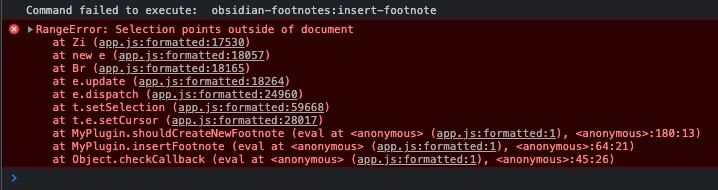
Setting 2 breakpoints in the code while running the action on a (new) document confirms this, because the error only appears when I skip past the first breakpoint and hit the second one:
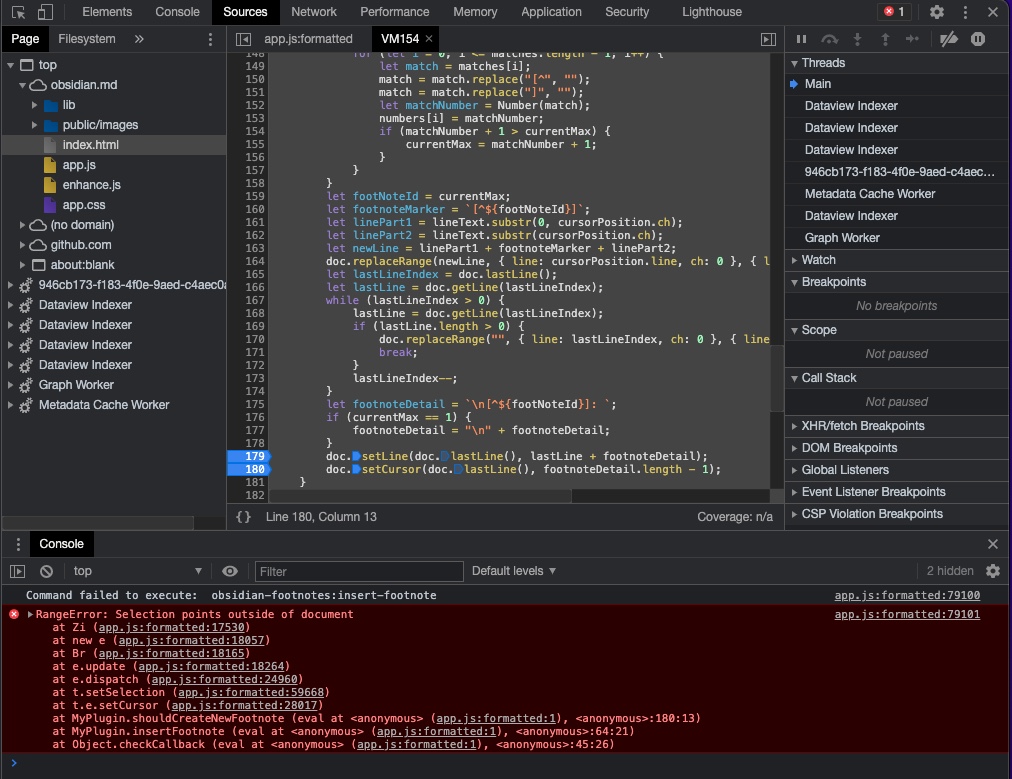
I will try to do some more digging over the weekend, but the issue most certainly lies in the fact that Obsidian thinks we're placing the cursor somewhere outside the document. Even though we aren't. Programming is fun 🙃

thanks for looking into this - sounds like from what you are saying this might be an Obsidian issue as opposed to the plugin itself.... could be a long wait for the fix?
Not necessarily. I'm pretty sure there's a way for this plugin to work around it. But like I said, I'll see if I can make some time to look into it over the weekend 😄
I can't do anything but thank you guys/girls for your patience! I'm really sorry you had to wait so long for me to finally fix this. It's really been a super stressful semester, but I shouldn't have made promises I can't keep.
It would be great if you could give me some feedback if this fixed it for you. I'll wait with closing the issue until I got some confirmation about that.
I've manually applied the patch in my .obsidian folder and it seems to work now @MichaBrugger! 🎉 Only thing it's not doing is inserting an empty line after my note. Here's a gif for context:
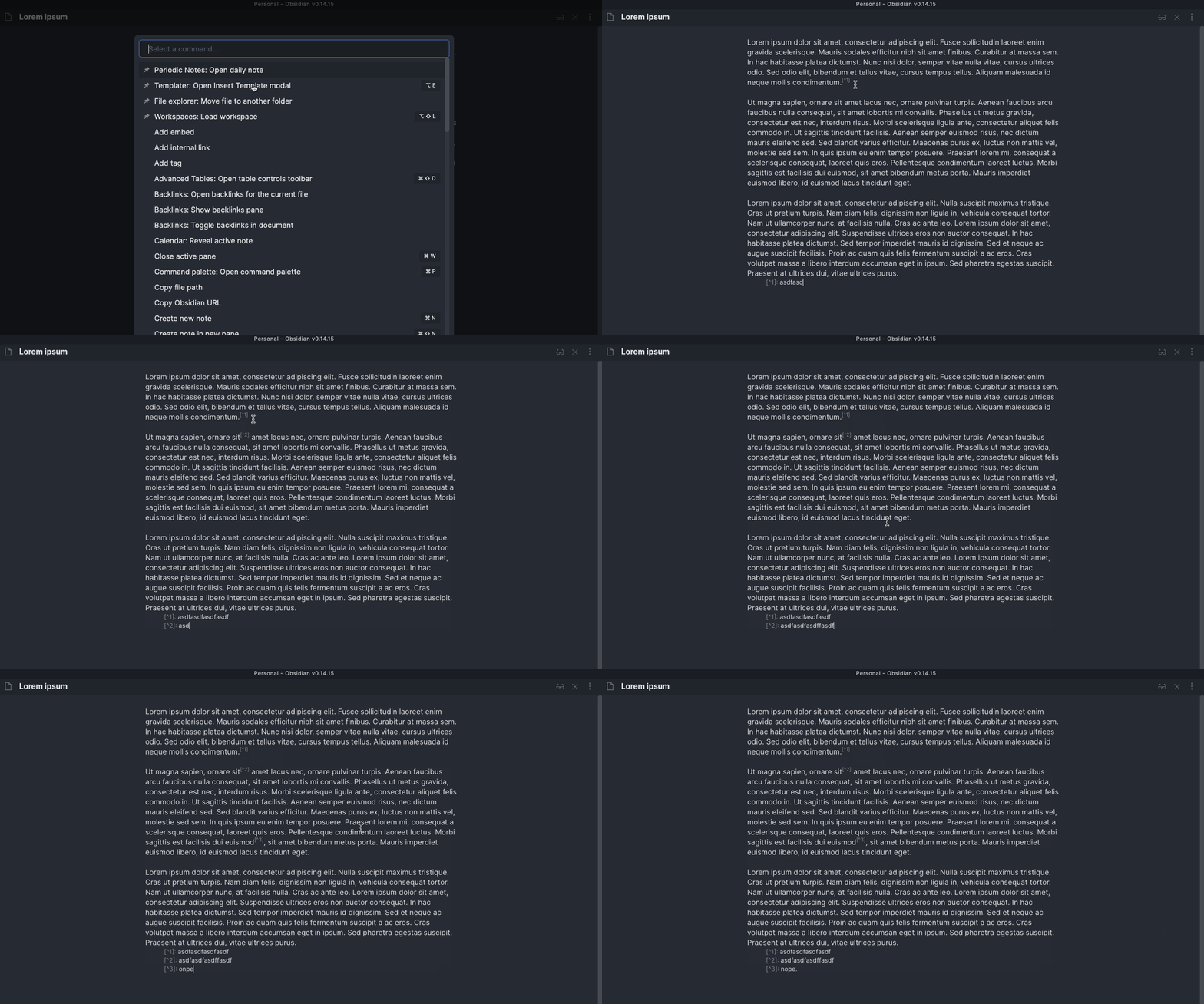
I expected there to be an empty line after my final paragraph and the first footnote detail. However, this is a minor gripe, absolutely nothing that prevents this from being released imo 👍
@svenluijten thanks for the quick feedback, that should be fixed now too 👍🏼
I tested on several of my files - it is working as expected 👍 thank you so much for fixing this, really grateful that you created this plugin, still using it daily.
thanks for testing and your feedback. I will create a new release tomorrow 👍🏼
@svenluijten Is this still a problem for you, or is it fixed? If it's fixed, I will close this issue.

This was already fixed, it just needed a release tagged. I just tested it on the latest stable version and it's not a problem anymore, so this issue can be closed!