
osmeditor4android
 osmeditor4android copied to clipboard
 MarcusWolschon
Add an image as background
Sometimes, when plans are available for an area, it is necessary to be able to use that as a background in the editor. Furthermore, it is also important to be able to resize and rotate the image to suit the data. JOSM supports this via the PicLayer plugin.
Since this is relatively less-used functionality, it may be preferable to implement it as a plugin.

I believe using https://mapwarper.net/ and then adding the URL (or as MBTiles) as custom imagery is probably the better solution.

That sounds interesting! Might it be worth while implementing that behind the scenes to help the users(like MapRoulette, Osmose, etc are integrated)?

Mapwarper might be great but on my itty bitty cell phone their website's rather hard to read just to begin with. All I have is just this little tiny .JPG plat,
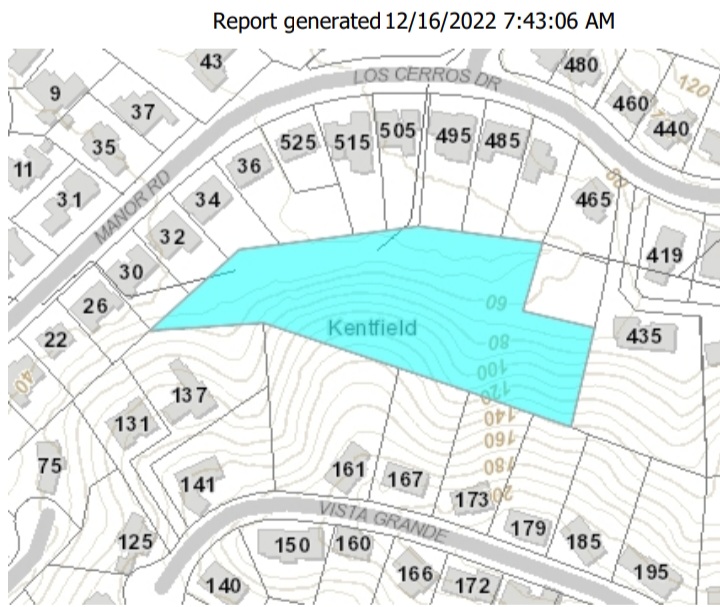 that I would want to just quickly put into Vespucci and get it over with.
Then I can trace out the boundaries of the park without having to switch back and forth looking at the map. It's just a simple .jpg. North is up. The only problem would be just sticking it in the right spot (I would just slide it around until comfortable,) then zooming in a little until it matches the rest of the streets of the other backgrounds. (Yes, assume the mayor gave written permission to use it.)

Most maps have some distortion in imagery that needs to be fixed when matching to OSM data (or gps traces, etc). I don't think simple scaling and moving will be enough in most cases.
In my opinion, it should be OK that some features aren't possible to implement for all screen sizes.
I haven't seen mapwarper gui but it should definitely be possible to implement this using the same feature set as the PicLayer plugin in josm. The user inputs 1-3 reference points manually and then moves them around until the image fits, using a simple affine transform (See android.graphics.Canvas.setMatrix.
I finally had a look at MapWarper today. A solution built into Vespucci would be preferable, such that one has to neither login anywhere nor upload anything to a web service.