
Leaflet.markercluster
 Leaflet.markercluster copied to clipboard
 Leaflet
Optional spiderfy sort function
It would be awesome if order in which markers were displayed in the spiderfied spirals was able to be customized. My use case: I want to use single marker mode and have my markers be pie charts. I'd like to be able to sort the single marker nodes so that markers of the same color are all grouped together.
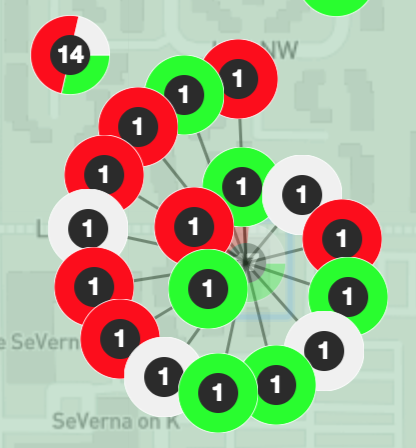
For example in this screenshot I'd like to be able to have a meaningful orderering to the colors displayed in the spiral.

How did you get donut charts working? I've been struggling with this, and have been considering switching to a different plug-in

@Neato-Nick I'm using react and as such react-leaflet and react-leaflet-markercluster. The pie chart is from react-svg-piechart so you could take a look at their implementation. I use the iconCreateFunction provided by leaflet-markercluster which returns a divIcon.
L.divIcon({
      html: ReactDOMServer.renderToStaticMarkup(
        <div>
          <span
            style={{color: childCount === 1 ? 'white' : ''}}
            className={`cluster-count${childCount === 1 ? ' single' : ''}`}>
              {totalCount}
          </span>
          <PieChart data={data}/>
        </div>
      ),
      className: `pie-cluster`,
      iconSize: new L.Point(size, size)
    })