

 KingSora
Strange behavior with Nuxt.js
Hello, thanks for this very nice plugin. I faced a very strange problem using it with server side rendering in Nuxt.js. I created layout with sidebar and by clicking a button i can change it's width. My main and sidebar's contents are wrapped with OverlayScrollbars-vue component. Once the width of sidebar is changed (by setting flag in store), the main content's native scrollbar becomes visible along with plugin. It's looks like
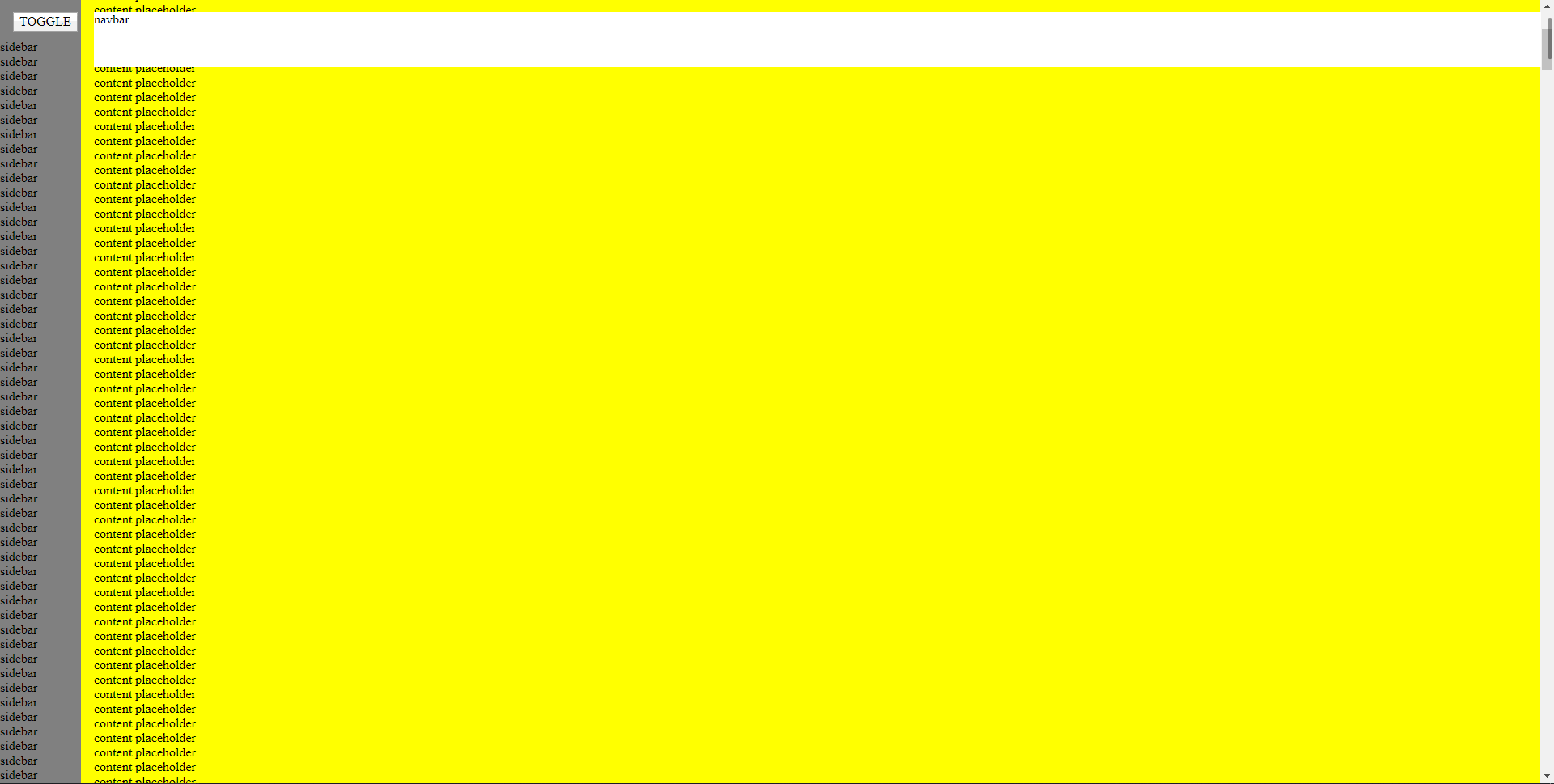
This problem only exists with server side rendering, with SPA mode everything is seems ok. I created a sandbox to reproduce this behavior. In my project sidebar's scrollbar also brakes, but i couldn't reproduce it here. Applying v-once directive to overlayscrollbar-vue component fix it, but i need reactivity in child nodes. Tested it in Chrome and Firefox.
https://codesandbox.io/s/elastic-cerf-nrtlh
To reproduce:
- Open codesandbox;
- Click 'toggle' button in sidebar

Good day!
Thanks for the example, but on my side is working everything correctly inside your example. Please tell me which OS and browser (with version) you are using.

Thanks for fast response.
OS Windows 10.0.18363 Build 18363 Browser: Chrome 81.0.4044.138 (Official Build) (64-bit)
I changed type of plugin's include and now (at least for me) its brakes every time. Open sandbox again, please.
Alright, now it breaks on my side too.
It seems like part of the DOM classes are overwritten by the classes inside the components template which is defined here. This is just the "blueprint" and there are classes added depending on the browser and its feature support. Thats why the scrollbar gets visible, because the class which is responsible to hide it gets added during initialization.
I honestly don't know what is happening.
Edit: Ok, after a bit of testing, this is indeed happning because vue re-renders the OverlayScrollbarsComponent which is in the yellow content. Thats why the classes are reset. In the Component logic itself isn't anything defined which re-renders the component so I don't exactly know why thats happening.
Well, thanks for taking a look at this. Will try to find some workaround. Seems like the problem is related to Nuxt and SSR mode, because with pure Vue plugin works as expected and never brakes with the exactly same layout.
Please let the codesandbox example unchanged as I can experiment with it to fix the issue. I believe I can create a workaround for that.
I created a GitHub repository for this because for some reason i couldn't fork my own codesandbox without getting strange errors.
git clone https://github.com/ExileofAranei/overlayscrollbars-nuxt-experiments.git npm install npm run dev
Hello!
Sooo... any news on this issue? I've faced the exact same problem while using this plugin with Nuxt.
The only workaround I've found is to wrap plugin's tags in <client-only></client-only>, so it's seems to be related to Nuxt's SSR.

@disjointed I'm trying to figuring it out.. but I got no answer yet: https://github.com/nuxt/nuxt.js/issues/7706
I've just hit this same issue, went in circles for ages wondering what it was! Again only happens on SSR, and fixed by using client-only but then you lose the SSR part.
Seems that some of the initialisation that happens on the server during SSR is carried over to the client, (which has a different browser) and so invalidates some of the probed config. Looks to me like the Vue component needs to rerun some of the initial checks when it gets mounted again and hydrated on the client side.

I did manage to get it working by hacking in a reinitialisation after mounting on the component using it:
<template>
    <overlay-scrollbars ref="scroll" class="h-100" :options="{ className: 'os-theme-light' }">
            etc...
    </overlay-scrollbars>
</template>
In script...
mounted() {
    this.$refs.scroll._osInstace.destroy();

    setTimeout(() => {
        this.$refs.scroll._osInstace = OverlayScrollbars(
            this.$refs.scroll.osTarget(),
            this.$refs.scroll.options || {},
            this.$refs.scroll.extensions
        );
    }, 0);
}

@Alex-Sokolov Yes quite, my thought too, this was just a quick hack! Having looked at the code for the Vue component, the initialisation of the overlayscrollbars happens in the mounted hook which only runs client-side already, so I wonder if in fact all it needs to a wrap around next tick or similar in mounted?
setTimeout doesn't guarantee that template will be updated, but nextTick recommended for using in that cases
Another quick hack is to give the component a key to let it rerender on mounted:
<overlay-scrollbars :key="scroll" :options="{ scrollbars: { autoHide: 'scroll' } }"> CODE HERE </overlay-scrollbars>
mounted() { this.$nextTick(() => { this.scroll++; }); }

This should be hopefully fixed with v2 and with it the newest version of overlayscrollbars-vue (v0.4.0)