
Unbox
 Unbox copied to clipboard
 JohnSundell
Separators in stashed groups and in windows
Problem Statement
I have some opened "New Tab" tabs. They are separators of another tabs. Tab Stash 2.9 used to show ALL open tabs, but Tab Stash 2.10 doesn't. Without tabs-separators:
- it's harder to find needed tabs;
- it's impossible to move to needed blank tab from Tab Stash tab;
- it's impossible to close superfluous blank tabs from Tab Stash tab.
I've reverted to Tab Stash 2.9.
Also, as blank tabs can be separators, stashing blank tabs can be useful. No-stashing blank tabs was requested in #122 as setting, not mandatory behaviour.
Preferred Solution
- Show ALL open tabs or introduce setting for it.
- Introduce setting for stashing ANY tabs, including blank tabs.
Readers: If you are also interested in seeing this feature be developed, please vote for it by giving the ORIGINAL POST a thumbs-up using the :smiley: button. You are welcome to leave comments and discuss the feature request, but "Me too!" comments are not counted by the voting system.

Sorry to hear you were negatively impacted by this change. However, it was in fact a bug, and would sometimes cause weird behavior (like creating stashes with a single new-tab entry). So the bad news is there is not going to be a setting for this. But the good news is there's a pretty easy workaround.
You can manually create a "separator" bookmark with a title like - and a URL of about:blank in Firefox's bookmark manager. Then put the bookmark into one of your Tab Stash folders (usually under "Other Bookmarks" > "Tab Stash"). (Make sure you don't have a completely blank title, or Tab Stash will fill the URL as the title whenever you copy it.)
Later, if you need more separators, you can make copies of your separator bookmark using the new feature in v2.10 which lets you select/move multiple tabs at once. Just select it (by clicking its icon), hold down the Alt or Option key, and click the "stash" button on the group you want to copy it to (can even be the same group).
Hope this helps, let me know how this workaround works for you.

It was in fact a bug, and would sometimes cause weird behavior (like creating stashes with a single new-tab entry).
I've never considered it as a bug. It was normal behavior: stashing new-tab -> getting new-tab entry.
Described workaround isn't convenient. I can make separators through bookmark, but new tabs are opened as usual new tabs. Actually, my "New Tab" tabs isn't blank. They have title "New Tab", useful content inside and hidden URL moz-extension://0055cbeb-da13-46f1-a959-98d25766d89b/new-tab-page.html (I use New Tab Page Container addon). And they are not shown in Tab Stash 2.10.
But stashing new tabs isn't main. What about first part of my issue? I am sure that in Open Tabs list, ALL tabs must be shown. Open Tabs list must correspond with browser tabs.
Described workaround isn't convenient. I can make separators through bookmark, but new tabs are opened as usual new tabs. Actually, my "New Tab" tabs isn't blank. They have title "New Tab", useful content inside and hidden URL moz-extension://0055cbeb-da13-46f1-a959-98d25766d89b/new-tab-page.html (I use New Tab Page Container addon). And they are not shown in Tab Stash 2.10.
I'm not sure I understand why you would want to open a separator in its own tab. But the workaround also works with your custom new-tab page, just replace about:blank with your preferred URL. Except that as you probably already know, Firefox does not allow Tab Stash to open pages for other extensions, so ANY version of Tab Stash would have trouble with loading your "New Tab" page.
But stashing new tabs isn't main. What about first part of my issue? I am sure that in Open Tabs list, ALL tabs must be shown. Open Tabs list must correspond with browser tabs.
I'm not sure what you mean by "Open Tabs" list--are you referring to the "Unstashed Tabs" list or the experimental feature #116? If the latter, do remember that experimental features are not supported and you should expect things to break sometimes. Though if you're using #116 and not seeing new/empty tabs in the list, this would be good to know.
Setting aside the specific behavior for the moment, I think there might be a feature request buried in here somewhere that I'd like to tease out, because there might be another way to solve your problem that doesn't involve re-introducing a bug that multiple people have complained about.
- In what situations do you find yourself wanting to create separators? Can you give me some examples?
- Where do you need separators (in the open window, and/or in the stash) and why?
- Why are the alternatives (opening multiple windows, creating multiple stashes) not good enough? (Or, what can separators do that these alternatives can't?)
But the workaround also works with your custom new-tab page, just replace about:blank with your preferred URL.
No, Tab Stash 2.10 doesn't stash those tabs. They have title "New Tab" and hidden URL moz-extension://0055cbeb-da13-46f1-a959-98d25766d89b/new-tab-page.html . If I modify URL, for example, to moz-extension://0055cbeb-da13-46f1-a959-98d25766d89b/new-tab-page.html?a=1 , than URL stops to be hidden, title "New Tab" is replaced with URL and Tab Stash 2.10 shows that tabs and can stash them. Unfortunately, new tabs are opened with unmodified URL.
if you're using #116 and not seeing new/empty tabs in the list.
Yes, I am using #116, and Tab Stash 2.10 doesn't show New Tabs.
In what situations do you find yourself wanting to create separators? Can you give me some examples?
- Separators between tabs of different containers (to not mix up containers accidentally).
- If I close active tab, than another tab is activated. Separator prevents loading of tab that is needless at the moment.
- New Tabs is not just separators. New Tabs is used for opening bookmarks in definite places among another tabs.
Where do you need separators (in the open window, and/or in the stash) and why?
If there is great number of tabs, separators helps to find needed tabs. I need separators in open window; stashing them is also useful, as stash with separators is more comfortable, looks better and correspond with browser tabs before stashing.
opening multiple windows
I don't use multiple windows. Tabs only from one window are saved between sessions.
creating multiple stashes
I constantly switch between groups of some tabs separated by separators. I don't stash them during actively using.
Stashing New Tabs wasn't bug; skipping New Tabs is bug in my sense. If I select some tabs, including New Tabs, for stashing, than I expect that all selected tabs will be stashed. Moreover, in Tab Stash 2.10 I can right-click New Tab, click "Stash This Tab", and nothing happens. It's clearly bug.
I have the same requirements as Mikhail. Previously, I organised my tabs in "groups" which, in my Tab Stash sidebar, were separated by "New Tab" tabs. Now that "New Tab" tabs have disappeared, I can no longer clearly see where my groups of tabs begin and end, as they are all mushed together.
An alternative solution might be to have a special "Separator" page (perhaps a local html file?) which appears as a clear separator tab between groups of tabs in the Tab Stash sidebar; e.g. "----------------------------------------". This separator tab should be easily insertable (after the current tab), perhaps with a hotkey, or perhaps with a Tab Stash tab button.
The "Separator" page itself might redirect to, or pull in, whatever content is configured for "New Tab", or it might be separately configurable with Tab Stash features (including options, settings etc.).
Hope this helps.

I've found workaround ~~that most likely would work for me: https://addons.mozilla.org/ru/firefox/addon/new-tab-homepage/ With this addon, New Tabs have UNhidden URL moz-extension://0055cbeb-da13-46f1-a959-98d25766d89b/new-tab-page.html and same title (not "New Tab"). So, I think Tab Stash 2.10 would treat these tabs as normal tabs (but I haven't tested).~~
But it would be better if new Tab Stash could work with New Tabs as v2.9 can.
Tried 2.10.1. Workaround doesn't work!:( Despite absence of "New Tab" title and unhidden URL moz-extension://0055cbeb-da13-46f1-a959-98d25766d89b/new-tab-page.html , Tab Stash 2.10.1 doesn't show these tabs and doesn't stash them, i.e., Tab Stash 2.10.1 recognizes them as new tabs. I've reverted to Tab Stash 2.9 again.
The workaround gives you a way to insert separators manually into your stashes (you can even give them names like "------" if you want), and to restore/insert "separator" tabs at the right places when restoring a stash. I tested this before posting and tested again on 2.10.1 just now:
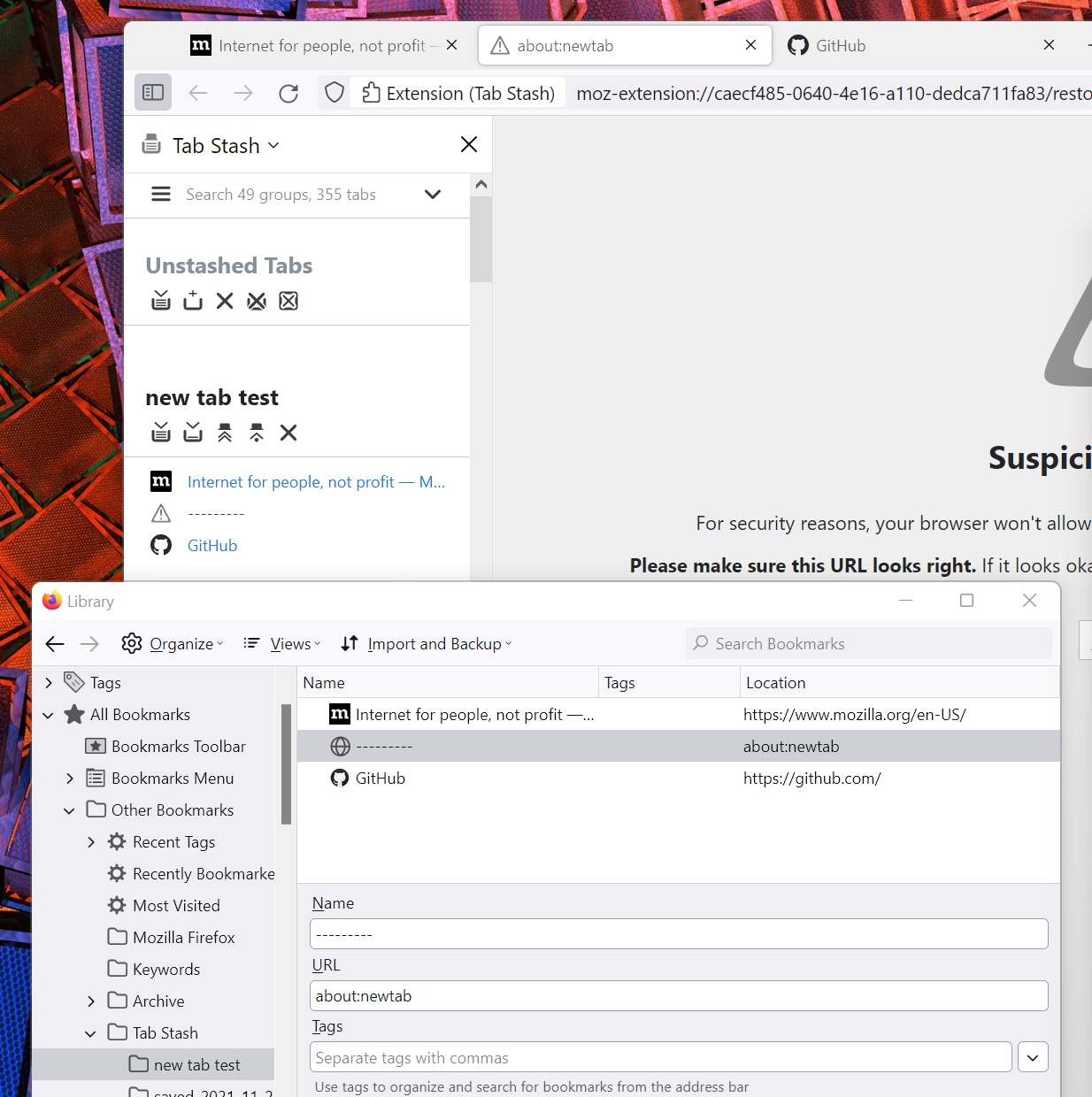
Interestingly there is some odd behavior when restoring pages that need a redirect (like about:newtab or any other "privileged" page) that might be biting you here (I'll have to look into it further). If you're not seeing pages restored correctly, restoring duplicates, etc. I suggest using another URL that's not privileged (any http or https URL will do). https://example.com/ works nicely for instance. I know it's not the new-tab page, but it takes very few resources so I think addresses most of @Mikhail-M12 's points.
In any case, the point about separators in groups is well-taken and I'll keep it in mind for a future release. Thanks to you both for your comments.
I was thinking about it, and have a vague working idea, that this could maybe be a possibly separate addon compatible with Tab Stash. The rough sketch I have in my mind is:
- the plugin would allow creating a "fake" "separator" tab
- the tab would have an URL of an "internal HTML page" of the particular plugin, with an URL query parameter specifying color of the particular separator, and/or any other customization (hopefully such URL query is allowed for internal pages of Fx plugins!)
- based on this URL query, the interal HTML page's JS would dynamically generate a favicon of a particular color (not sure what shape: rectangle? bullet? diamond? something more fancy? would need to show up nicely in sidebar and in regular tab bar) + some "separatorish" title of the tab (some fancy unicode bar? TBD)
- initial color would be generated randomly from a predefined set of reasonable & differing colors, but then could be adjusted per-separator on the separator tab's actual content view (i.e. after clicking the separator tab, the "internal HTML page" would allow tweaking the color)
- some way to let user easily create such separator tab would need to exist (didn't think too much yet how this could be done; keyboard shortcut? context menu? some button somewhere?)
edit: after some further thinking, such separator tabs could then also be potentially recognized by Tab Stash, and a set of tabs from one separator till the end, or till another separator, could then be stashed as a new group with a single click.
