react-hotkeys-hook
 react-hotkeys-hook copied to clipboard
 JohannesKlauss
Mac: 'option+n' don't trigger callback
We have a WebApp, where we implemented 'alt+n' to open a form. This also triggers, when user focuses an input field and press 'alt+n'. Means, current form will be saved and a new one will be opened. Everything work's as expected!
Now we refactor all our hotkey events for Mac users and we struggle at 'option+n'. It work'e well, when no form is open. Also when the form is open, but no input field is focused. But when an input field is focused (and that should be the most case in a form), 'option+n' writes a tilde '~' and nothing happens.
We also have 'alt+t, option+t' to open a modal with templates to fill the form. This also work's well with alt and option as modifier.
Only 'option+n' doesn't. Any idea why? What I recognized in this sample code from your documentation page now, that 'option+n' counts 2 up when not focusing the input field, but 'alt+n' or 'option+t' counts 1 as it should. Seems to be that underline below tilde what is shown but does not remain.
function ExampleComponent() {
  const [count, setCount] = useState(0)

  useHotkeys(
   'alt+n, option+t, option+n',
   (e) => {
     e.preventDefault;
     setCount(prevCount => prevCount + 1);
   },
   {
     enableOnTags: ["INPUT", "TEXTAREA"],
   }
  );

  return (
  <div>
    <span>Received the combination {count} times.</span>
    <input />
  </div>
  )
}

Hi @SO-Eng thx for raising that issue. I'll check that out and come back to you :)

The same issue seems to happen on MacBook for firefox for all other combinations. Example: I show a popup, in the event of clicking CMD + F6, and none of the other combinations such as Option + F6 or SHIFT + F6 work.

I also ran into this too on Chrome on macOS Ventura. Defining a hotkey for 'option+1' (or 'option+2') didn't register. Interestingly, it seems to be a regression in version 4.0.2 since reverting to version 3.4.7 fixed it.

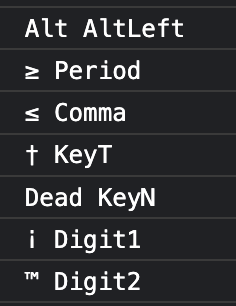
I ran into this as well, with 'alt+.'. I found a workaround; I suspect something is matching against the typed character (i.e. holding "option" and pressing "." outputs "≥"). Defining the hotkey as 'alt+., alt+≥' works without issue.
For reference, with this event listener...
document.addEventListener('keydown', e => {
  console.log(e.key, e.code)
})
I got this output from typing option + period, comma, t, n, 1 and 2: