
jsbsim
 jsbsim copied to clipboard
 JSBSim-Team
Flight behaviour issue
I'm submitting a ...
- [X] bug report
- [ ] feature request
- [ ] support request => Please do not submit support request here, see note at the top of this template.
Describe the issue
We're having a disorientation issue after a few minutes of flight, causing the aircraft to have random movements and then crash.
What is the current behavior?
After a few minutes of flight, the aircraft gets disorientated while being way above the ground in a stable state. The strength of this disorientation is not constant, sometimes it doesn't affect much the trajectory of the aircraft, but it also can be very violent and moves the aircraft below the ground level in an instant. Video showing the issue below. All the collisions and physics between all the 3d models present have been disabled.Please tell us about your environment:
- Windows 11 Pro. Ryzen 7 5700G, 48Go RAM, RTX 3080Ti
- JSBSim version : Unreal Engine v1.01
- Simulating in mixed reality with a Varjo XR-3
- Language if applicable : Using Blueprints to interact with JSBSim plugin on Unreal Engine
Other information Vidéo of the issue : https://www.youtube.com/watch?v=qiI9f86q_c0&feature=youtu.be

Hmm, so based on that video how sure are you that it isn't a simple example of a stall and then spin?
Use JSBSim's logging facilities to log useful state information, e.g. airspeed, attitude, altitude, alpha (angle of attack), beta (angle of sidelip), control positions, g, pitch rate, roll rate, yaw rate etc. Given this sort of state information you can work out what is happening.

Hi,
It is neither a problem of stall or spin, since it happened also during a normal level flight or a simple visual circuit. Even if it was a stall or spin, the earth woudnt appear chaotic like that, and unfortunately that happend during a demonstration of our simulator when a General of the french air force previously test pilot tried it! i am also a aerodynamics engineer and airline pilot, so I know exactly what parameters to look for when it is aircraft related. here it is just unbelivable what is happening, and I think it is related to the plugin and the way it is implemented. It is why we contacted you to help us figure out the possibilities related to our pb. Thanks in advance for your consideration and help Regards Jeff link to the issue: https://youtu.be/nRTNc35lMx8
It is neither a problem of stall or spin, since it happened also during a normal level flight or a simple visual circuit.
Although the video link you submitted, which was the only real data you submitted wasn't of a normal level flight.
It is why we contacted you to help us figure out the possibilities related to our pb.
You do realise that JSBSim is a free open source project with just part-time volunteers who offer their assistance right? And it's easiest for part-time volunteers to help when there are detailed logs. So generate some logs, and plot some of the data from just before when the issue starts and into the issue a bit. Maybe for example we'll see some weird extreme control inputs being passed into JSBSim, possibly due to a bug in how the plug-in processes inputs for example. Or we might see that according to JSBSim the aircraft's attitude is still level whereas again maybe a bug in the plug-in is passing bogus attitude information to the Unreal Engine.
Very difficult to go around figuring it out without data. Especially since the Unreal plug-in is very new, and was developed by someone from Unreal and not by the regular JSBSim developers.
our simulator when a General of the french air force previously test pilot tried it!
I developed a JSBSim based VSS (Variable Stability System) sim for a test pilot school which I've been supporting and updating over the last 10 years or so. In my case I integrate with Prepar3D for the outside graphics.
Here's a few things to confirm/check in order to eliminate potential issues: -check frame rate of the game and see if it's dropping/losing frames before/while issue happens. -confirm the frame rate is locked -look at the unreal engine output log and take note of any warnings or errors or anything unusual.
I also suggest you do the following to eliminate any other issues first: -test your game without VR, without earth model/ground/buildings, without other plugins/features you added etc. This is to verify that the other features aren't causing problems.
My thought is that something else is broken/not configured and is causing frame rate drop after a few minutes. Frame rate drop will introduce instability/jumping in JSBSim, currently the plugin will run JSB sim steps even when Unreal drops framerate. So this will cause the simulation to "jump" because unreal slowed down, while JSB stays running in real time. This can easily be fixed, as the original plugin v1.0 ran JSB together with Unreal engine, ie Unreal Engine runs one frame, JSB then runs one simulation step. v1.01 was updated to run JSB at 120hz, no matter what Unreal Engine runs at. So if you run Unreal Engine at 10fps or 200fps, JSB still goes 120hz.

v1.01 was updated to run JSB at 120hz, no matter what Unreal Engine runs at. So if you run Unreal Engine at 10fps or 200fps, JSB still goes 120hz.
I remember seeing this, so sort of assumed this was the default, but I guess they could be using V1.0. Also a JSBSim log output will confirm what rate JSBSim is being run at by looking at the time column.
It looks like the problem is not aerodynamic but rather mathematical. The extreme and instant changes in orientation look like an equation is "blowing up". Some factor is going to near infinity.
Does this flight model work OK outside of Unreal?
-- Dave
On 8/29/22 02:43, Matthias wrote:
I'm submitting a ...
- bug report
- feature request
- support request => Please do not submit support request here, see note at the top of this template.
Describe the issue
We're having a disorientation issue after a few minutes of flight, causing the aircraft to have random movements and then crash.
What is the current behavior?
After a few minutes of flight, the aircraft gets disorientated while being way above the ground in a stable state. The strength of this disorientation is not constant, sometimes it doesn't affect much the trajectory of the aircraft, but it also can be very violent and moves the aircraft below the ground level in an instant. Video showing the issue below.
Please tell us about your environment:
- Windows 11 Pro. Ryzen 7 5700G, 48Go RAM, RTX 3080Ti
- JSBSim version : Unreal Engine v1.01
- Simulating in mixed reality with a Varjo XR-3
- Language if applicable : Using Blueprints to interact with JSBSim plugin on Unreal Engine
Other information Vidéo of the issue : https://www.youtube.com/watch?v=qiI9f86q_c0&feature=youtu.be https://www.youtube.com/watch?v=qiI9f86q_c0&feature=youtu.be
— Reply to this email directly, view it on GitHub https://github.com/JSBSim-Team/jsbsim/issues/711, or unsubscribe https://github.com/notifications/unsubscribe-auth/AFDBF2OH7XTKQ3BWEPNPXX3V3SA4JANCNFSM575DMGHQ. You are receiving this because you are subscribed to this thread.Message ID: @.***>

Hi guys,
first of all thanks for your contribution to solve our pb, we truly appreciate! We are trying to figure out what is wrong with jsbsim with a log of all the parameters, since I do agree that one equation should go near infinity suddenly and then crash the simulator. We have also to understand what is the impact of jsbsim running at 120hz and UE at around 40-60fps. We are using the varjo XR-3, doing mixed reality and using cesium as terrain all at the same time, and trying to get more fps from UE! We will come back here as soon as we have some more information Thanks again guys Regards Jeff

We have also to understand what is the impact of jsbsim running at 120hz and UE at around 40-60fps.
There shouldn't really be an issue. The UE screen refreshes should really just be at a half to a third of what JSBSim is running at. Maybe control inputs if they're sampled at the same rate as the UE rendering will only be fed into JSBSim at 40-60Hz which again I don't see that being an issue.
Let's see what the JSBSim logs show.
I may have misdirected about checking for FPS issues, I just finished testing various unsteady and poor FPS conditions in UE5/JSB plugin and could not reproduce any issues. UE5 JSBsim plugin is actually more stable that I thought with bad frame rates. When I initially updated plugin to be a fixed 120hz, I only tested a steady range of FPS and not unsteady FPS. So I am happy to report unsteady and low FPS is not a problem.
It appears you are using custom controller input. Possibly this is the source of strange flight behaviour? As Sean said, logs will help.
Hello.
So I am happy to report unsteady and low FPS is not a problem.
We see that with our tests and it's a good point to know !
It appears you are using custom controller input. Possibly this is the source of strange flight behaviour? As Sean said, logs will help.
After your message, we tried with a lot of different controller (simple keyboard, simple xbox controller) without our plugin for custom inputs and the result is the same, the issue continue to appear.
After a long flight sessions with activated logs, we took some screenshots on a video (frame by frame) to see the difference in all datas. And we see a radical difference at the exact issue moment. There is there screen :
First flight :
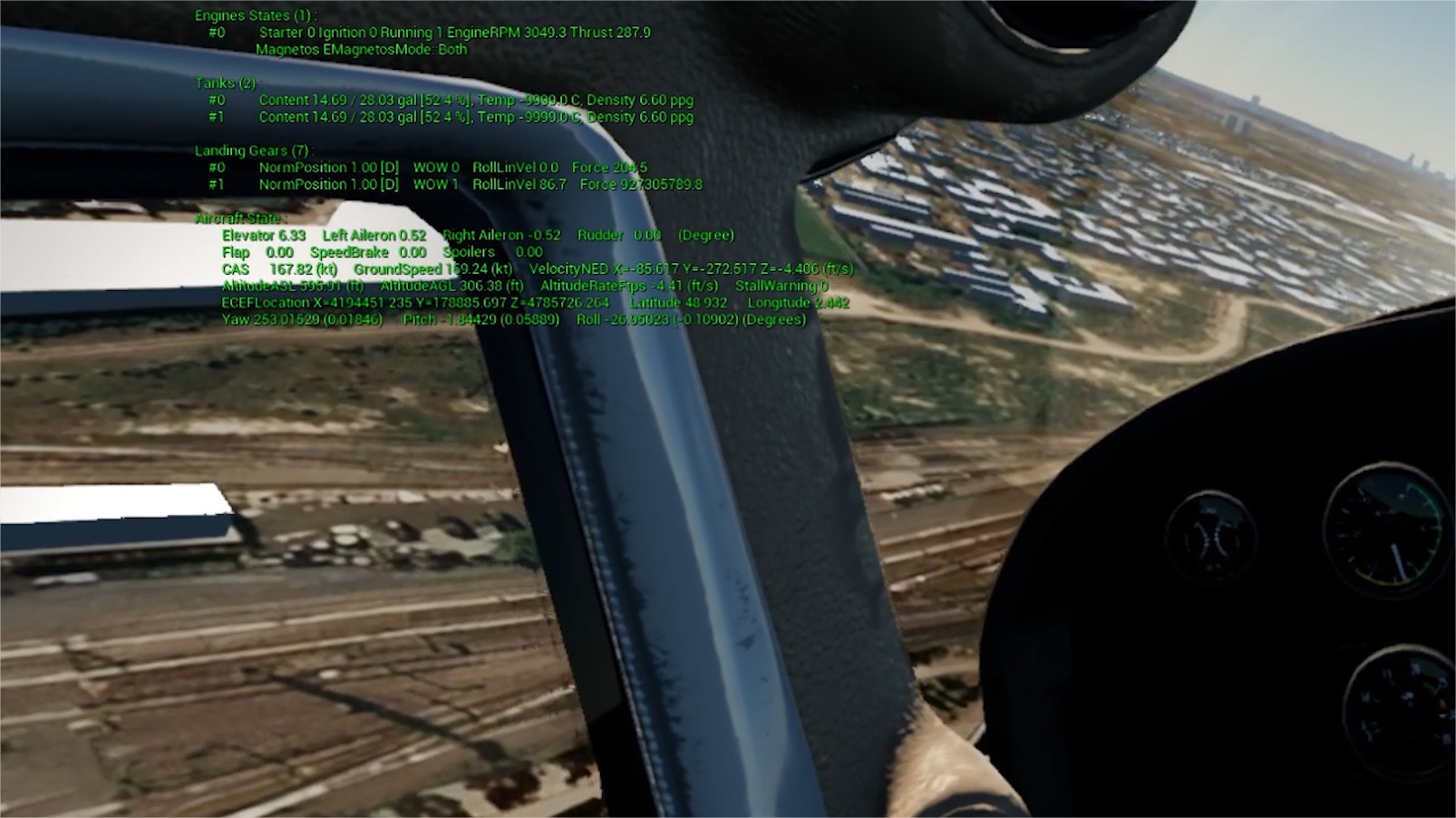
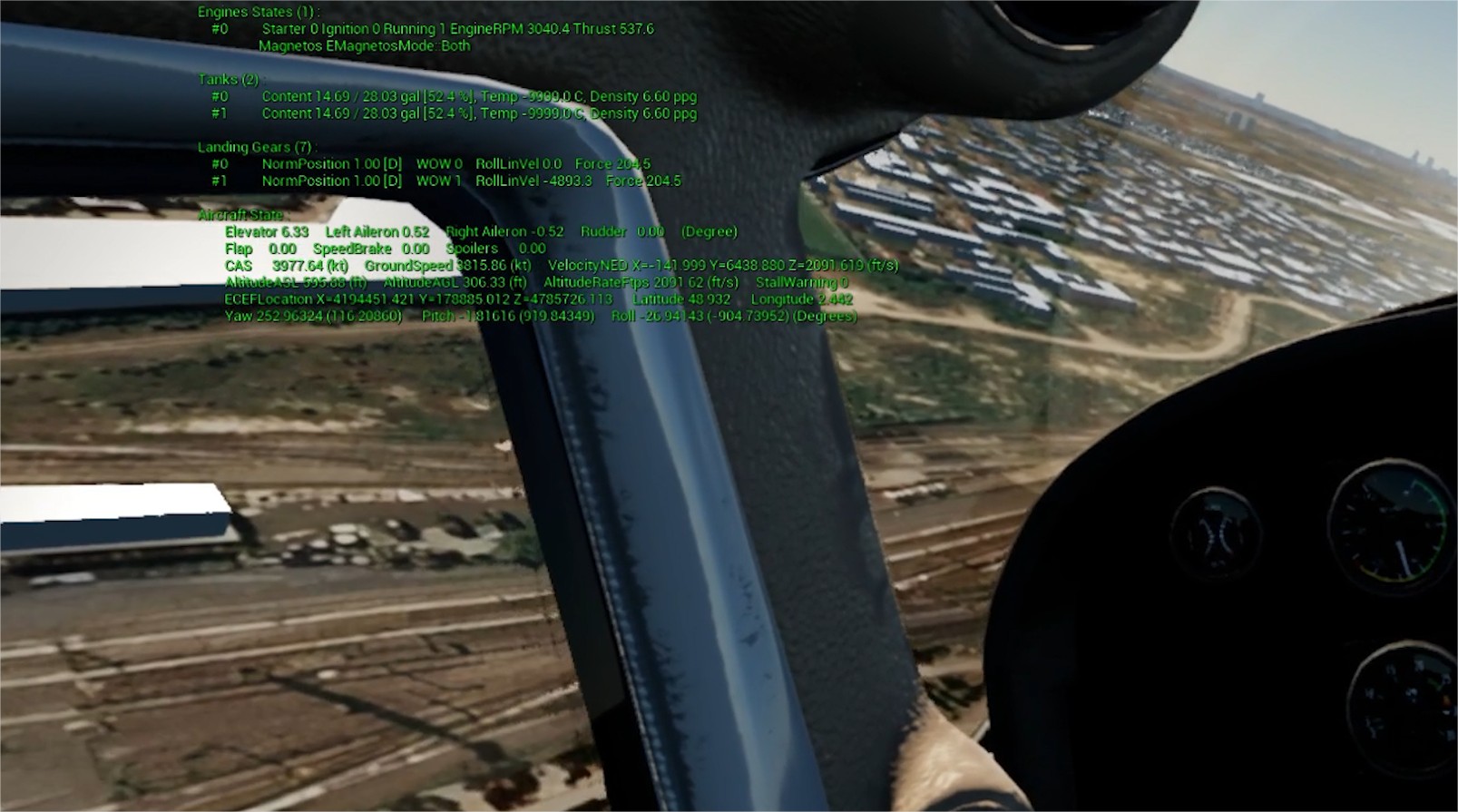
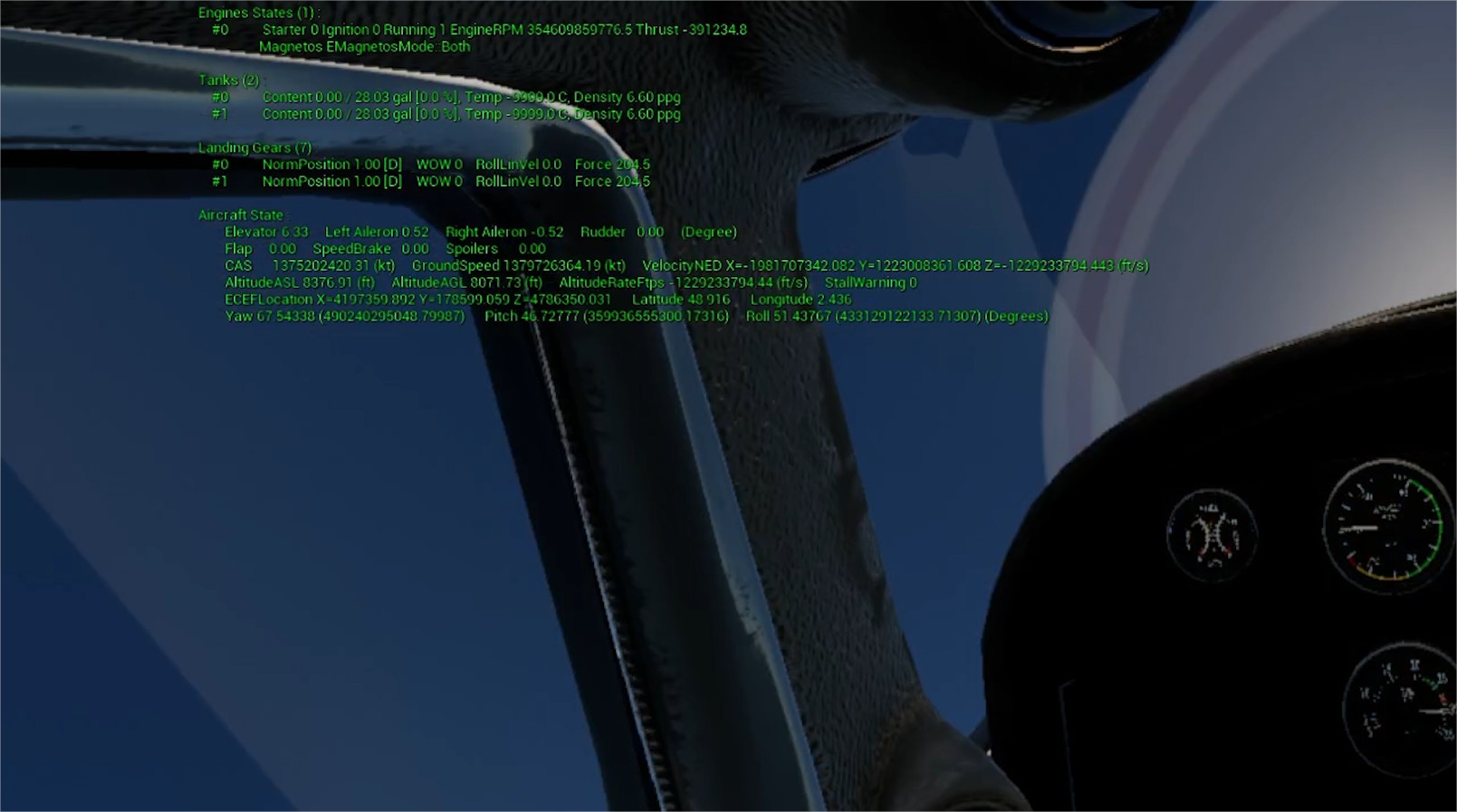
Second flight :
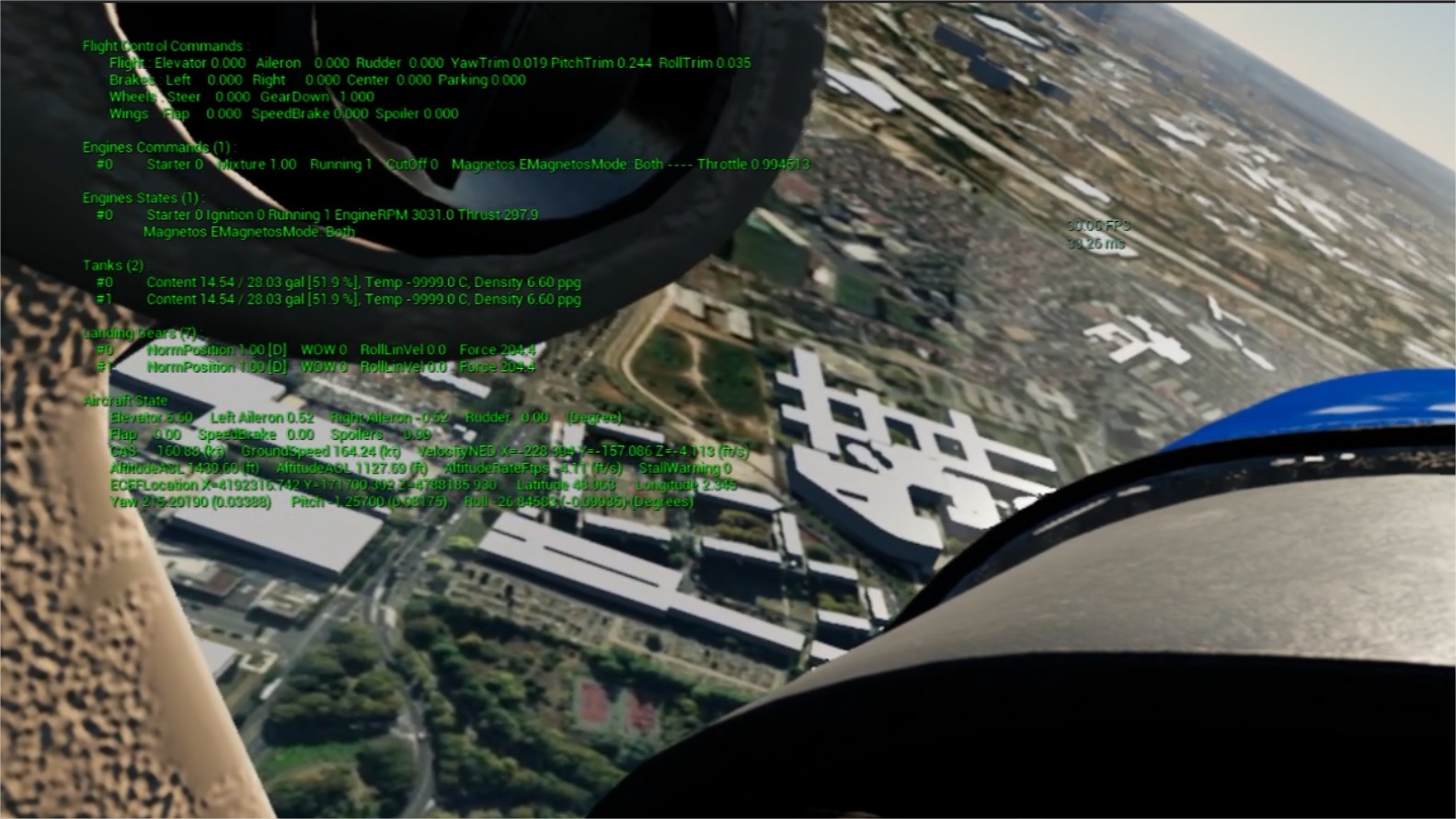
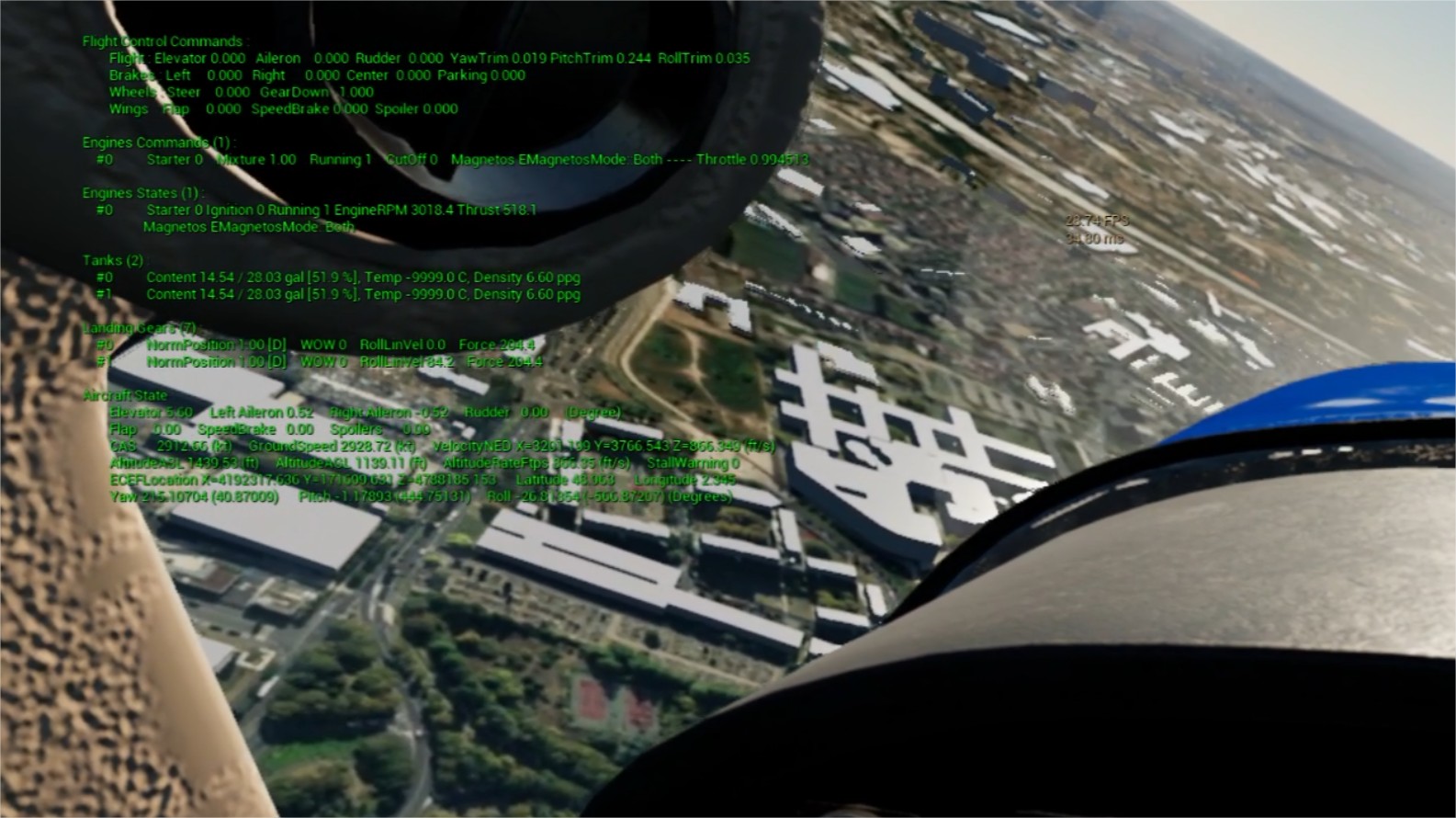
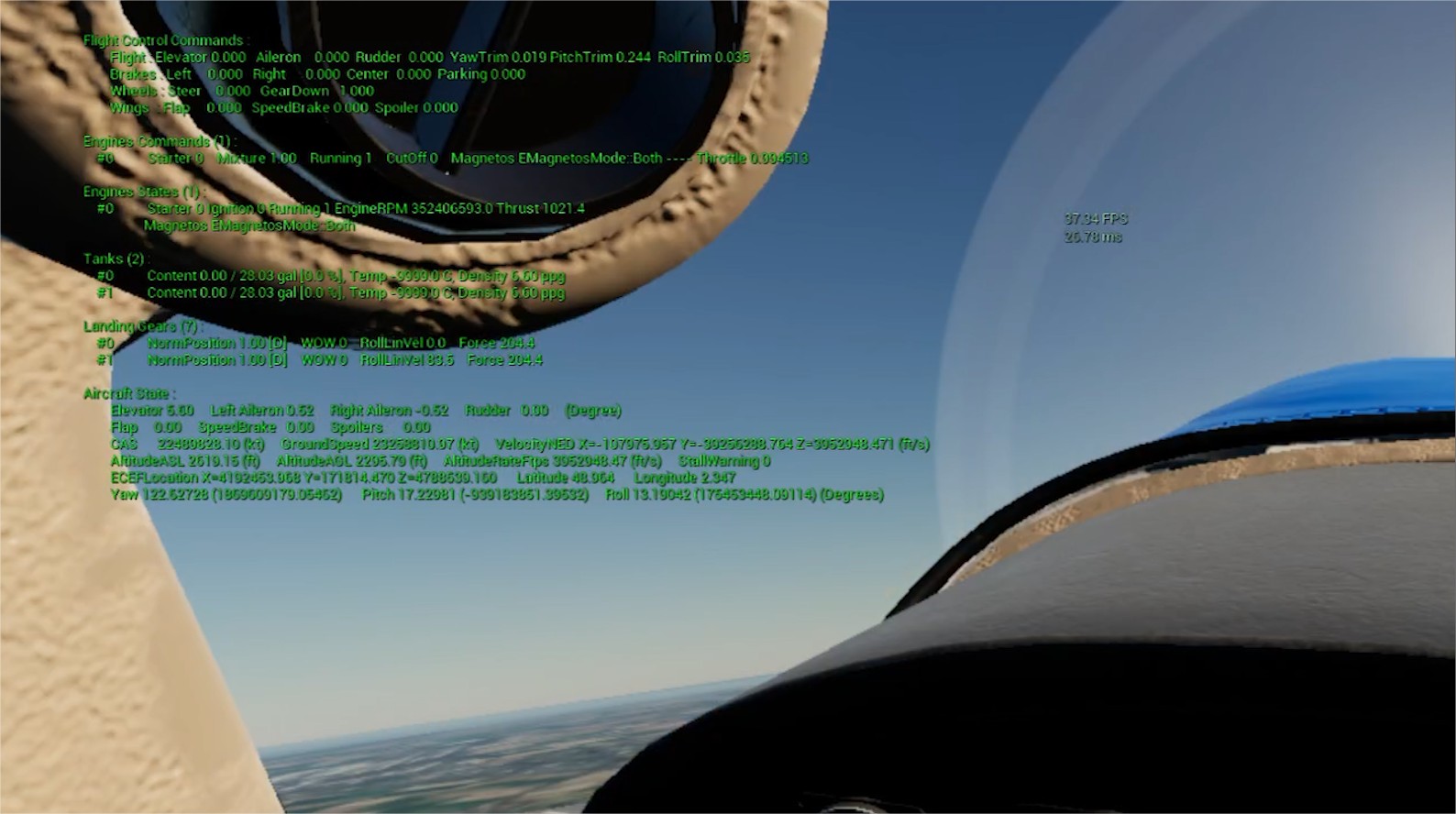
Do you have an explaination for this changement ?
Thanks for your help !
Can you not plot the relevant data from the JSBSim output log showing say from 2s before the issue to 2s after the issue appears? And attach a snippet of the log as well.
It's not ideal in terms of trying to help to try and squint at this sort of text overlaid on the outside world.
Plus there is a lot of useful information missing, e.g. what are the exact sim times that JSBSim is seeing, is there something going wrong where instead of a dT of 1/120 JSBSim is being fed a massive dT when things go wrong? This would show up in the logs.
But squinting through the screenshots it looks like CAS increases massively and obviously unrealistically, e.g. from 167kt to 3977kt. Again a wild guess without seeing the logs, maybe a sudden massive dT is passed, possibly due to some memory corruption somewhere so that when integrating the acceleration you end up with a massive change in CAS velocity.
We couldn't find a specific logs directory for JSBSim infos, is there any ? The following pastebin is the end of the logs file of a session where the issue occured. Hoping this will help you :
https://pastebin.com/71MDCfqA
Thanks by advance
Did you notice the massive increase in CAS between the video frames you posted? Did you notice anything else that I haven't spotted in the video frame data when you analysed them?
After a long flight sessions with activated logs....
I assumed that meant you had enabled JSBSim output logs.
We couldn't find a specific logs directory for JSBSim infos, is there any ?
You have to activate output logging. There are multiple ways, the easiest for you is to probably add an <output> element to your aircraft file, configured to output to CSV. For example here is what a CSV output element looks like, from the C172x aircraft:
https://github.com/JSBSim-Team/jsbsim/blob/4195e16f83f41e2b510dbb7062ce3cba733fcdef/aircraft/c172x/c172x.xml#L1197-L1216
In general there are categories of properties you can output, e.g. <rates>, or you can go more fine-grained and list individual properties, and you can mix both types.
For example here are a number of individual properties, example from the 737 model aircraft:
https://github.com/JSBSim-Team/jsbsim/blob/4195e16f83f41e2b510dbb7062ce3cba733fcdef/aircraft/737/737.xml#L845-L894
I "replied to list", but I don't see the message here (maybe it takes a long time) so I'll repost:
It looks like the problem is that landing gear 1 is on the ground and generated a great force:
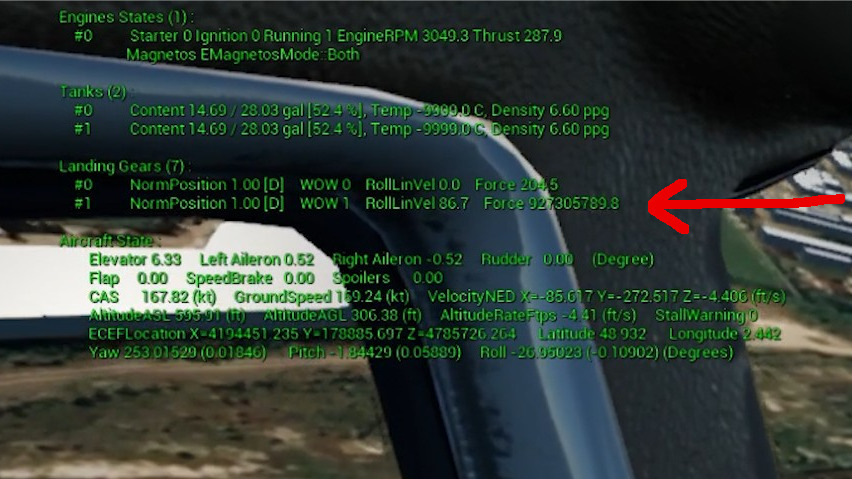
Maybe an inches/meters units error in the landing gear definition in the configuration file?
@dpculp well spotted. Visually and looking at the altitude values it appears the aircraft is a fair distance from the ground. However I wonder if there is a bug in their code in terms of feeding in terrain elevation to JSBSim from their terrain data.
and using cesium as terrain
Although in Flight 2, none of the 3 screenshots show a WOW for any of the gears at least displayed. Is this because there was a brief WOW in-between the video frames they've shared? Plus does the (7) indicate that there are 7 gears and they're only printing out values for 2 of the gears? Which is really why I've been pushing for proper JSBSim output logs rather than haphazard screenshots with difficult to read text etc.
I wonder if four of those landing gear are actually structural contact points? In any case it appears some part of the airplane model is contacting the ground while the airplane is at 300 feet AGL altitude, and this is generating a crash.
I remember a time when crash detection and subsequent simulation freeze was added to JSBSim, and then removed because one user wanted to animate crashes. The problem is that without crash detection the model doesn't know it has crashed, so it behaves wildly until some factor reaches NaN.
Likely causes of ground contact are:
- Ill-defined contact points (wrong units?)
- A problem in the terrain interaction routine with cesium (@seanmcleod)
@ImKogane so definitely make sure you log gear data and also elevation data so that we can see whether the issue you're seeing is specifically due to JSBSim thinking that one of the gears is suddenly underground causing a massive spring force.
Have you written your own ground callback to feed elevation data into JSBSim from the Cesium terrain DEM you're using?
You have multiple serious errors in your Unreal output log that you pasted a link to, it's a surprise the simulation didn't entirely crash.
I would re-check details for cesium from https://dev.epicgames.com/community/learning/tutorials/mmL/a-diy-flight-simulator-tutorial to see if you missed some setting. It's like there's issues with the cesium/level/ue world.
From your logs, I do not think there is any bug in the plugin, and has something to do with cesium and the level/map of your game. Unfortunately I do not use cesium.
First error of your log is saying that you've gone outside the Unreal Physics World bounds. (has nothing to do with JSBSim, but it could be causing JSBSim to malfunction indirectly) [2022.08.31-14.23.24:670][980]LogOutputDevice: Error: AABBTree encountered invalid bounds input. Forcing element to global payload. Min: X=-113527076612833200.000 Y=-26845629848152164.000 Z=-155918927914946592.000 Max: X=-113527076612833200.000 Y=-26845629848152156.000 Z=-155918927914946592.000. If Bounds are valid but large, increase FAABBTreeCVars::MaxNonGlobalElementBoundsExtrema.
Edit: I tried looking to see if there's a simple solution but I don't see any and I don't use Cesium to test. I would post to the Cesium community forum and ask if anyone has issues with UE5 and physics going out of bounds. It seems their Cesium UE5 plugin is new and still has many bugs they are fixing if you search around.
Edit2: As pointed out in the previous posts, if the gear is the actual problem and is momentarily putting some object outside the UE5 world physics, thus causing UE5 to momentarily crash, (which then crashes JSBSim.) Either way some object is outside the UE5 world physics at some point in time.
Hello,
I would post to the Cesium community forum and ask if anyone has issues with UE5 and physics going out of bounds
Thank you for your answers, we will soon be in touch with the Cesium team. However, we tested to fly in an empty level, without Cesium, and the issue still occurs.
More news : After testing, we currently have 2 types of problems :
- One giving the aircraft some random rotations/speed for a brief period, sometimes minor enough to take back the control of the aircraft (with normal fly infos values).
- Another one causing the entier project to crash suddenly, with the extreme log values you saw earlier (with the WOW of gears before crash).
We use to try with the C172p or c182 aircrafts, ande we have the problem. But when we launched with the 737 (in a Cesium level), we could fly for more than an hour without any physics/stability issue. Maybe the problem is related to the Cessna files ?
You have to activate output logging.
Sadly we couldn't find any C172 or C182 logs in our system after removing the commentary in the xml, is there another parameter to enable or a very specific path to find the files ?
To precise, we didn't touch the JSBSIM source code. We use the native code for Unreal provided on the repository.
Hope this will help, and thank you again by advance.
specific path to find the files
I don't think JSBSim does anything specific to the path, so I'm guessing it will be in the current directory for your process. You can double-check by setting a breakpoint in FGOutputTextFile etc.
Okay, we found the logs and we can show it ! (but we don't understand a lot of things in it to be honest)
UEReferenceApp.log Pastebin if you want : https://pastebin.com/9hSjyV1m
There are the last 2 seconds of the simulation, just when the problem changes the behavior and makes the plane crash.
With the logs, I hope this time, it will help.
Okay, we found the logs....
Although what you've found isn't the CSV file that the output element should be creating. What you've found is some log generated by the UE plug-in code. This is very limited compared to what can be output via the output element, it only reports the position, attitude, translation velocity and angular velocity.
We use to try with the C172p or c182 aircrafts, ande we have the problem. But when we launched with the 737 (in a Cesium level), we could fly for more than an hour without any physics/stability issue. Maybe the problem is related to the Cessna files ?
I think the 737 is flying without problems because the landing gear is retracted. Retracted landing gear don't interact with the terrain elevation. Try flying it with the gear down.
I can't reproduce any issues with the c172p in UE5 while using the original demo map from the plugin. I am using all default settings, nothing change from demo map and plane. I use the demo's BP Airliner, type in c172p in the level editor, hit play, and fly for many minutes.
I think the 737 is flying without problems because the landing gear is retracted. Retracted landing gear don't interact with the terrain elevation. Try flying it with the gear down.
We fly for many inutes with the 737 and the gear down and everything is great, the problem does not occur again. Actually it's just with the Cessna aircrafts.
I can't reproduce any issues with the c172p in UE5 while using the original demo map from the plugin. I am using all default settings, nothing change from demo map and plane.
We will try to take the basic demo map to try this in our side too.
Thanks in advance.
Add some code around this line in FGLGear.cpp to conditionally break if the force calculated for the gear is greater than some fairly large magnitude.
https://github.com/JSBSim-Team/jsbsim/blob/375f5be0fdfeb210f4cf66f938e3e6fd426c2966/src/models/FGLGear.cpp#L418
As @dpculp noticed there was an extremely large force being generated by one of the gears. So when the breakpoint is hit then you can inspect the code up and down the stack to try and figure out why at this sort of altitude you're getting contact. In particular what is the ground elevation at that point in time in JSBSim?

Also log these properties in the output element:
        <property> position/terrain-elevation-asl-ft </property>
        <property> position/h-agl-ft </property>
        <property> position/h-sl-ft </property>
Add some code around this line in FGLGear.cpp to conditionally break if the force calculated for the gear is greater than some fairly large magnitude.
We found where is the problem with the JSBSIM Logs in our project. It's because all files (.cpp and headers) in
...\Plugins\JSBSimFlightDynamicsModel\Source\ThirdParty\JSBSim\Include\input_output are ignored in the compilation and so, they never be called in the flight process.

We will find how to add and compile this and after we can normaly have JSBSIM logs.