

 Intel-Media-SDK
I found that using MediaSDK-intel-mediasdk-21.3.5 version failed to decode on the machine (sample_decode.exe h264 -i 1.h264 -o 1.yuv), but using ffmpeg to use avcodec_find_decoder_by_name("h264_qsv"); the decoder can successfully decode normally
System information
- CPU information(
cat /proc/cpuinfo | grep "model name" | uniq): - GPU information(
lspci -nn | grep -E 'VGA|isplay): - Display server if rendering to display(X or wayland):
Issue behavior
Describe the current behavior
Describe the expected behavior
Debug information
- What's libva/libva-utils/gmmlib/media-driver/Media SDK version?
- Could you confirm whether GPU hardware exist or not by
ls /dev/dri? - Could you attach dmesg log if it's GPU hang by
dmesg >dmesg.log 2>&1? - Could you provide vainfo log if possible by
vainfo -a >vainfo.log 2>&1? - Could you provide strace log if possible by
strace YOUR_CMD >strace.log 2>&1? - Could you provide libva trace log if possible? Run cmd
export LIBVA_TRACE=/tmp/libva_trace.logfirst then execute the case. - Media SDK tracer output (https://github.com/Intel-Media-SDK/MediaSDK/blob/master/tools/tracer/README.md)?
- Do you want to contribute a PR? (yes/no):


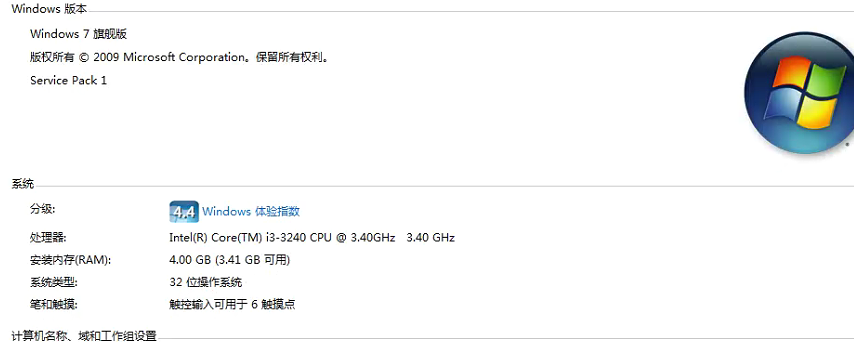
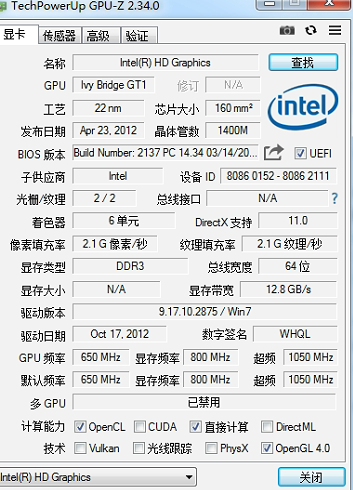
No matter what h264 file is on this machine, sample_decode.exe always fails, but my machine uses sample_decode.exe to decode normally, and ffmpeg uses "h264_qsv" both machines are normal.
I use Intel(R) Media SDK 2019 R1 to decode, can decode sucess,but the decoded data is often green screen


请尝试添加-hw: sample_decode.exe h264 -i 1.h264 -o 1.yuv -hw
hello,i add -hw has fails
It's Ivybridge. Pretty old driver and HW. It's very hard to say what's wrong. I'd suggest you to experiment. Try -d3d9 vs d3d11. Try to collect msdk api traces (tracer is a part of MSDK Windows Dev kit) in case of ffmpeg and sample and compare. Try to remove MFXQueryAdapters call from the sample and hardcode some adapter value instead
hello ,I commented out GetImpl and found that the decoding on some machines is normal, and the decoding on some machines is green screen.@dmitryermilov
 ,
,
normal machines is i3 3210,the machines GetImpl is failed,MFX_ERR_NOT_FOUND(-9), MFXQueryAdapters failed
Sorry, what I mean is that on the i3 3210 machine, GetImpl failed and it can’t be decoded. I commented out GetImpl and used initPar.Implementation = MFX_IMPL_HARDWARE_ANY; and the decoding was successful, and the decoded data was normal.
What is the difference between normal and non-normal machine?
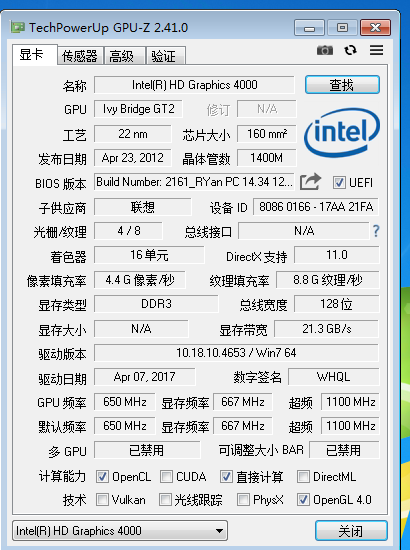
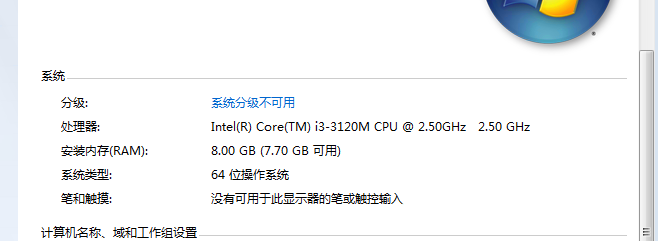 I mean is that on the i3 3210 machine, GetImpl failed and it can’t be decoded. I commented out GetImpl and used initPar.Implementation = MFX_IMPL_HARDWARE_ANY; and the decoding was successful, and the decoded data was normal.
Ahh. Okay. Most likely old mediasdk run-time library doesn't support something which is needed by https://github.com/Intel-Media-SDK/MediaSDK/blob/510d19dcace1d8c57567fdd40b557155ab11ab8e/api/mfx_dispatch/windows/src/mfx_dispatcher.cpp#L542
I guess ffmpeg simply doesn't use MFXQueryAdapters. MFXQueryAdapters is an optional function.