

 Gustavinho
Filter rendering
I add some test filter to my table view and I have problem with rendering. The filter is render with double drop/down arrow and I don't known why.
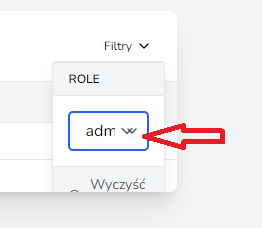
Versions: "php": "^8.0.2", "arcanedev/log-viewer": "^9.0", "guzzlehttp/guzzle": "^7.2", "laravel-views/laravel-views": "^2.4", "laravel/framework": "^9.19", "laravel/jetstream": "^2.10", "laravel/sanctum": "^2.14.1", "laravel/tinker": "^2.7", "livewire/livewire": "^2.5", "spatie/laravel-permission": "^5.5"

Hi @gyroid thanks for raising this, I might know why this is happening, by any chance do you have tailwind forms installed? there could be a collision adding the arrow twice

Hi @Gustavinho. Thanks for answer. I created project using Laravel Jetstream with Livewire.
https://jetstream.laravel.com/2.x/introduction.html#livewire-blade
I use the standard JS/CSS imports in resources.
The app.css file: @tailwind base; @tailwind components; @tailwind utilities;
The app.js file: import './bootstrap'; import Alpine from 'alpinejs'; window.Alpine = Alpine; Alpine.start();
And the bootstrap.js file: import _ from 'lodash'; window._ = _; import axios from 'axios'; window.axios = axios; window.axios.defaults.headers.common['X-Requested-With'] = 'XMLHttpRequest';
In app.blade.php tempate I have the following code:
    @livewireStyles
    @laravelViewsStyles(laravel-views)
    @vite(['resources/css/app.css', 'resources/js/app.js'])
    // ...
    @livewireScripts
    @laravelViewsScripts(laravel-views)
Composer dependencies I show earlier. JS dependencies are:
    "@tailwindcss/forms": "^0.5.2",
    "@tailwindcss/typography": "^0.5.0",
    "alpinejs": "^3.0.6",
    "autoprefixer": "^10.4.7",
    "axios": "^0.27",
    "laravel-vite-plugin": "^0.5.0",
    "lodash": "^4.17.19",
    "postcss": "^8.4.14",
    "tailwindcss": "^3.1.0",
    "vite": "^3.0.0"
Thanks @gyroid, thanks for the info, yeah it seems like both are adding the arrow to the dropdown, I'm thinking in a workaround, what if you add a custom CSS rule hiding the div with the dropdown of this package and let taildinscss/form do its magic, I'm thinking something like this
- Add an id to the wrapper of the component
- Add a new CSS rule after
@laravelViewsStyles(laravel-views)and before@vite(['resources/css/app.css', 'resources/js/app.js']), I think it could be part of the app.css that you are compiling, then adding a rule to the div with the arrow could be enough for hiding it
#id-of-the-component-wrapper .pointer-events-none.absolute.inset-y-0.right-0.flex.items-center.px-2.text-gray-700 {
  display: none
}
what do you think?
Thanks @Gustavinho for your advice. You are rigth. Double drop/down arrow disappeared.
I added id to wraper. Something like this:
        <div id="table-view-wrapper">
            <livewire:users.users-table-view />
        </div>
and I added CSS style to app.css:
#table-view-wrapper .pointer-events-none.absolute.inset-y-0.right-0.flex.items-center.px-2.text-gray-700 { display: none }