

 Gifox
Gifox
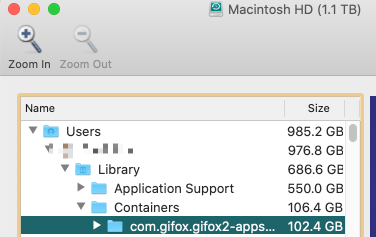
102 gb size on the com.gifox.gifox2-appstore folder
I do use Gifox quite a lot, and I think this is the folder where Gifox saves the edit sessions for each gif? I deleted the .gifx files and cleaned it up, no issues. Just wanted to report it here. Thanks!

Apologies for a lagged reply. There are a few things at play here:
- When we capture the recording we save very hi-res video. So, naturally you can easily end up with 1GB RAW files for 30-second full-screen capture on retina. We plan to add post-recording compression in one of the upcoming releases to take care of this. We avoid any compression on the fly to minimize impact on recording and CPU/GPU resources.
- We had a couple of reports complaining about log files growing over a few GBs, but these are very rare cases.
So, it be good to exclude logs next time you do this. With GIFX files – if you remove them you actually lose the ability to edit and re-export, which might be perfectly fine.
In 2.3.0 we added an extra check to clean up any detached GIFX files and left-overs. You can also Cmd + A and Cmd + Delete inside the library popover to zap all of the recordings – this should also empty that folder of associated RAW files.
I'll post an update once we release improvements on re-compressing these RAWs or anything relevant. If you have any other details, concerns or feedback on this, please share! 👍

Thanks for your reply. Cmd+A, Cmd+Delete is pretty quick and I can do that every now and then, thanks for the suggestion!
A quick update on this… 🥁🥁🥁
In the latest 2.6.1 release we introduced recompression of raw files: now, recordings that 3+ days old will get recompressed in the background. You no longer should run into situations when Compositions folders takes up 100+ GB of disk space.
Please note, this is the initial implementation and once we validate that it's working as expected we will apply the same recompression to all recordings as soon as they are created + will see how else this approach can be improved.
Please bear in mind, recordings can still result taking a lot of space if not cleaned up periodically. Also, as implied above, recent recordings created within the past 3 days will remain in their original format, which is pretty heavy. So, if you create 50 recordings per day and very disk-space-concious, please consider cleaning them up manually for the time being as suggested in the previous post.
I'm going to close this issue. If you have any questions or feedback, please feel free to comment!