
Pinout.xyz
 Pinout.xyz copied to clipboard
 Gadgetoid
Why are we using BCM instead of GPIO
Please excuse my ignorance on such matters but all documentation/training uses pins labelled GPIO and not BCM. So while the site is excellent the labelling is confusing and I teach this to people. Can we at least have a tag at the top so we can choose GPIO labelling. Eg replaces BCM with GPIO on the picture on the left.

I believe this is a holdover from the labelling / numbering scheme used by RPi.GPIO https://sourceforge.net/p/raspberry-gpio-python/wiki/BasicUsage/
Which numbering / labelling scheme gets used can be quite a contentious issue - see https://github.com/gpiozero/gpiozero/issues/467 for an example of how passionate people get :wink: And see also https://rasp.io/portsplus/

Because GPIO is wrong. 😆
That said, the GPIO numbers are the same as the physical ones, IIRC, which are also listed so we have those number to hand. I suppose a bit of javascript could switch the text out.
Could be even more contentious and drop WiringPi, since it's (pretty much) depricated now.

I realised it would contentious because there are always those who believe it should be proper and fair enough. Just those who are new to this platform and read all the material for it are just going to see BCM and cock their heads in a quizzical look. So a GPIO labelled version would match up with all the current RPi education material (don’t blame me) and means I can give them a link to your site that references the GPIO tab
The issue here is when experts read GPIO they automagically translate that to general purpose input output but when joe bloggs reads GPIO all he sees is a label. When he looks all your pins named BCM then reads the descriptions that refer to GPIO he just goes huh? For new users, the default view is quite confusing. Some might argue why cater to the lowest common denominator, my response to that is, there your up and coming engineers and future electronics experts. Why put roadblocks on a pinout display which is meant to be friendly to end users.
As I use the 'Pico Hat Hacker' board when needed the BCM numbers make more sense for me as that is what is printed on them.
Maybe it would be best to have no labels on the pins at all to start with and a radio button to select the description you want (saved as a cookie maybe)? Another option would be to have the hover show the PIN numbers and function names as the Pi 4 introduces extra serial ports etc. that do not work / exist on the older boards.

Now the design has changed around the pinout, we have a very clear area that could accomodate some tabs to implement @ADBeasley's suggestion. Eg:
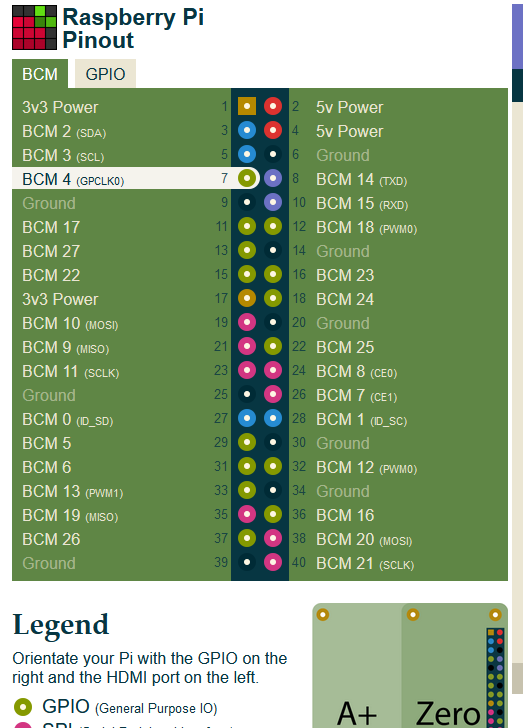
While I loathe to overload the website with too much functionality, this should be fairly straight-forward to add with some javascript over the top of the existing HTML and maybe some minor HTML tweaks.
Thoughts?
Captures of a working prototype. In GPIO mode the physical pin annotation becomes BCM pin annotation, though I'm not sure how clear that is.

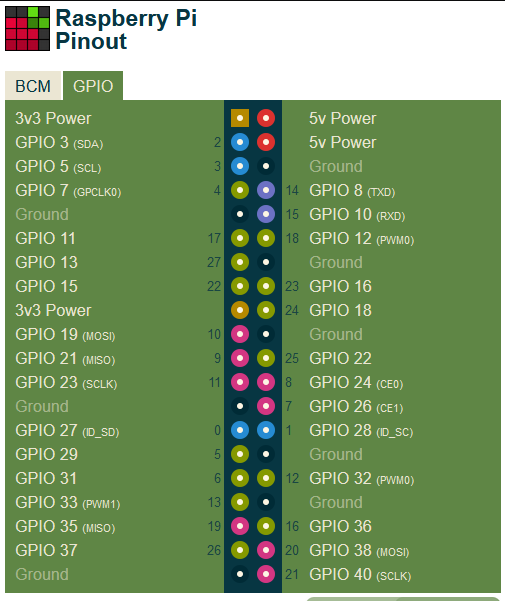
@rtfmoz2 when you see "GPIO" do you understand that to refer to the BCM or the Physical numbering scheme? BCM being the weird Broadcom ones, and Physical being the sequential numbering of the pins (odd on the left, even on the right).
To be honest - when I see GPIO, the first thing I do is check to see what numbering scheme the person is using... A scan through the RPF forum and Stack Exchange will show lots of examples where the users has followed one numbering scheme but physically used another (or even more fun used the wrong one in software).
It's a bit of a muddle for new users and there is so many web articles showing both being used I do not think any will become standard till the RPF/RPT drop the 40pin connector and create a new pin-out :-)
Given a choice. I would go for BCM as that links directly back to the SOC and should be independent of the physical connector as its function driven.
@rtfmoz2 when you see "GPIO" do you understand that to refer to the BCM or the Physical numbering scheme? BCM being the weird Broadcom ones, and Physical being the sequential numbering of the pins (odd on the left, even on the right).
I do these days. I'm just saying for the original reasons and GPIO view would be useful especially since much of the material out there uses this alternative terminology. You get me?
FYI the names are needed. Please don't leave them out. Its confusing. Show BCM and GPIO names like in the pictures above.
Looking at the current version of the site, I guess this could be closed now?