
gns3-gui
 gns3-gui copied to clipboard
 GNS3
GNS3
[2.1] Open *.gns3 file on remote-only server
Hi!
I stumbled upon this problem, when I started doing converter from EVE-NG to GNS3.
From source EVE-NG topology files I was able to generate .gns3 topology file. They were opening fine on my computer, because I use local server + remote server as GNS3 VM, but it failed for my friend who uses remote-only server:
https://contattafiles.s3-us-west-1.amazonaws.com/tnt5232/MNAvJjvnuJu_iCv/Screen%20Shot%202017-12-31%20at%203.11.47%20PM.png
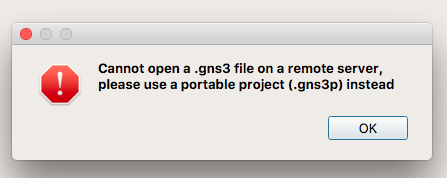 This is the problem, because I can't generate GNS3 project locally.
It would be great to allow opening *.gns3 file on remote-only setup and generate all necessary server-side files during opening.
This is the problem, because I can't generate GNS3 project locally.
It would be great to allow opening *.gns3 file on remote-only setup and generate all necessary server-side files during opening.

@dmfigol , what I have been doing is to create a new temporary project on the remote server and save it there. Once done, use SCP to overwrite the .gns3 file with your existing project. You should then be able to open your project from the remote server.
Also ensure you have manually set the "compute_id" for all nodes within the .gns3 file to "local". I use Notepad++ to edit all noded simultaneously.
Example Before (VMWare Workstation Remote Server): "compute_id": "vm"
Example After (Remote Server): "compute_id": "local"
PS: obviously this is just a temporary workaround, but much faster than recreating projects from scratch when migrating them to a remote GNS3 server.

Thanks for the comment and the proposed workaround. While it probably achieves what I need, this is still a problem. That's why the issue was raised in the first place. If I am converting projects from one emulator to another, I want them to be 100% ready for import. If a user has remote-only server, this is close to impossible. In my case I was given around 100 EVE-NG labs, which I successfully converted to GNS3 with a script. I am not going to do any manual work to make them work for the remote server. I had to ask the person to switch to local server + remote server as GNS VM to make these labs work. I don't think this is the proper way.