
barcodebuddy-android
 barcodebuddy-android copied to clipboard
 Forceu
"Error: Illegal API parameter" on using mobile app
The title pretty much has it. I've just launched a BB instance with Docker, it seems to be functioning — at least it says "Successfully connected to Grocy, valid API key.", but when I scan any barcode with the android app it just says "Error: Illegal API parameter" and nothing happens. I assume this is not the intended behaviour, but I couldn't find anything about this error.


I have the same issue using both, the Google PlayStore or F-Droid version. The barcode is recognized correctly and shown under the scan window. There are no log entries on the server, as far as I've seen.

I have the same issue. I believe it's because I am running behind an nginx proxy and have set the base url to https://myaddress/bcbuddy but, when I attempt to use the web based API (https://myaddress/bcbuddy/api/) from my phone the curl -X POST "https://myaddress/api <- Missing the bcbuddy. Have you seen this before?

Thanks for the input! Is the url in the barcode correct? You can change it during the creation of the QR code
I was just scanning a can of Diced Green Chillies let me go back and try again :) Thank you for the comment
The URL is definitely correct I have tried many different attempts and moved the url to / on my domain . That changed the /api page to allow me to authorize and run api queries but, still the android app has "Illegal API parameter" but has a valid scanned code after scanning. I am at a loss as to what to try next. Any thoughts?
A couple of things .. It's definitely not using the URL after the domain https://my.domain.org/notusingthis/api there was another thread where you posted a debug version that spits out the response between setting a special route in nginx to /api for bcbuddy and using that version I can scan items, but, even with the play store version I get a malformed json back when using that version from the play store.
Thanks for your reply. I just tried it myself with a suburl, however I cannot reproduce the problem.
Have you enabled URL rewriting? This is required for using the API, if you are using nginx, an entry like needs to be in the configuration:
    location /api/ {
            try_files $uri /api/index.php$is_args$query_string;
    }
To try out if the rewriting works, try opening https://[your.bbuddy.url]/api/system/info. If it prints something like {"data":{"version":"1.8.0.2","version_int":"1802"},"result":{"result":"OK","http_code":200}} at least the rewriting is working.
Ok I see yes, thank you, that will work what I was trying to avoid is having anything common shared at the webserver level /api I assume in the code you are stripping out everything before the /api at some point.. This is great though I have learned a lot with this and I really appreciate your help.
No, nothing gets stripped, only the URL in from the barcode is being used. It more likely sounds like the webserver is not configured correctly - are you using apache or nginx?
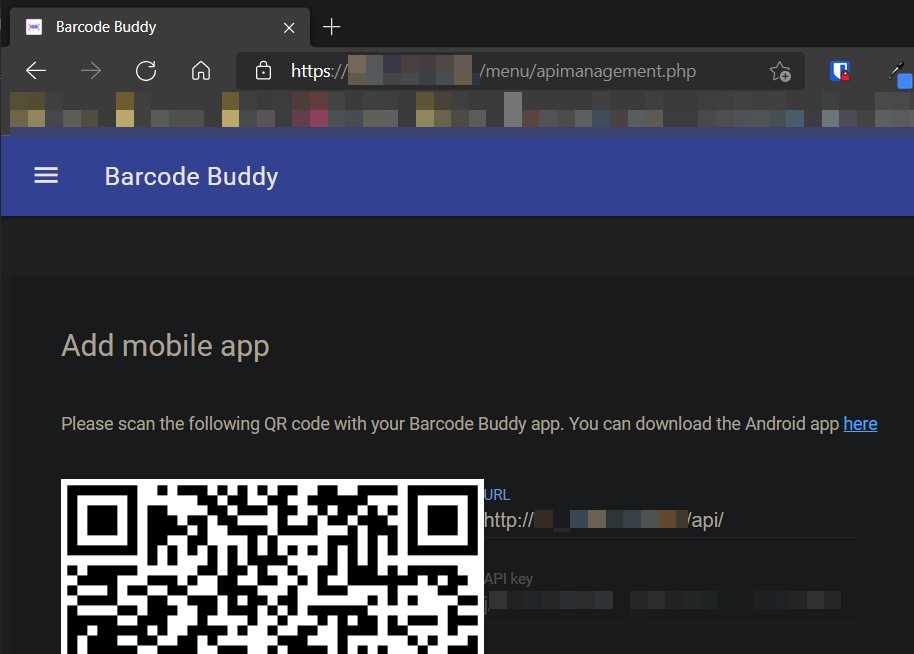
@Forceu I had this same issue, my problem was that the auto-generated URL in the API screen on the website was doing http:// even though the site URL is https:// for my site. I believe that this would be a bug in the API generation page.
My guess is that you are using serverside code to get the URL and I am using an NGINX reverse proxy for SSL support and because the container running the app is only http://localIP:port it doesn't see the https server info.

Also encounter this bug. I use nginx as reverse proxy, and I get system/info successfully:
curl -X GET -H "BBUDDY-API-KEY: anI" "https://buddy.my/api/system/info"
{"data":{"version":"1.8.1.4","version_int":"1814"},"result":{"result":"OK","http_code":200}}
All other is ok: via web UI I can use API (for example set "consumer mode") and I see requests in the log:
172.18.0.3 - - [19/Sep/2021:15:41:43 +0000] "GET /api/action/scan?add=BBUDDY-P HTTP/1.1" 200
172.18.0.3 - - [19/Sep/2021:15:42:26 +0000] "GET /api/action/scan?add=BBUDDY-C HTTP/1.1" 200
I connect Android app successfully via QRCode and got API key (see above, it works)
BUT
When I scan code by app, I get same as users above:
" The barcode is recognized correctly and shown under the scan window.
but when I scan any barcode with the android app it just says "Error: Illegal API parameter" and nothing happens."
In the log:
127.0.0.1 - - [19/Sep/2021:14:59:42 +0000] "GET /api/action/scan HTTP/1.1" 400 82 "-" "curl/7.67.0"172.18.0.3 - - [19/Sep/2021:15:00:41 +0000] "GET /api/action/scan HTTP/1.1" 400 82 "-" "okhttp/3.14.7"
1: My curl request , GET without parameters in query string, responce:
< HTTP/1.1 400 Bad Request
{"data":null,"result":{"result":"No barcode supplied","http_code":400}}
2: My android barcode scan
WHY android app also do GET request without parameters? If it was POST I do not expect it, but if it is GET it must be in query string in url, as "add=..." above

@Forceu I had this same issue, my problem was that the auto-generated URL in the API screen on the website was doing http:// even though the site URL is https:// for my site. I believe that this would be a bug in the API generation page.
My guess is that you are using serverside code to get the URL and I am using an NGINX reverse proxy for SSL support and because the container running the app is only http://localIP:port it doesn't see the https server info.
This was my issue as well. when i changed the url to https before scanning the QR code and saving it, things worked correctly.

I'm also seeing this issue, on both product-scans and default-barcode scans. My nginx config on the BarcodeBuddy install itself is correct, as per https://github.com/Forceu/barcodebuddy-android/issues/15#issuecomment-862721376. I'm using BB behind another nginx reverse-proxy - I've attempted to configure anything unusual in my proxy_pass section, but it all seems to check out. Does anyone else successfully have BB working behind an https-enabled reverse proxy?

I can confirm that the analysis by @xionous is correct: once you set the URL to https:// instead of the proposted http:// in the API page, everything works fine.

Thanks for the feedback on this issue. In the next version I will include a check that tries to connect to the https version if the connection fails on http
I can confirm that the analysis by @xionous is correct: once you set the URL to
https://instead of the propostedhttp://in the API page, everything works fine.
This solved the issue for me as well.
