
rave-android
 rave-android copied to clipboard
 Flutterwave
Texts in the editText fields are not visible in dark theme
The texts in the text input fields turn white when the phone is in dark mode. They blends with the field's background and become difficult to see.

HI @megamendhie Thanks for bringing this up. Please share sample screenshots of the affected screens

@jeremiahAI Here's it. There are numbers there but they are all white so can't be seen.
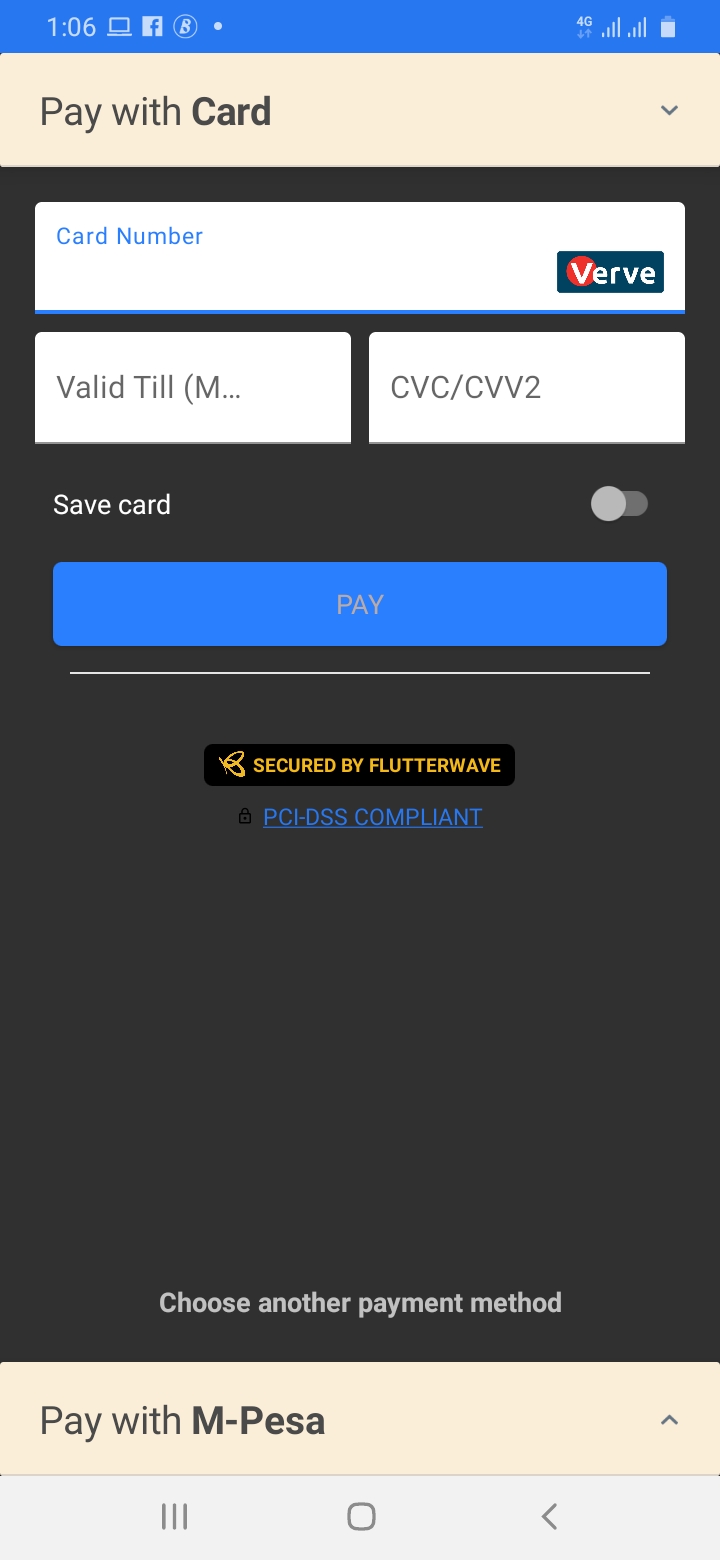
I'm facing the same issue. Someone please provide with a solution to this problem.

Thanks, @venusaim23, please can you share what android version you're experiencing this on?
@jeremiahAI I have android 9 on my phone. The min SDK of my app is 23 and target 30
Same issue. On dark mode, text cant be seen on EditText field. (Its white on a white editText Field).
This is so because my app doesn't implement dark mode. (Using MaterialTheme.Light)
Tried customizing the the theme by setting android:textColor to black...Didnt work

Is there a way to pass a Boolean to prevent Dark theme from changing the display? If Boolean is false, don't change the in-app theme to black. This is because my Toolbar text and EditTexts become unseen because of Dark theme, and my application only changes theme when the user wants to.

I am facing same issue.... And also the Do you want to continue? payment prompt "YES" and "NO" texts are white in the light theme.....


Edit: android/app/src/main/res/values/styles.xml
replace this line:
