
flux
 flux copied to clipboard
 FluidTYPO3
flux:grid.column for Col-Grid causing infinite loop
I've got a very strange problem trying to set-up a simple grid-column Element (for 2 Columns in my case).
This is my template:
<html
    data-namespace-typo3-fluid="true"
    xmlns:f="https://typo3.org/ns/TYPO3/CMS/Fluid/ViewHelpers"
    xmlns:v="https://typo3.org/ns/TYPO3/CMS/Vhs/ViewHelpers"
    xmlns:flux="http://typo3.org/ns/FluidTYPO3/Flux/ViewHelpers"
>
    <f:layout name="Content/Default" />

    <f:section name="Configuration">
        <flux:form id="grid-twocolumns" label="Grid 2-Columns">
            <flux:form.option.group value="Grid" />
            <flux:form.option.sorting value="10"/>

            <flux:grid>
                <flux:grid.row>
                    <flux:grid.column
                        colPos="101"
                        colspan="1"
                        label="Col 1"
                        name="col-1"
                    />
                    <flux:grid.column
                        colPos="102"
                        colspan="1"
                        label="Col 2"
                        name="col-2"
                    />
                </flux:grid.row>
            </flux:grid>
        </flux:form>
    </f:section>

    <f:section name="Preview">
        <h4>Grid 2-Columns</h4>
    </f:section>

    <f:section name="Main"><f:spaceless>
        <section class="section section--container section--container-twocolumns row">
            <div class="col-xs-12 col-md-6">
                <flux:content.render area="col-1" />
            </div>
            <div class="col-xs-12 col-md-6">
                <flux:content.render area="col-2" />
            </div>
        </section>
    </f:spaceless></f:section>
</html>
It looks fine in backend at first glance. But after creating an element in the first or second column I cannot open the Content-Wizard anymore!
TYPO3 Log contains this. There is no error in Console or Request-Debugger:
Core: Exception handler (WEB): Uncaught TYPO3 Exception: Xdebug has detected a possible infinite loop, and aborted your script with a stack depth of '10000' frames \| Error thrown in file /var/www/****/typo3/src/vendor/doctrine/dbal/lib/Doctrine/DBAL/Platforms/MySqlPlatform.php in line 69. Requested URL: ***************
The content-element created before has an "invalid colPos":
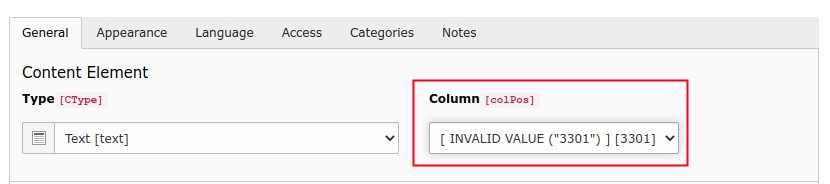
The only workaround so far is to move the element outside the fce-grid container, create the second one and move the first one back :facepalm:
I hope there are any suggestions what's wrong. Thanks in advice.

Tiny update... I think the problem is somewhere here: flux/Classes/Integration/HookSubscribers/WizardItems.php causing kind of endless-loop somewhere caused by "colPos". No clue why, but increasing colPos from 101 and 101 to 1001 and 1002 helps (this time?).
As far as I know there's only a problem for colPos smaller than 100? For such things there should at least be any warning shown in the backend Content-Element.
Column position numbers above 100 are reserved, choose a value from 0 to 99. The reason for this is that parent column relationship is determined by colPos value multiple and remainder of 100, so choosing a value like 101 technically means that children will be associated with the wrong parent and depending on which parent is incorrectly resolved this may cause unexpected behavior.

Ok I've followed your hint and migrated all FCE columns back into a range of 0-99 by creating additional rows/columns with the new numbers and dragging them manually in new position. Now the Column-Label isn't shown invalid anymore.
My column numbers are remapped as follows: old -> new 1001 -> 11 1002 -> 12
But afterwards I noticed another problem. In the new columns I use open the content-element wizard anymore. Opening it shows an empty/broken dialog (no CE listed!). In the old column (f.e. 1001) it worked fine.
Just for my own interest. Why is it dangerous to use colPos greater 100? Does it have to do with ColumnNumberUtility::MULTIPLIER? What would be required to patch to make flux also create labels for colPos using numberings above 1000 to give it a test?
In the new columns I use open the content-element wizard anymore. Opening it shows an empty/broken dialog (no CE listed!)
I'm not sure what would cause this - are you by any chance defining lists of allowed content types for the parent column (whether it is a page- or content-column)? Or are you using the content_defender extension?
Just for my own interest. Why is it dangerous to use colPos greater 100? Does it have to do with ColumnNumberUtility::MULTIPLIER?
Precisely, it has to do with the column multiplier. The value of 100 was chosen after asking a selection of users whether they would reasonably expect to use more than 100 columns in either a page or content element - and the answer was an overwhelming "no". A higher value could have been chosen but this would cause the resulting calculated column numbers to be significantly larger, which potentially could make large installations incompatible with a 32-bit operating system due to the size of the integers.
What would be required to patch to make flux also create labels for colPos using numberings above 1000 to give it a test?
This should be as simple as changing the ColumnNumberUtility::MULTIPLIER value to 1000 but be aware that this would cause all existing parent/child relations to become invalid. If you do try this, I suggest using a completely blank installation!
If for some technical reason you are forced to have more than 100 columns I could evaluate whether to make this column multiplier configurable (with a BIG warning sign to avoid affecting existing installations) - but if this is just a matter of wanting a logical grouping of columns I'd suggest numbering in a scheme that sticks to column numbers < 100 (e.g. grouping in 10s instead of 100s).
Closing as solved + explained. Workaround to patch ColumnNumberUtility::MULTIPLIER is documented but is definitely not recommended.